Websites and web applications are becoming more complex than ever, with live data powering features that deliver fast insights. If you’re wondering which technology makes those live updates possible, the answer is WebSockets.
You might think that, in a web scraping scenario, the solution is simply to connect directly to the WebSocket channels. Sure, that’s possible, but there are a few obstacles along the way. The main ones are WebSocket anti-bot techniques and bot detection measures.
In this post, I’ll walk through the most common ones, explain how they work, and share proven tips and tricks to help you avoid them.
Before proceeding, let me thank NetNut, the platinum partner of the month. They have prepared a juicy offer for you: up to 1 TB of web unblocker for free.
Before diving into WebSocket bot detection, let me first provide some context about WebSocket as a protocol and its role in web scraping.
What Is the WebSocket Protocol?
WebSocket, also abbreviated as WS for short, is a web protocol standardized in RFC 6455 that enables full-duplex, bidirectional communication between clients and servers over a single, persistent TCP connection.
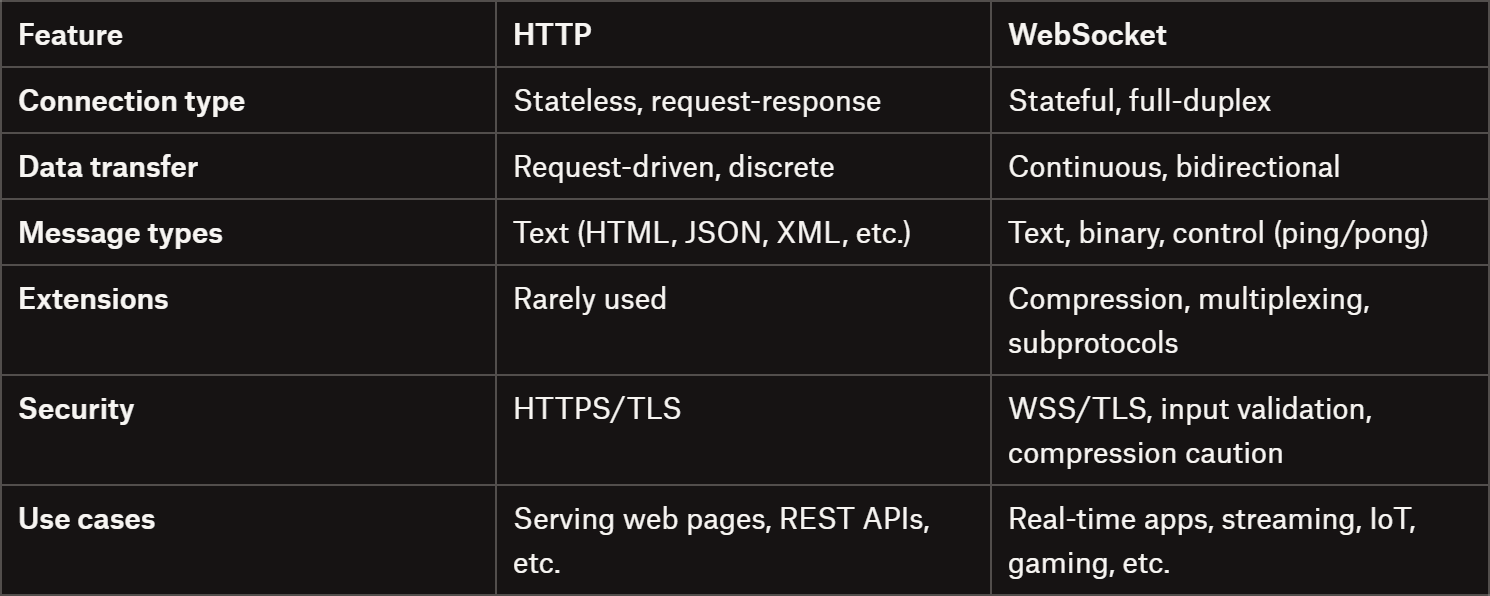
Unlike HTTP, which is stateless and request-driven, WebSockets establish a long-lived connection through an initial HTTP handshake. After the handshake, both client and server can send messages independently, with data transmitted in frames that can be text, binary, or control frames (ping, pong, close).
WebSockets support fragmentation, masking, and optional compression via extensions like per-message-deflate, while newer HTTP/2 and HTTP/3 mechanisms allow multiplexing, reduced latency, and better proxy traversal.
HTTP vs WebSocket
For your ethical scraping activity, you need IPs with good reputation. For this reason, we’re using a proxy provider like our partner Ping Proxies, that’s sharing with TWSC readers this offer.
The WebSocket protocol opens the door to live, bidirectional web communication. Unlike HTTP’s request-response model, it lets servers and clients exchange data continuously over a single, persistent connection.
In general, WebSockets are essential for any application where low latency and frequent updates are required. Common use cases include:
Live streaming: YouTube Live, TikTok LIVE, Kick, Twitch, and similar platforms.
Chat applications: Slack, Discord, and other messaging services.
Collaboration tools: Google Docs, Figma, and online whiteboards.
Gaming and multiplayer experiences: Browser-based MMO games, turn-based games, and PvP games.
Financial data feeds: Stock tickers, cryptocurrency price updates, and trading dashboards.
IoT and telemetry: Sensor updates, home automation, and device monitoring.
Notifications and alerts: Push updates for social networks, dashboards, or monitoring systems.
In short, WebSocket comes into play wherever instant, continuous communication is necessary (and standard HTTP polling would be too slow or resource-intensive).
Main Challenges of Scraping Data from WebSockets
Connecting to a WebSocket server for collecting data isn’t as straightforward as spoofing API requests for web scraping. In particular, the main challenges of scraping data straight from WebSockets include:
Finding the right client implementation: You must use a WebSocket client (and there are way fewer than HTTP clients…) that supports the correct protocol version and any negotiated extensions, such as compression or subprotocols.
Limited documentation and examples: WebSocket scraping is less common than API scraping, so there are fewer guides, tools, and community resources available.
Proxy integration complexity: Not all clients support proxy integrations, making IP rotation a challenge.
No request–response model: You can’t simply send a request and receive a response, as with API scraping. Instead, you must send the right messages and then listen to a continuous stream of events.
Real-time data handling: You require a system to collect, process, and store messages in real time, often dealing with high-frequency updates.
Main WebSocket Anti-Bot Techniques and Solutions
Now you’re ready to discover the most important WebSocket-specific bot detection techniques, along with practical tips to avoid and bypass them. The idea here is to target a WebSocket server from an automated script, relying on a WS client in Python, Node.js, or another programming language of your choice.
WebSocket Handshake Issues
The WebSocket handshake is a transition phase in which an HTTP connection is upgraded to a persistent WebSocket connection. During this step, both the client and the server negotiate the connection parameters, and either side can abort the process if the conditions aren’t acceptable.
Because the handshake is where the protocol upgrade happens, it’s also a pivotal security and bot-detection point. The server must carefully validate everything the client requests. Otherwise, protocol misuse or security issues may occur.
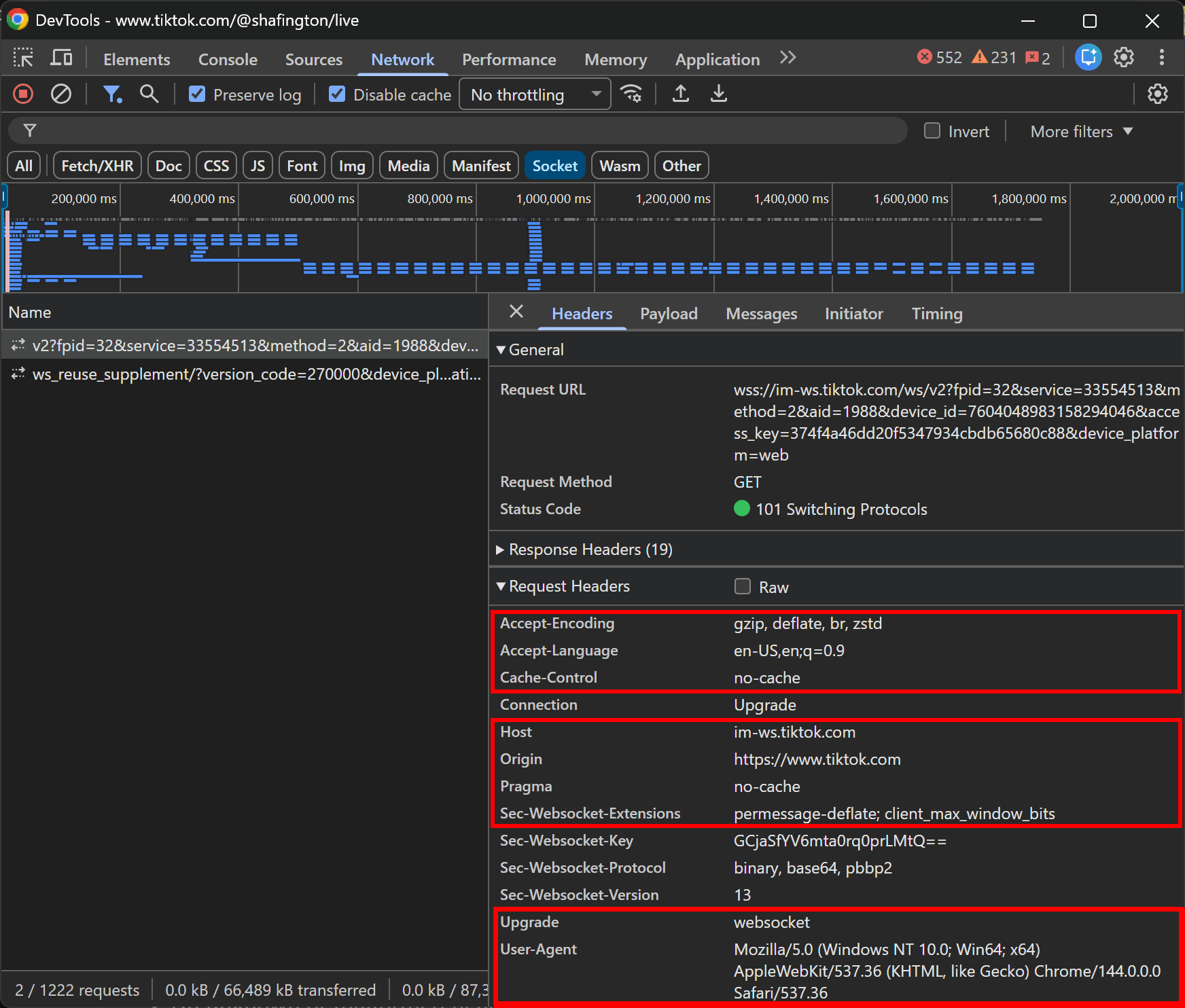
In detail, during the handshake, a WebSocket client must send a valid HTTP/1.1 GET request with specific headers, for example:
In practice, browsers also include additional headers such as Origin, User-Agent, Referer, Cookie, as well as authentication headers (e.g., Authorization). While these HTTP headers aren’t strictly required by the WebSocket specification, they are extremely valuable for fingerprinting and bot detection.
Note all extra HTTP headers
Now, the server should respond with 400 Bad Request and immediately close the connection if it encounters:
Instead, if the WebSocket version is unsupported, the server should return a Sec-WebSocket-Version header listing the versions it supports (most modern servers only accept version 13).
In practice, repeated handshake failures or non-browser-like handshake patterns are often treated as a bot indicator. Those may result in blocking, particularly after repeated handshake attempts from the same IP or when fingerprinting enables identification even across IP changes.
📌 Tips:
Always send a valid Origin header: All major browsers include it, and many servers automatically reject WebSocket requests without one.
Replicate real browser handshakes as closely as possible: Inspect the WebSocket request made by a real browser and match all headers (e.g., User-Agent and similar extra headers).
Avoid excessive handshake attempts from the same machine: Too many connection attempts in a short time window are a common bot signal.
Use IP rotation carefully: Rotation can help avoid rate-based blocks, but it doesn’t protect against fingerprint-based detection if the handshake remains identical.
Honeypot WebSocket Events and Channels
If you’re familiar with common anti-bot techniques, you’ve probably heard of honeypots. A honeypot is a decoy mechanism designed to attract bots by exposing fake or hidden resources, allowing systems to detect automated behavior when those resources are accessed or interacted with (e.g., invisible links or fake pages created to study bots).
In the context of WebSockets, honeypot events are a possible anti-bot technique to detect automated clients. With this approach, the server deliberately sends fake, misleading, or non-actionable events over the WebSocket connection. Similarly, the server might expose channels that aren’t meant to be accessed by regular clients.
Yet, automated scraping bots may react incorrectly to WebSocket honeypots by:
Processing incoming data that is fake or intentionally invalid.
Requesting access to or subscribing to channels they aren’t supposed to use.
📌 Tips:
Study real browser behavior carefully: Inspect WebSocket traffic in your browser’s DevTools (“Network” → “Socket”) and observe which server messages actually trigger data flow or UI updates.
Avoid assuming every message is meaningful: Remember that reacting to every event can lead to detection.
Connection Lifecycle Anomalies and Patterns
Since WebSocket channels are stateful (unlike stateless HTTP requests), servers can detect bots by analyzing connection behavior over time. Scraping bots tend to prioritize speed over realistic user behavior, which can produce identifiable patterns.
In this regard, popular bot-like indicators include:
Very short-lived connections: Opening and closing sockets rapidly to collect data.
Immediate reconnections after closure: Reconnecting instantly without human-like delays.
High connection churn per IP: Multiple connections from the same IP within a short period.
Missing browser events: Typical browser WebSocket clients trigger events like proper socket closure, whereas bots often skip them.
Unnatural latency patterns: Servers use ping frames as heartbeats to check responsiveness. Real users on home Wi-Fi or mobile networks exhibit variable latency (jitter), while automated scripts deployed on data centers generally show extremely stable, low-latency responses.
📌 Tips:
Introduce some randomness: Introduce realistic delays between connections and reconnections.
Replicate intended behavior: Emulate browser close events if testing automated clients.
Add latency variation: Consider latency variation when sending and receiving frames to mimic real-world network jitter.
WebSocket servers sometimes choose to send binary data instead of plain text or JSON. The main technical reasons for this are:
Reduced bandwidth: Binary messages omit field names and whitespace, making packets smaller than JSON strings and supporting high-frequency updates.
Faster parsing: Binary data can be read as typed arrays or fixed-size fields, avoiding JSON parsing overhead.
Custom protocols: Web apps can define their own compact binary format for predictable, high-frequency data.
Efficient number storage: Numeric values can be stored in 1–4 bytes rather than as multi-character strings, saving space.
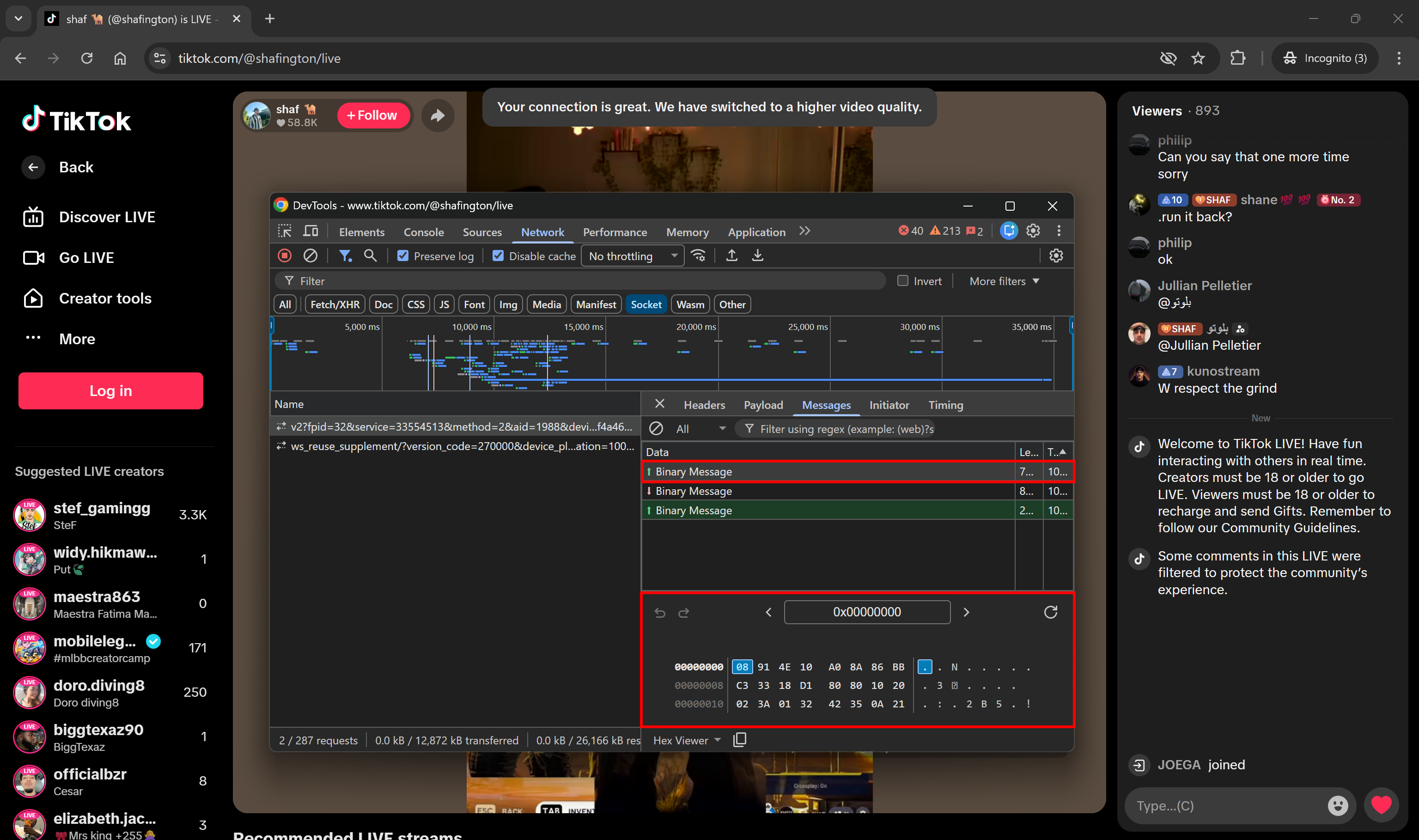
For instance, TikTok LIVE pages use WebSockets to stream updates (e.g., chat messages, view counters, and other statistics) in binary format:
Note the binary message sent from the server
Sure, binary data can be converted to text. So, you may think that’s not a problem…
Well, keep in mind that most web applications using binary data implementations include some form of compression or encryption. This adds significant complexity!
Reverse-engineering these systems is technically possible by inspecting browser WebSocket clients, analyzing request headers for compression hints, or trial-and-error with common compression methods. Still, that’s time-consuming and error-prone. Plus, encryption keys, salts, or other details can easily change with each deployment.
📌 Tips:
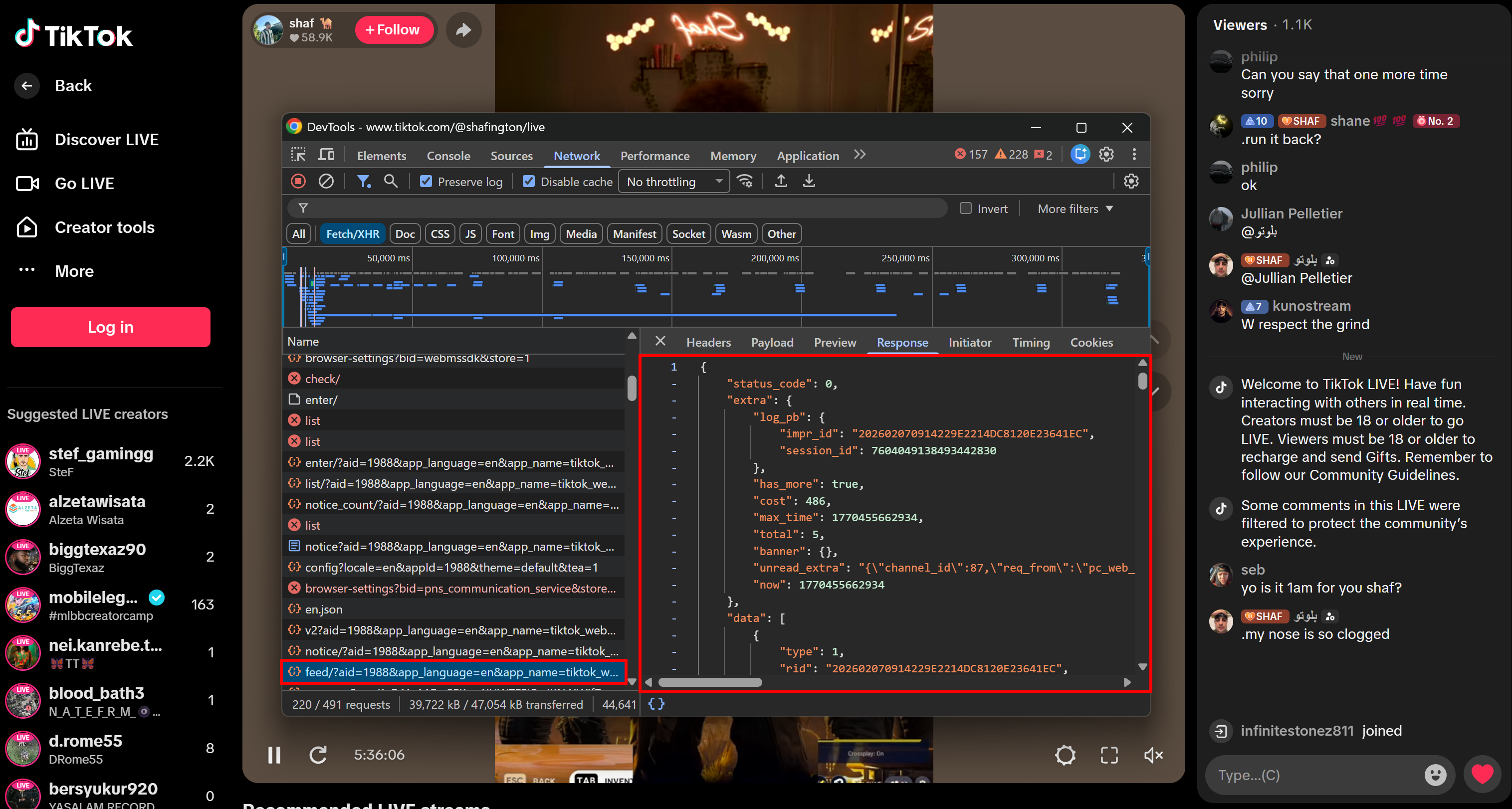
This time, the only piece of advice I have is to look for alternative data sources. Many WebSocket-based pages, including TikTok LIVE, use regular HTTP APIs to retrieve initial data.
Note the RESTful HTTP request made by the client during rendering
Note: Why aren’t these APIs called server-side when the HTML page is generated? In the case of live data, it’s more reliable to fetch it on the client, because even a single second of latency could result in outdated or inconsistent information.
Thus, polling over those RESTful APIs instead of the WebSocket data streams can allow you to retrieve the information of interest without dealing with binary encoding, compression, or encryption challenges.
The WebSocket protocol is built on top of HTTP, so they inherit many anti-bot techniques commonly used for HTTP requests. At the same time, due to its stateful and persistent nature, anti-bot solutions like WAF (Web Application Firewalls) can leverage WebSockets to detect automated behavior even more effectively…
As a result, WebSocket-based anti-bot measures are not only relevant when connecting directly to WS servers, but also when interacting with web pages through browser automation tools like Playwright and Selenium. That’s why you must know them!
Advanced TLS Fingerprinting
Traditional HTTP fingerprinting checks headers and TLS details. WebSockets extend this by combining the TLS handshake with WebSocket-specific framing, which is much harder to spoof. Signals include JA3/JA4 fingerprints, unusual cipher suite ordering, frame fragmentation patterns, and incorrect masking behavior.
HTTP allows basic fingerprinting on a per-request basis, but it can’t verify whether the client’s environment remains consistent. The stateful nature of WebSockets enables servers to continuously validate device fingerprints over time. For example, servers can request Canvas/WebGL renders, available fonts, and other browser characteristics repeatedly. Any inconsistency can lead to an immediate block.
Real-Time User Behavior Monitoring
WebSockets allow live streaming of mouse, keyboard, and scrolling events back to the server. This enables a much deeper level of user behavior analysis compared to static HTTP requests.
After all, most browser automation scripts produce perfectly straight mouse movements or instantaneous clicks, while human interactions naturally include slight jitter, variable speed, and reaction delays. These differences make automated clients easier to detect when behavior is constantly monitored over a WebSocket connection.
The Web Scraping Club is a reader-supported publication. To receive new posts and support my work, consider becoming a free or paid subscriber.
Conclusion
Here, I introduced the WebSocket protocol and explained why and when it comes in handy. Specifically, you learned that it powers live data updates on web applications. Want to access that data? Well, it’s not as straightforward as you might think due to WebSocket anti-bot techniques.
In this post, I explored the most relevant WS bot detection methods, along with useful advice for bypassing them successfully. You also saw how WebSocket’s stateful, continuous data streaming can be used by WAFs and other advanced anti-bot systems for enhanced detection.
I hope you found this helpful and informative. If you have any questions or comments, drop them below. Until next time!
I’d be especially curious to hear more from the community here: are there people who consistently succeed with reverse engineering real-world WebSocket communication, or do most of you end up going the browser-based scraping route in these cases?
In practice it often feels like full browser automation is the more reliable path once things get complex, but I’d love to see examples or war stories from those who managed to make direct WS scraping work at scale.




Great overview, really nicely structured.
I’d be especially curious to hear more from the community here: are there people who consistently succeed with reverse engineering real-world WebSocket communication, or do most of you end up going the browser-based scraping route in these cases?
In practice it often feels like full browser automation is the more reliable path once things get complex, but I’d love to see examples or war stories from those who managed to make direct WS scraping work at scale.