Chances are, you may not even realize it, but your browser and favorite HTTP client could be using different versions of HTTP. That’s possible because most web servers accept connections over multiple HTTP versions.
Now, the Internet is gradually migrating toward HTTP/3, which promises faster, more secure, and connection-resilient communication. The real question for us, web scraping enthusiasts, is: can automated requests benefit from using HTTP/3?
In this post, I’ll provide all the information you need to answer that question, along with a Python snippet demonstrating how to use HTTP/3!
An Introduction to HTTP/3
First of all, let me introduce HTTP/3 so that you know what it is, how it works, why it’s important for web scraping, and how it compares to HTTP/2 and HTTP/1.1. (Note: HTTP/1 has been practically replaced by HTTP/1.1, so it makes more sense to focus on HTTP/1.1 instead!)
What is HTTP/3?
HTTP/3 is the latest major version (at least, as of this writing) of HTTP (Hypertext Transfer Protocol), officially published as RFC 9114 by the IETF in June 2022.
Unlike its predecessors (HTTP/1.1 and HTTP/2), which rely on TCP, HTTP/3 runs over QUIC—a transport protocol developed by Jim Roskind at Google and built on top of UDP. This change reduces latency, prevents head-of-line blocking, and simplifies network switching, making it especially effective for mobile-heavy use.
The journey to HTTP/3 began with Google’s early QUIC experiments in 2012, evolving through the IETF’s standardization process. This new version of HTTP was first proposed as “HTTP/2 Semantics over QUIC,” but it was officially renamed HTTP/3 in 2018.
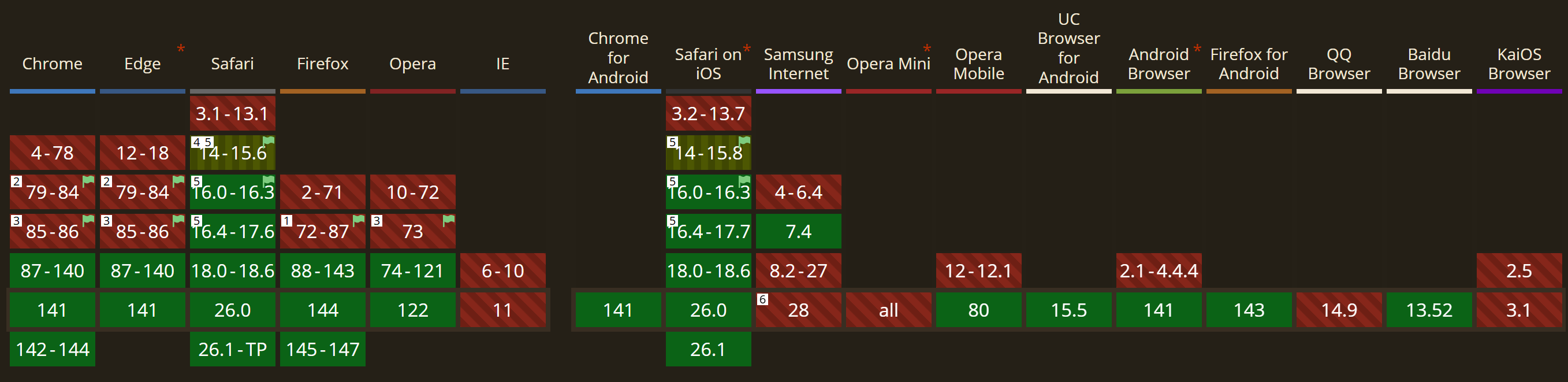
The driving force behind this rapid adoption? HTTP/3’s faster, encrypted-by-default connections deliver a more secure and efficient web experience to end users.
Browsers supporting HTTP/3, according to CanIUse
Before proceeding, let me thank Decodo, the platinum partner of the month, and their Scraping API.
Scraping made simple - try Decodo’s All-In-One Scraping API free for 7 days.
Below are the five reasons why HTTP/3 is particularly interesting for web scraping (or making automated requests in general):
Faster connection establishment: QUIC combines the transport and TLS handshakes into a single step, allowing encrypted connections to be established much faster than traditional TCP-based protocols like HTTP/1.1 or HTTP/2. That opens the door to 0-RTT (Zero Round-Trip Time) resumption. In simpler terms, web scrapers using HTTP/3 can start sending data immediately, dramatically reducing latency when connecting repeatedly to the same server.
Elimination of head-of-line blocking: Unlike TCP-based protocols, QUIC handles each stream independently. As a result, packet loss on one request no longer blocks others, guaranteeing smoother and faster automated requests across multiple simultaneous connections.
Enhanced multiplexing and prioritization: HTTP/3 supports efficient multiplexing with improved stream prioritization. This means scrapers relying on browser automation tools (when integrating with browsers that support HTTP/3 and when scraping sites that support it as well) can fetch critical content like HTML first and defer secondary assets, improving extraction speed and performance.
Improved reliability on unstable networks: ****QUIC is resilient to packet loss and network fluctuations. This stability is essential when scraping via rotating (generally, residential) proxies where connections frequently change. In detail, QUIC can keep connections alive across IP changes, achieving uninterrupted sessions.
Built-in encryption and efficiency: HTTP/3 integrates TLS 1.3 by default, encrypting every request to enhance privacy and reduce detection risks. Combined with QPACK header compression and efficient cryptographic algorithms, it lowers bandwidth and CPU overhead, helping you reach higher scraping throughput.
HTTP/1.1 vs HTTP/2 vs HTTP/3
Now that you know what HTTP/3 is and why it plays a role in modern web scraping, it’s time to compare the three major versions of HTTP. This will help you understand their differences.
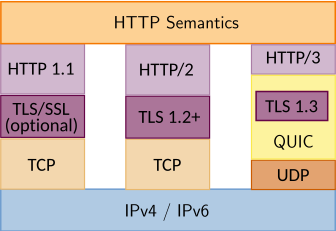
From a protocol perspective, refer to the HTTP/1.1 vs HTTP/2 vs HTTP/3 diagram below:
HTTP/1.1 vs HTTP/2 vs HTTP/3: Protocol stack comparison
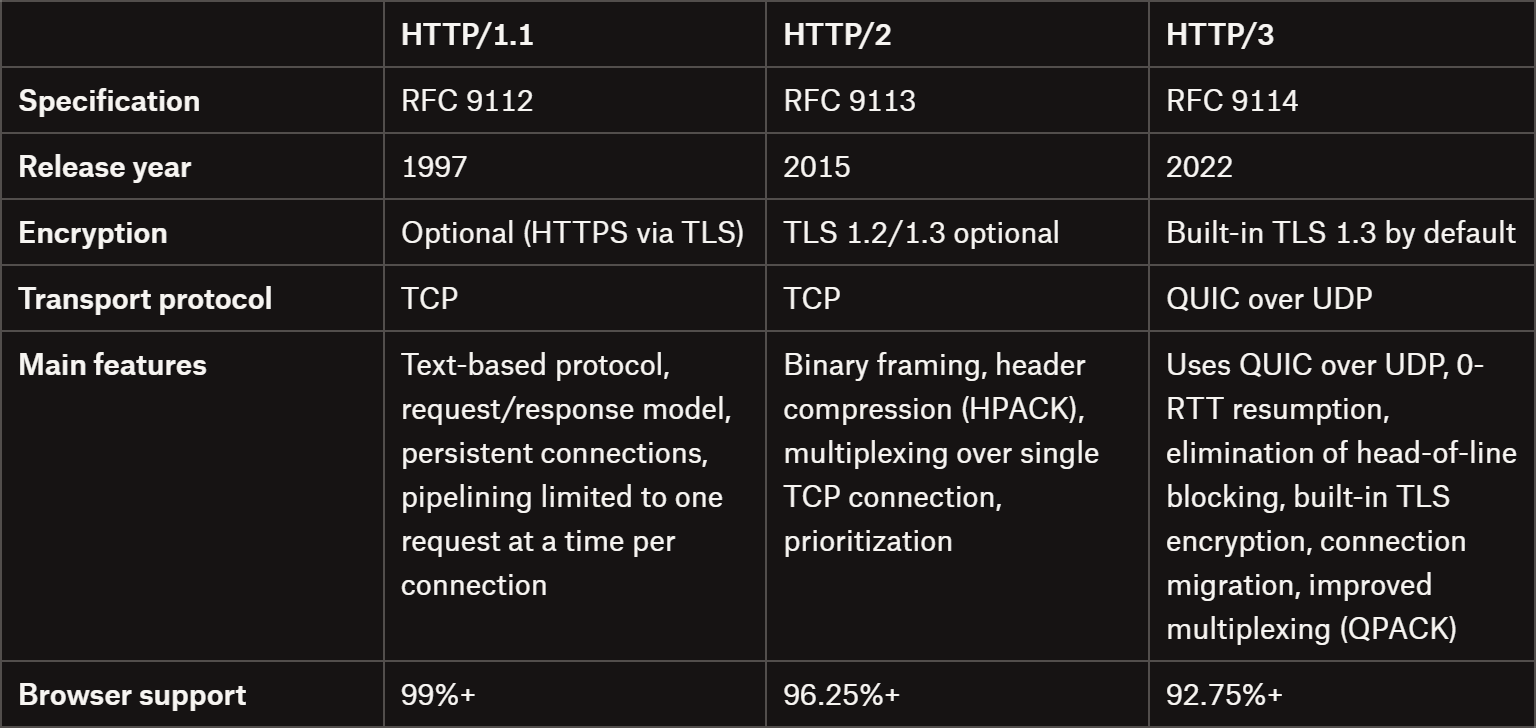
For a feature- and info-focused comparison, take a look at the table below:
HTTP/1.1 vs HTTP/2 vs HTTP/3: Comparison table
This episode is brought to you by our Gold Partners. Be sure to have a look at the Club Deals page to discover their generous offers available for the TWSC readers.
💰 - You can also claim a 30% discount on residential proxies by emailing sales@rayobyte.com.
Cool! HTTP/3 seems like a game-changer, but considering that only around one-third of all websites currently use it, how can you verify if a site actually supports HTTP/3? In this section, I’ll show you two different approaches!
Note: Technically, you can check HTTP/3 support via browser DevTools, but that’s unnecessarily tricky and requires custom configurations you may not want to enable. So, I’ll skip that method.
Using HTTP/3 Check
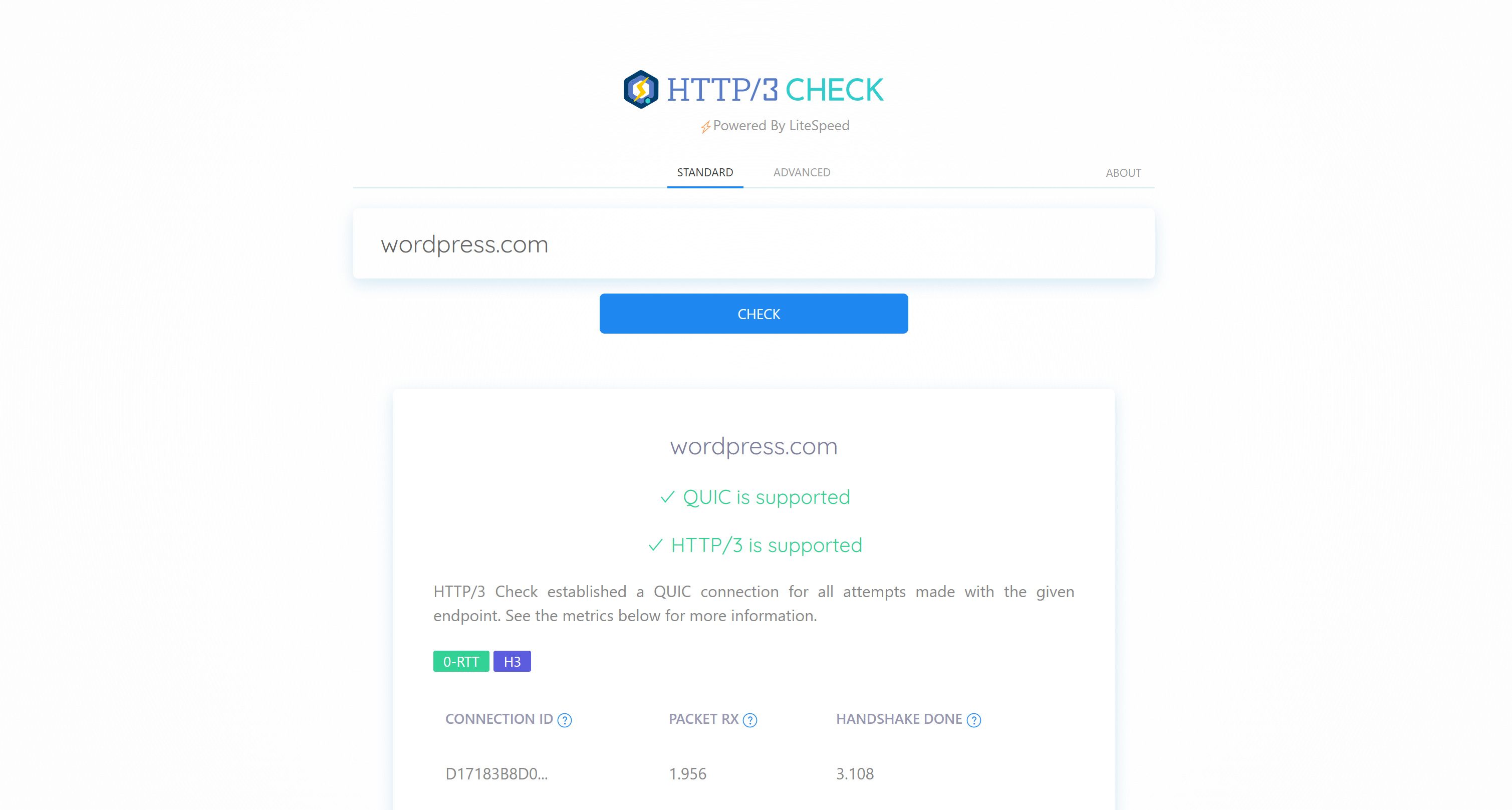
HTTP/3 Check is a simple website where you enter a URL (or domain), click the “Check” button, and it tells you whether the site uses HTTP/3:
This is probably the easiest way to verify HTTP/3 support, so I recommend you rely on such a tool (there must be other sites offering this service as well).
See that WordPress.com has QUIC and HTTP/3 enabled
Using cURL
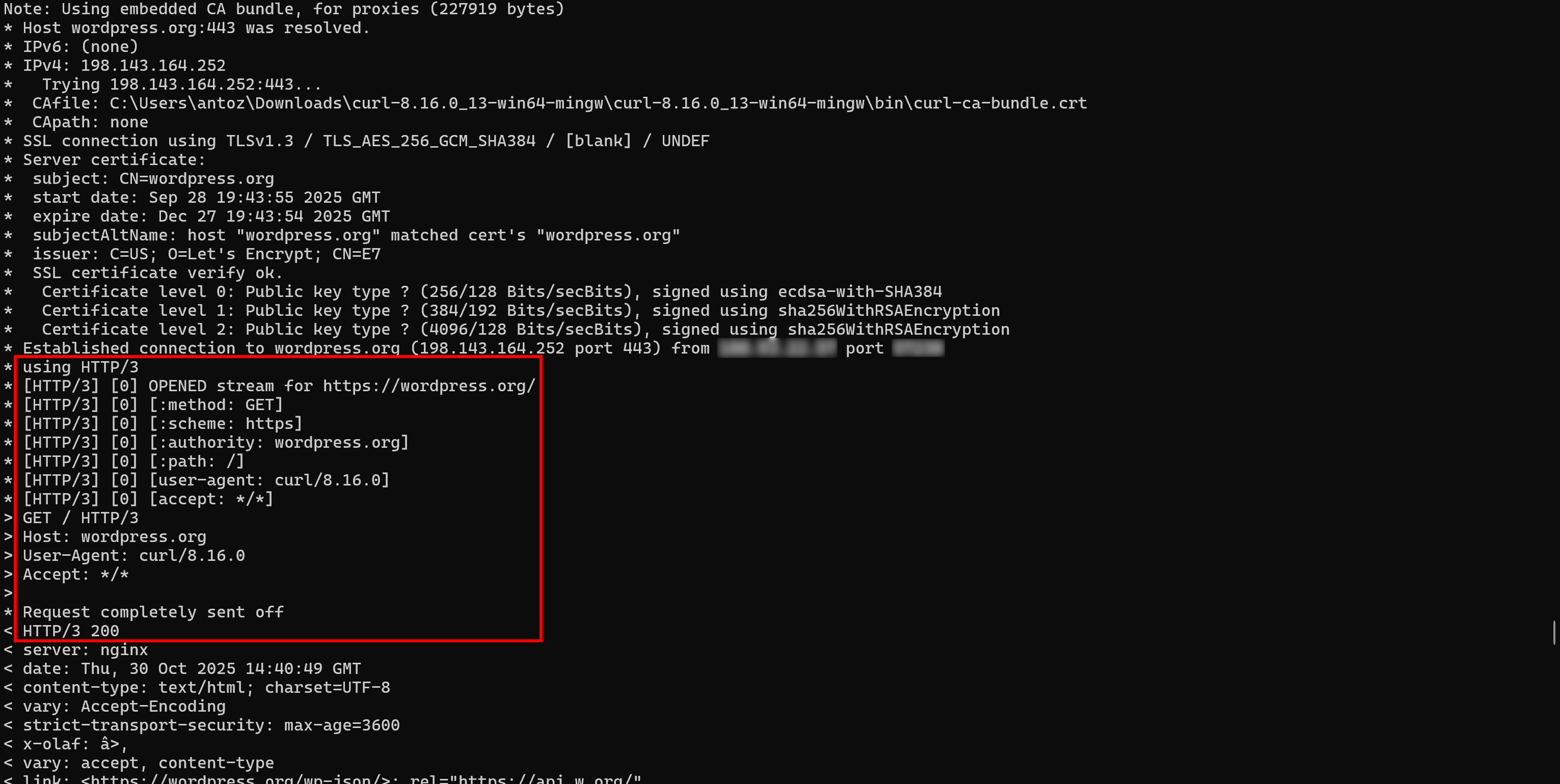
Recent versions of cURL include the –http3-only flag, which forces connections over HTTP/3. Similarly, –http3 attempts to connect via HTTP/3 and falls back to HTTP/2 or HTTP/1.1 in case of errors.
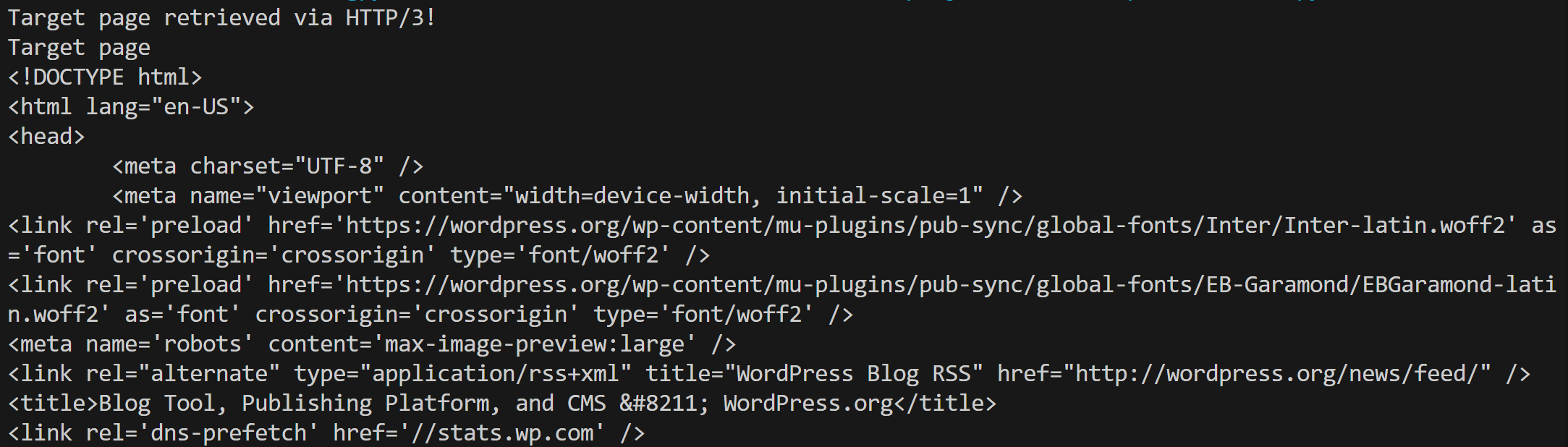
With the –http3-only flag, if a site supports HTTP/3, you’ll receive its HTML document retrieved via HTTP/3. Otherwise, you’ll see an ERR_HANDSHAKE_TIMEOUT error.
Important: Don’t forget that HTTP/3 support in cURL is still considered experimental.
To check whether a site operates over HTTP/3 using cURL, make sure you have the latest version of curl installed locally (default versions in Linux or Windows are typically outdated).
The command for the check is:
curl --verbose --http3-only <URL>
Note: The –verbose flag is not strictly required, but it helps verify that the connection was indeed established using HTTP/3.
You should see output confirming the connection was established via HTTP/3, followed by the page’s HTML:
Note that the connection was established over HTTP/3
Before continuing with the article, I wanted to let you know that I've started my community in Circle. It’s a place where we can share our experiences and knowledge, and it’s included in your subscription. Enter the TWSC community at this link.
Since HTTP/3 is still relatively new and about two‑thirds of the Internet isn’t using it yet, not all HTTP clients support it. After all, even if a site supports HTTP/3, it will usually also allow HTTP/2 or HTTP/1.1 for compatibility.
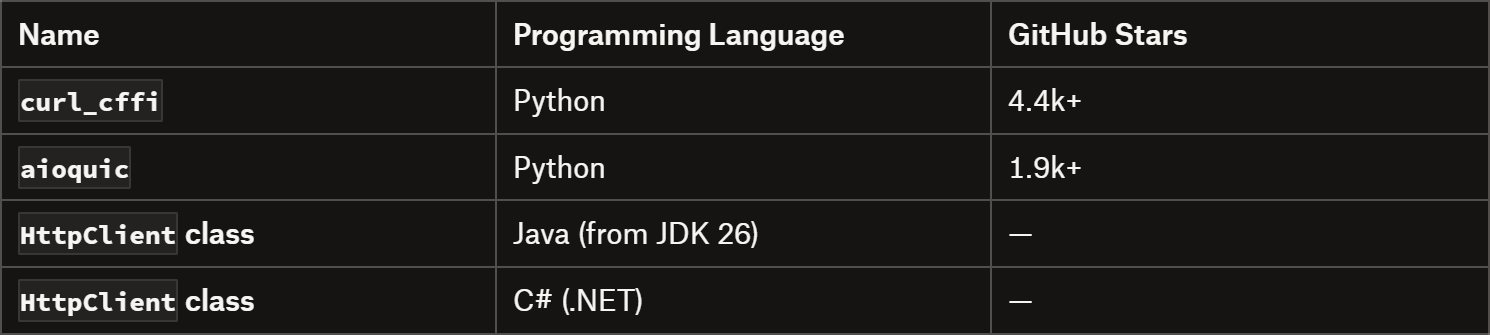
In short, not every HTTP client for web scraping supports HTTP/3. As of now, the major HTTP clients for web scraping that do support HTTP/3 include:
Note 1: Just because modern browsers support HTTP/3—and browser automation tools like Playwright or Puppeteer ship with a recent browser—this doesn’t guarantee that your Playwright/Puppeteer-based scraper is actually using HTTP/3! In most browsers, HTTP/3 is generally disabled by default, so you need to adjust flags (or browser settings) to enable that feature.
Note 2: Implementations of QUIC and HTTP/3 aren’t included in the standard libraries of many major programming languages, including Node.js, Python, Go, Rust, or Ruby. That’s also why it’s so difficult to find HTTP clients working with HTTP/3.
In this tutorial section, I’ll walk you through a real-world example of using HTTP/3 to connect to a website for web scraping.
For simplicity, I’ll assume you already have a Python environment set up. I decided to go for curl_cffi for this example, as it’s probably the most popular HTTP client supporting HTTP/3 that is also scraping-ready and available in Python.
If you’re not familiar with it, curl_cffi is a Python binding for cURL Impersonate, a special build of curl that can impersonate Chrome and Firefox. For more information, see Pierluigi’s previous newsletter post.
Prerequisites
The two main prerequisites for using HTTP/3 for web scraping with curl_cffi are:
The website you want to scrape must support HTTP/3 connections (you can verify that, as I explained earlier).
Your chosen HTTP client must be capable of making HTTP/3 requests (and curl_cffi does!)
The goal of this post was to introduce you to the world of HTTP/3, explaining how it works, why it matters, and how it differs from HTTP/2 and HTTP/1.1. You now understand the performance and stability benefits of HTTP/3, as well as the challenges in adopting it due to limited support among target sites and client libraries.
I hope you found this article helpful—feel free to share your thoughts and questions in the comments. Until next time!
The Web Scraping Club is a reader-supported publication. To receive new posts and support my work, consider becoming a free or paid subscriber.
FAQ
What happens if I connect to a site supporting HTTP/3 using a browser or HTTP client that doesn’t support HTTP/3?
If your HTTP client / browser doesn’t support HTTP/3, the connection automatically falls back to HTTP/2 or HTTP/1.1, depending on what the server supports. Thus, the website remains accessible, but you won’t benefit from HTTP/3’s improvements.
Does HTTP/3 bring any significant changes to the field of HTTP fingerprinting?
“http/3 fingerprints have not yet been publicly exploited and reported. But given the rapidly increasing marketshare of http/3(35% of internet traffic), it is expected that some strict WAF vendors have begun to utilize http/3 fingerprinting. It has also been noticed by many users, that, for a lot of sites, there is less or even none detection when using http/3.”
This suggests that, at present, HTTP/3 may offer a way to bypass detection checks in certain scenarios. Since WAFs (Web Application Firewalls) may not yet be fully configured to analyze and fingerprint HTTP/3 requests as strictly as they do for HTTP/1.1 or HTTP/2, utilizing HTTP/3 can be a smart way to bypass anti-bot checks!