What do FireCrawl’s /scrape endpoint, Bright Data’s Web Unlocker API, Craw4AI, and a whole bunch of other AI-ready scraping libraries and products have in common? They all give you the option to return scraped content from web pages in Markdown (and sometimes, it’s even the default behavior!) Ever wondered why?
In this article, I’ll break down the main reasons so you can understand why LLM-ready scrapers work this way—and how you could even build a simple one yourself!
A Brief Reminder About Web Scraping Tools for AI
With the recent rise of AI, some web scraping solutions have specialized in returning content optimized for LLM ingestion.
That means the content returned by AI-ready web unlockers or open-source scraping libraries isn’t just plain HTML. On the contrary, you often get an optimized Markdown version of the page. (Sometimes it’s even parsed JSON, but that’s a different story I won’t cover here.)
The Markdown content is then ready to be processed by an LLM as part of an AI agent, an AI workflow or pipeline, a multi-agent system, or similar system. In some cases, these web scraping tools are even accessed autonomously by AI agents, which decide when to use them to retrieve web content based on the task at hand.
Before proceeding, let me thank NetNut, the platinum partner of the month. They have prepared a juicy offer for you: up to 1 TB of web unblocker for free.
Why AI-Ready Web Scrapers Choose Markdown in the First Place
Let me introduce you to Markdown, the language spoken by LLMs.
Note: I assume you already know what Markdown is, but if not, read its Wikipedia page (as it gives a quick overview with everything you need to know about its syntax).
A Bit of Context About Data Formats in LLMs
Most LLMs can handle pretty much any text-based format you throw at them, whether it’s plain text, HTML, JSON, CSV, XML, or others. Some even have vision capabilities and can understand images or other multimodal content.
Still, under the hood, most LLMs actually “speak” Markdown. That’s how they handle code blocks, tables, and other structured content, if you’ve ever wondered…
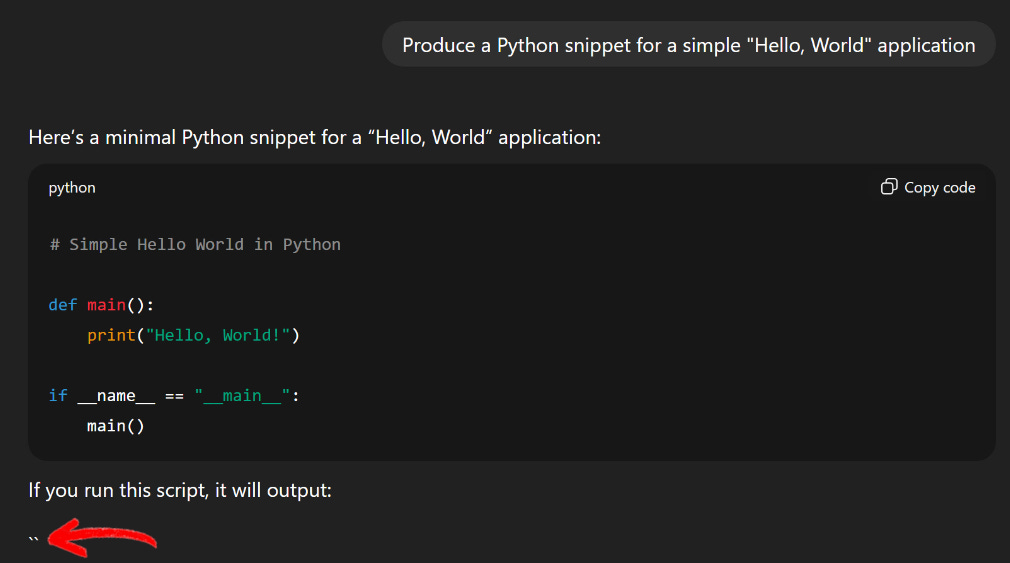
I’m sure I’m not the only one who has received a response from ChatGPT or Gemini in pure Markdown, even if I didn’t ask for it. Or sometimes, you can even catch the LLM responding in Markdown, and the page renders it in real time:
Note the `` characters returned by the LLM
Note that the LLM is writing the “```” characters used in Markdown to signify code blocks.
Why Markdown Is a Perfect Data Format for LLMs (and AI-Ready Scrapers Use It Too)
So, cool, LLMs love Markdown and use it behind the scenes. But why? Well, because Markdown is a versatile format that hits all the sweet spots LLMs care about:
Structured content: Markdown gives you hierarchy and organization out of the box (H1, H2, H3, lists, images, code blocks, etc.), making it easy for LLMs to parse and understand the structure of your content.
Concise and LLM-friendly: Compared to raw HTML or JSON, Markdown is much more concise. Less unnecessary markup or structure means fewer tokens consumed, which also reduces the risk of hallucinations, truncations, or context overflows.
De facto standard: While there’s no single formal Markdown standard, GitHub-flavored Markdown has become the widely adopted baseline, so most tools and scrapers default to it.
Rich content support: Markdown supports images, links, tables, code snippets (and in some cases, such as with MDX/MarkdownX, even raw HTML or embedded React components), making it flexible for a wide range of content types.
Alignment with training data: LLMs are trained on massive datasets like Common Crawl, where a huge portion of high-quality technical documentation (READMEs, wikis, Stack Overflow posts, etc.) is written in Markdown. This means most AI models don’t just “understand” Markdown. Instead, they learned to reason through its structure during training, giving them a natural intuition for the format.
Long story short, that’s why most web scraping solutions built for AI integrations return content in Markdown (or at least give you the option).
By converting a scraped HTML page directly into Markdown, AI-ready scrapers help the underlying LLM (whether it’s part of a machine learning pipeline, AI agent, RAG workflow, plugin, or other application) process the content efficiently and effectively while also saving on token usage.
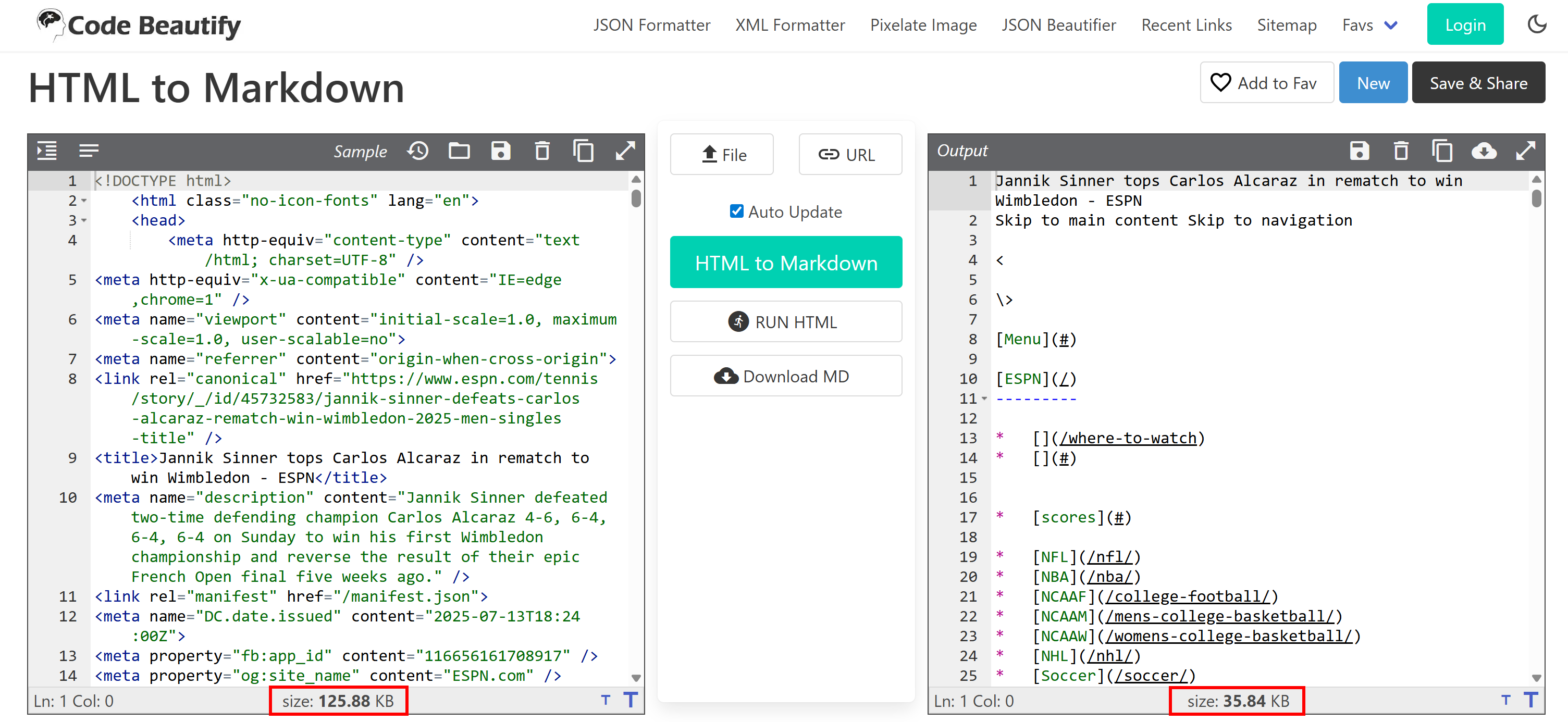
HTML vs Markdown representation of the same news article
As you can see, the original HTML page contains 125.88 KB of content. After converting to Markdown, it drops to 35.84 KB. That’s a ~28% reduction in size just from a simple data format conversion, without any significant loss of actual content!
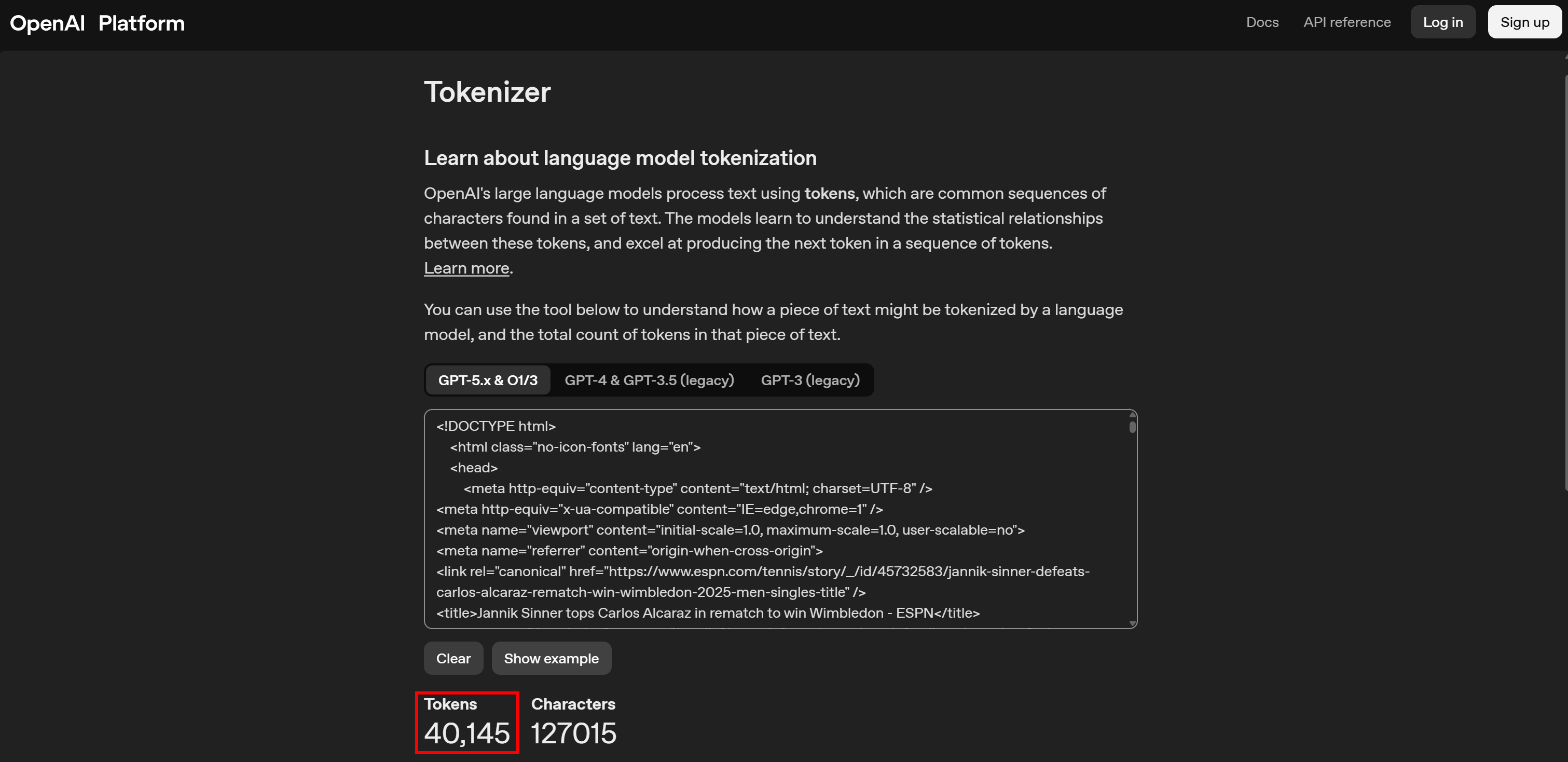
If we look at token usage, the difference can appear even more striking. The original HTML page translates to 40,125 tokens:
Tokens for the HTML page
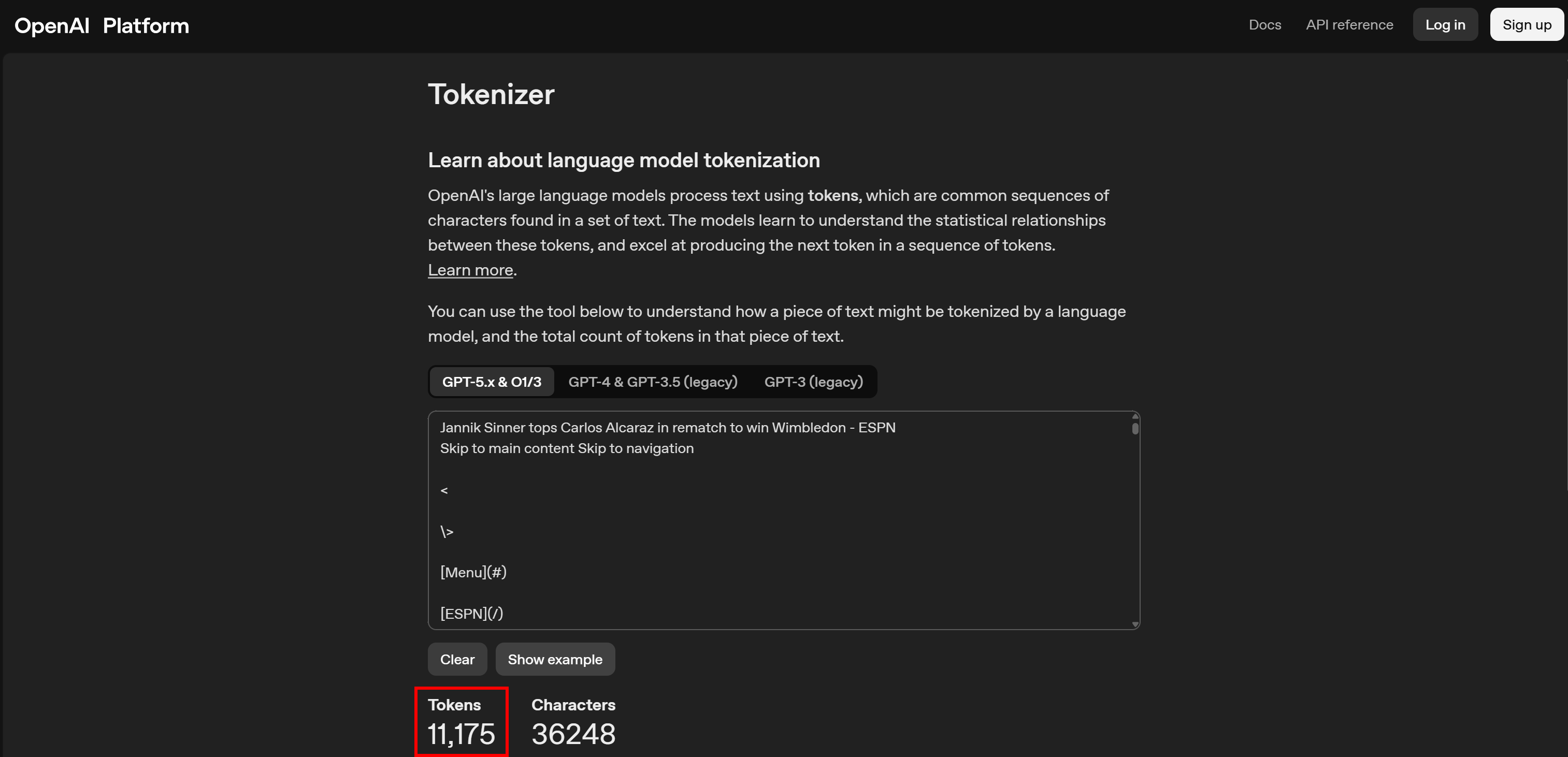
Meanwhile, the Markdown version corresponds to only 11,175 tokens:
Tokens for the Markdown-converted page
Again, that’s roughly a 3.6× reduction in token usage (which usually translates directly into cost savings, since most AI providers charge based on LLM usage).
For a more direct comparison between data formats, explore the AI data format comparison research piece (which I wrote in collaboration with Bright Data on its Kaggle account).
But Raw Markdown Alone Isn’t Enough…
Now, you might be thinking: “Okay, I’ll just convert HTML pages to Markdown using one of the many HTML-to-Markdown libraries out there, and I’m done.” Well… not quite.
The problem is that a direct HTML-to-Markdown conversion isn’t enough, and below are the main reasons why (and how to address them).
1. Non-Content HTML Tags Get Treated as Content
HTML pages are full of blocks that are required for rendering, but are completely useless for understanding the page itself. Think <script>, <style>, inline JSON configs, and similar tags.
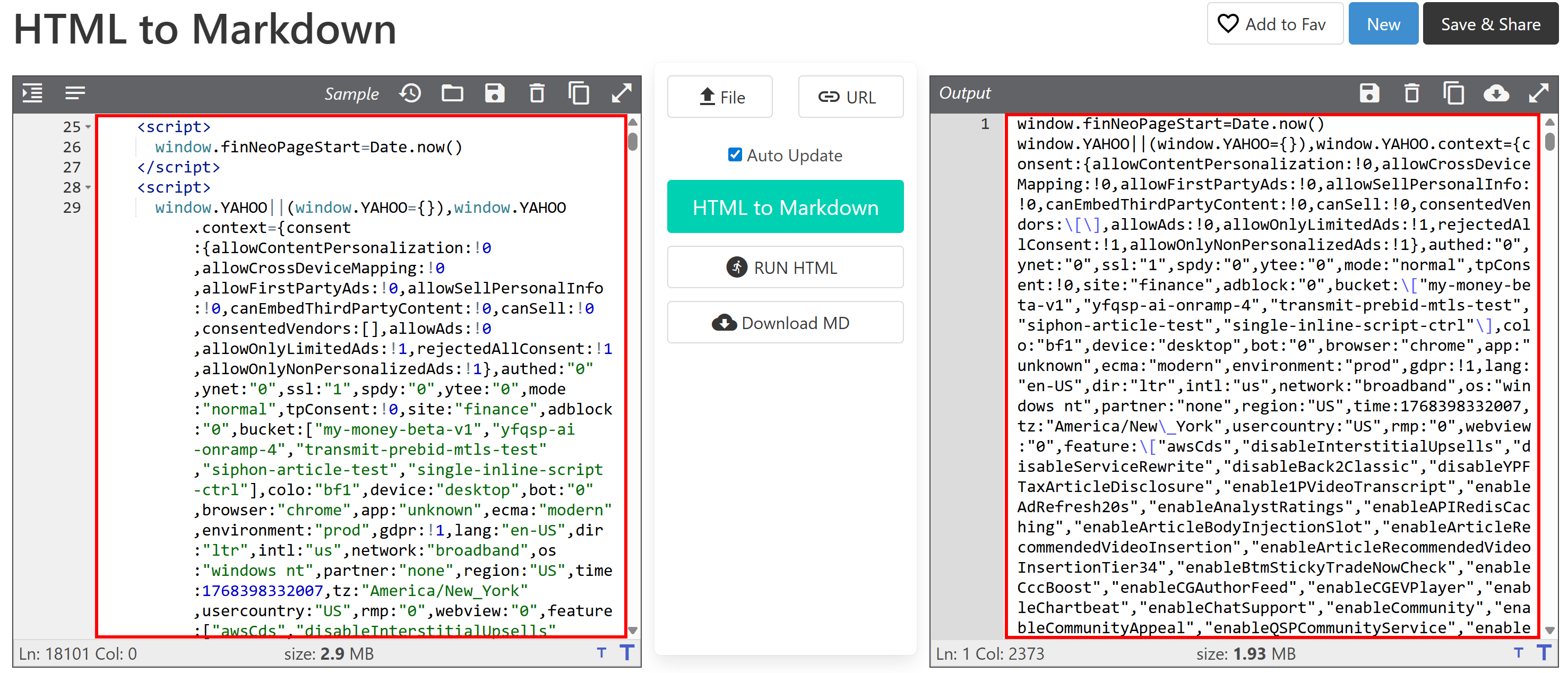
After all, those HTML blocks contain plain text. Thus, conversion libraries (rightfully) treat them like any other text node and include them in the Markdown output:
Notice how the <script> tags are converted
This clearly pollutes the output with noise the LLM doesn’t need, while also greatly increasing token usage (as <script> and <style> blocks can be surprisingly long!)
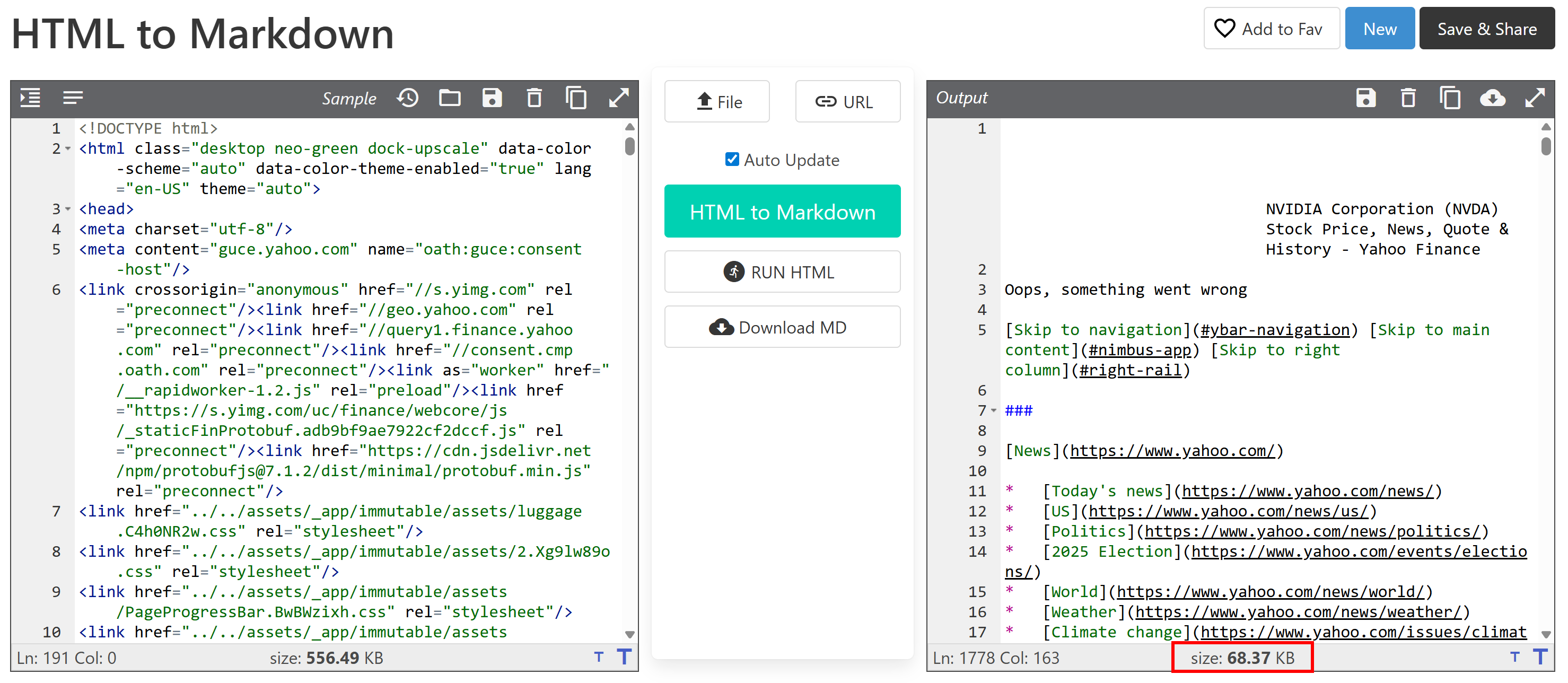
🎯 Solution: Use an HTML parser (or, in simpler cases, well-scoped regexes) to remove <script>, <style>, and similar rendering-only HTML tags before converting the page to Markdown.
For instance, simply removing <script> and <style> tags from the input HTML produces an impressive reduction, from 1.93 MB down to 68.37 KB, which also translates into huge token savings!
Note the size of the new output
2. Ads and Promotional Content
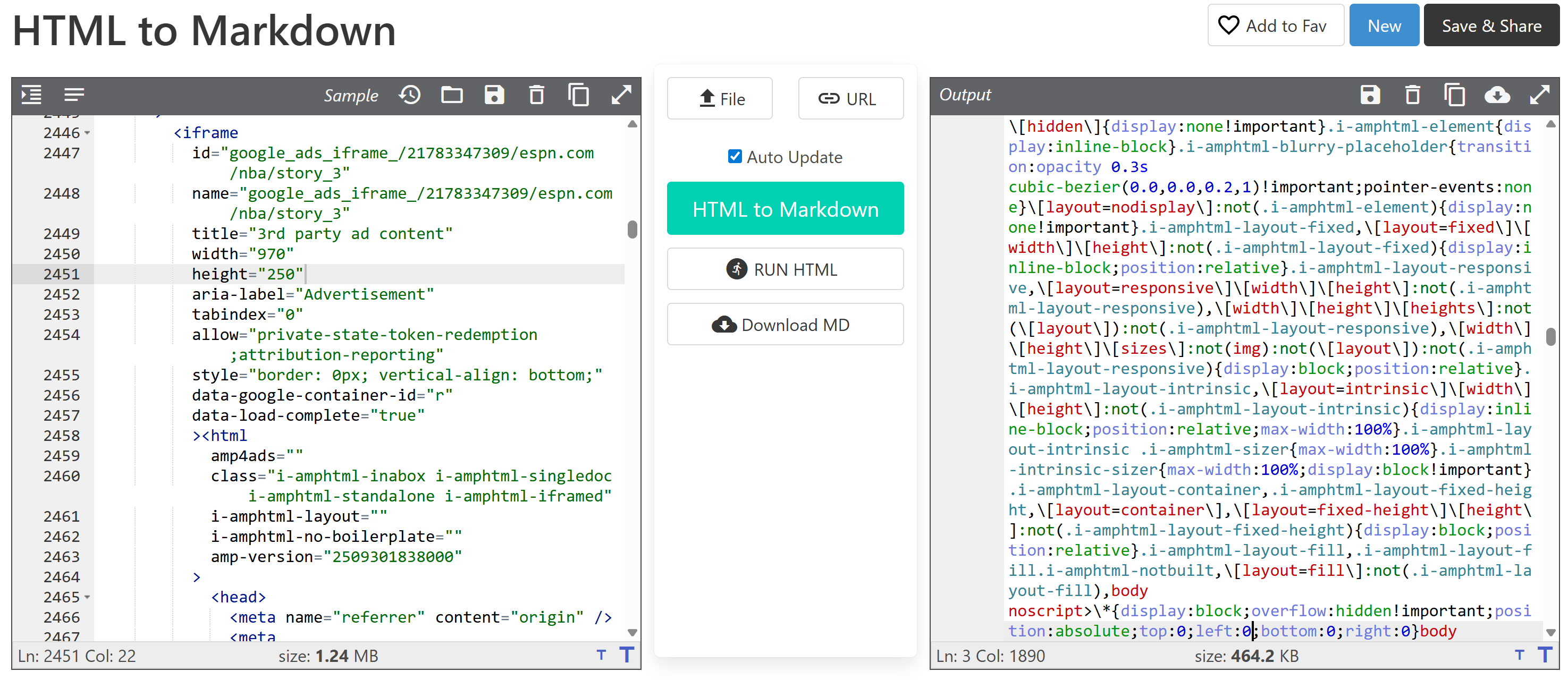
Ads, sponsored sections, and “recommended for you” blocks might have nothing to do with the main content of the page. Leaving them in the converted Markdown can confuse the LLM or skew its understanding of what the page is really about.
The rendered <iframe> ad is leaking content into the output Markdown
🎯 Solution: Use proxies that support ad-blocking when retrieving the HTML page, enable OS-based ad blockers on your deployment server, or apply rules to remove ads after fetching the HTML and before converting it to Markdown.
3. Navigation, Headers, and Footers
Menus, breadcrumbs, and footer links are all technically “content,” but could be semantically irrelevant for your use case (particularly if you’re not interested in links for crawling or further exploration).
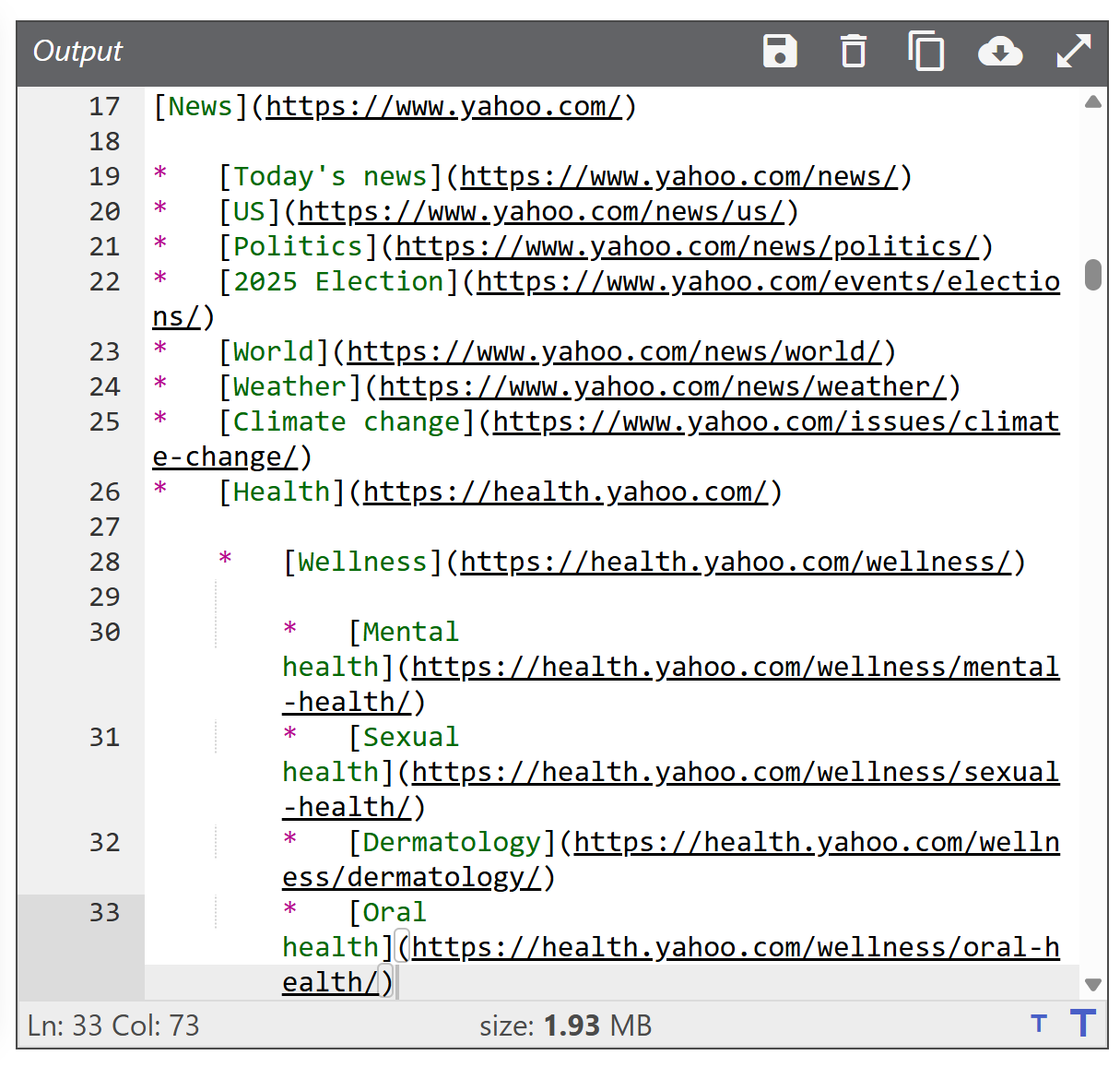
If those elements aren’t removed or downweighted, they increase token usage. Plus, the LLM may overemphasize them or mistake them for part of the main content.
The conversion of the <header> element results in a list of URLs appearing in the target Markdown
🎯 Solution: Conveniently remove tags like <header> and <footer>, or design your HTML-to-Markdown system to accept only specific CSS selectors for the blocks you want to include in the conversion process (just like Crawl4AI does).
4. Repeated and Boilerplate Text and Content
Things like “Sign up,” “Log in,” newsletter popups, cookie banners, or legal disclaimers (like GDPR notices) appear on almost every page of a site. Including them wastes tokens and adds repetition, which can degrade reasoning quality and increase the risk of hallucinations.
🎯 Solution: This is a tricky problem, as there’s no easy way to identify and remove all of these elements automatically. I know for a fact that some industry leaders have trained small LLMs specifically for this task, letting them process the remaining HTML (after earlier cleaning steps) to filter out all irrelevant content.
How to Convert a Web Page from HTML to LLM-Optimized Markdown
I was recently asked by a client to analyze specific web pages from competitors’ websites. These included structured pages with hidden elements that required basic interactions (like dropdowns). Plus, some information was spread across badge images, links, etc.
Now, if you’re trying to get high-level insights from web pages, your first idea might be to just copy all the text on a page (CTRL+A + CTRL+C) and paste it into ChatGPT (or a similar AI solution), analyzing it with the right prompt. That’s far from optimal, because you lose structure, links, image URLs, and other important context.
Instead, I wrote a simple Python script that:
Reads HTML from an index.html file.
Keeps only the <body> tag with Beautiful Soup for restricting the content to what you’re typically interested in.
Remove <script>, <style>, <header> and <footer> nodes.
Here’s the simple script for converting HTML files to LLM-ready Markdown outputs:
# pip install beautifulsoup4 lxml markdownify

from bs4 import BeautifulSoup
from markdownify import markdownify as md

def html_to_markdown(html_input_path: str, output_markdown_path: str):
    # Load the input HTML from a file
    with open(html_input_path, "r", encoding="utf-8") as f:
        html = f.read()

    # Parse the HTML (using lxml for high performance)
    soup = BeautifulSoup(html, "lxml")

    # Remove the undesired tags
    for tag in soup(["script", "style", "header", "footer"]):
        tag.decompose()

    # Keep only the <body> content (if present)
    body_html = soup.body.decode_contents() if soup.body else str(soup)

    # Convert the HTML to Markdown
    markdown = md(
        body_html,
        bs4_options="lxml" # Set the underlying HTML parser
    )

    # Write the Markdown output to disk
    with open(output_markdown_path, "w", encoding="utf-8") as f:
        f.write(markdown)


if __name__ == "__main__":
    html_to_markdown("index.html", "output.md")
The script above still involves a few manual steps, but it greatly improves the transformation of a web page into content that’s ready to be sent to any LLM.
First, load the target page in your browser (ideally with an ad blocker enabled):
The target page
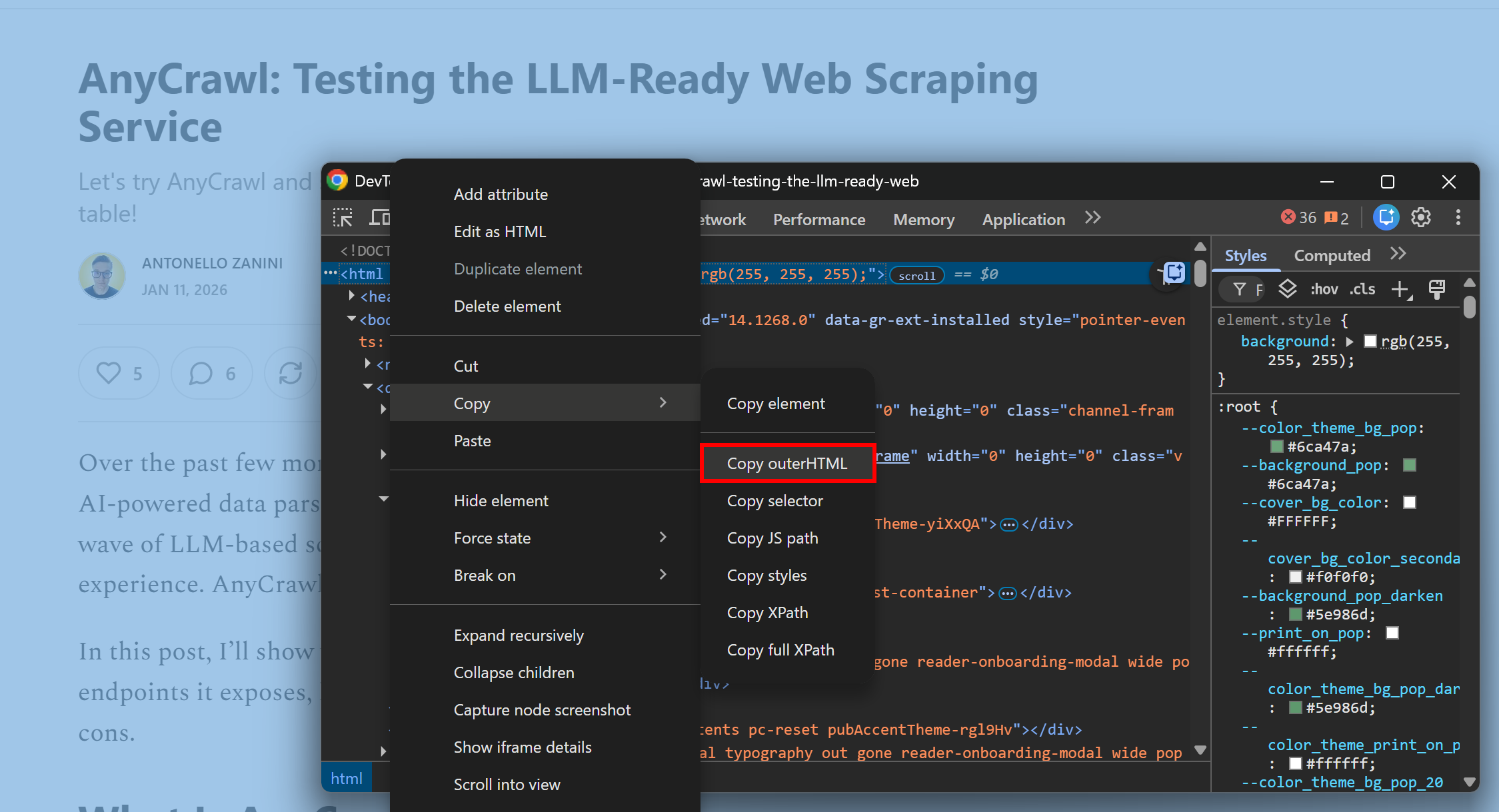
Once the page has fully rendered, right-click and select the “Inspect” entry. Locate the <html> tag, then use “Copy > Copy outerHTML” option to get the complete HTML of the rendered page:
Copying the rendered HTML of the target page
Note: Copying the rendered HTML is better than copying the HTML from the “View page source” option. The latter misses all dynamic content (basically, anything that requires JavaScript execution and rendering in the browser won’t appear in the raw page source).
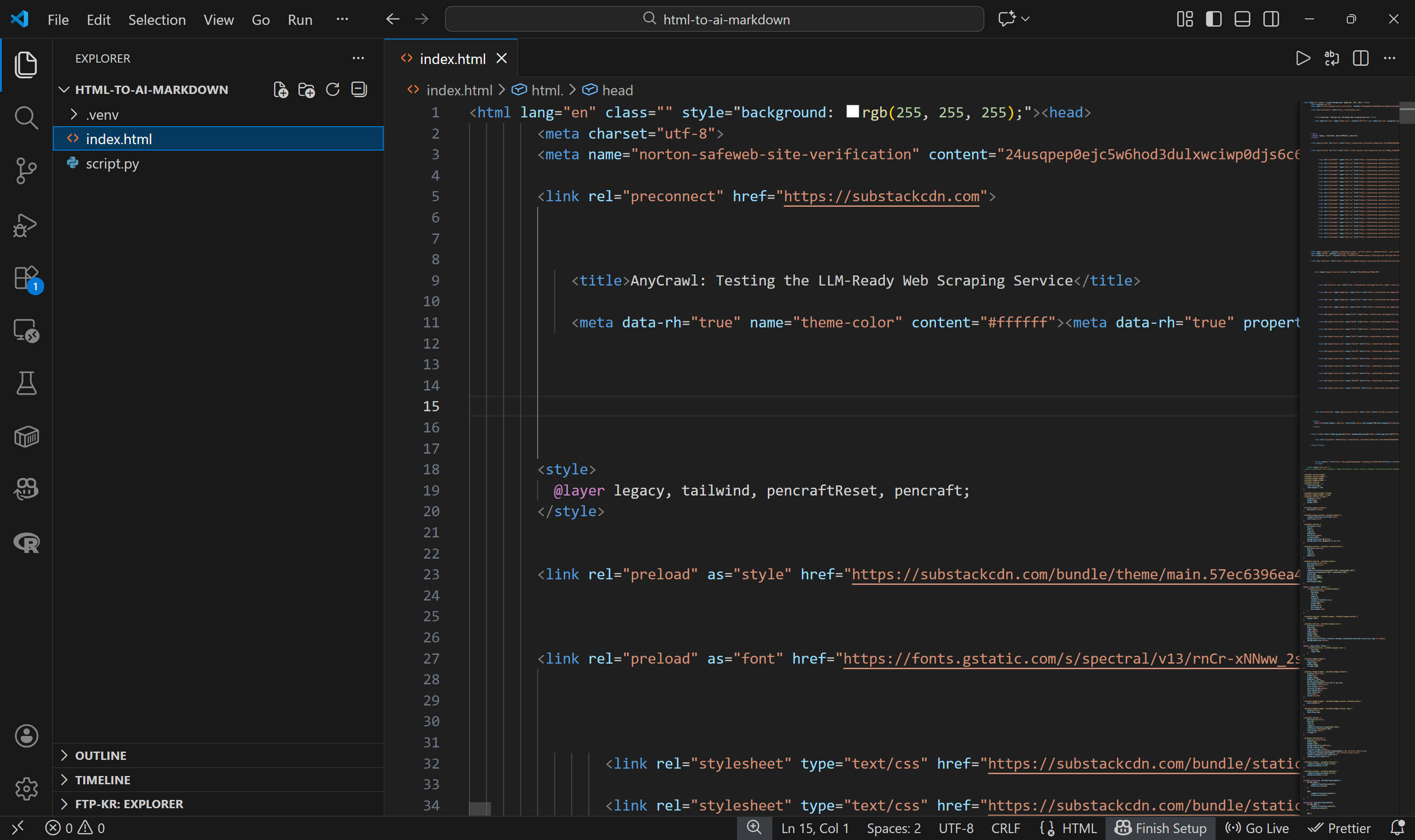
Next, in your project folder, paste the HTML into a file named index.html:
The index.html file in the project folder
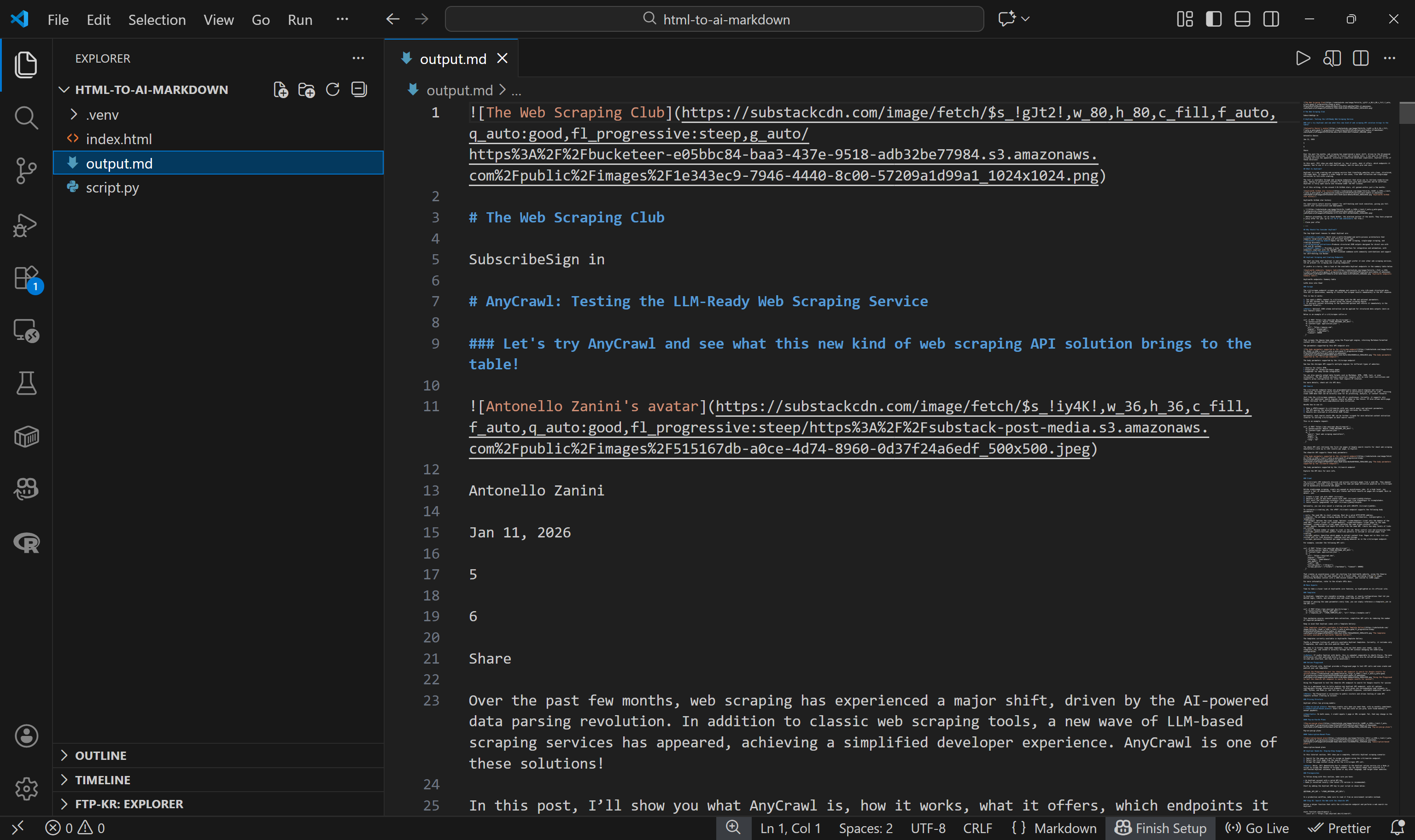
Run the Python script, and it’ll generate an output.md file:
The resulting output.md file generated by the script
You can now pass the resulting Markdown to an LLM for processing.
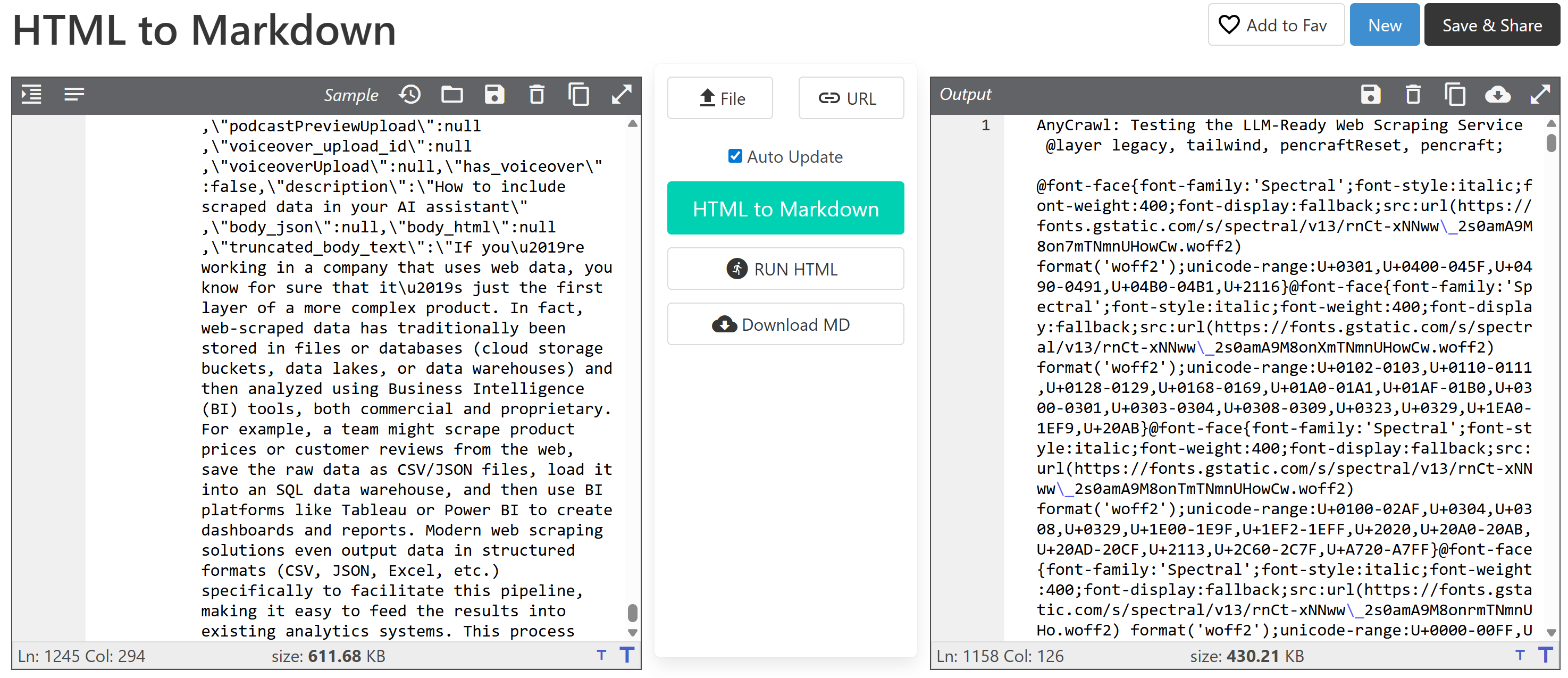
Compared to a traditional HTML-to-Markdown approach, the tweaks in this process save tons of tokens. In particular, the output produced by this method is just 41.2 KB (compared to 611.68 KB for the original HTML), which corresponds to 11,006 tokens.
If you applied a basic HTML-to-Markdown conversion, you’d end up with a 430.21 KB Markdown file, resulting in 154,191 tokens:
Traditional HTML-to-Markdown conversion approach
In other words, these basic tricks lead to over 14× token savings. Not bad!
The script I just shared achieves its goal, but it’s super straightforward. I presented it simply to prove how a basic HTML-to-Markdown conversion is essentially suboptimal.
For a more sophisticated result, you could integrate a similar process into your LLM-ready scraper, including CLI options for more control over which tags to remove, which nodes to select, and other conversion settings.
As a project idea, you could even turn this approach into a browser extension that converts rendered web pages in a user’s browser into LLM-ready Markdown output files. Clearly, if you go this route, make sure to follow ethical web scraping practices.
Is Markdown Always the Right Choice?
This is the final question to ask after all this discussion. Now, you might be thinking: “Okay, there are no good reasons to stick with plain HTML when passing web pages to an LLM.”
That’s not true since there are situations where having access to the raw HTML can make a difference. Think of when the HTML contains semantic attributes or metadata. This information would be lost during HTML-to-Markdown conversion.
In detail, these are some scenarios where sticking to HTML for LLM ingestion is beneficial:
data-* attributes storing product IDs, prices, etc.
ARIA attributes that convey accessibility or structural information.
class or other HTML attributes that reveal context beyond the visible content on a node.
HTML comments contain useful information about the page.
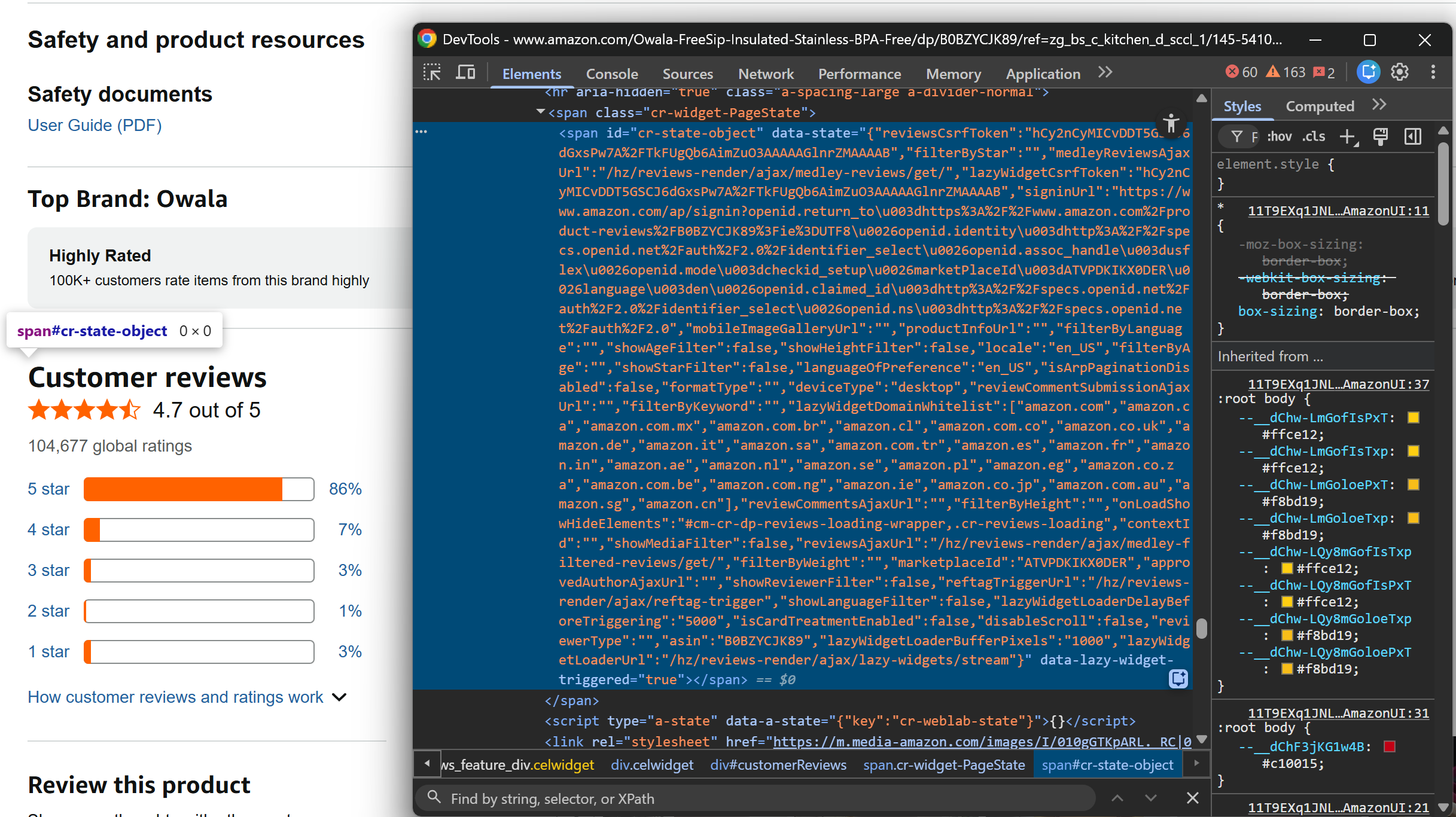
For example, consider this HTML node on an Amazon page:
Note the hidden element on this Amazon product page
This is just an empty <span>, but its data-state attribute contains information-rich JSON data that you would lose during the Markdown conversion (as the node doesn’t contain text).
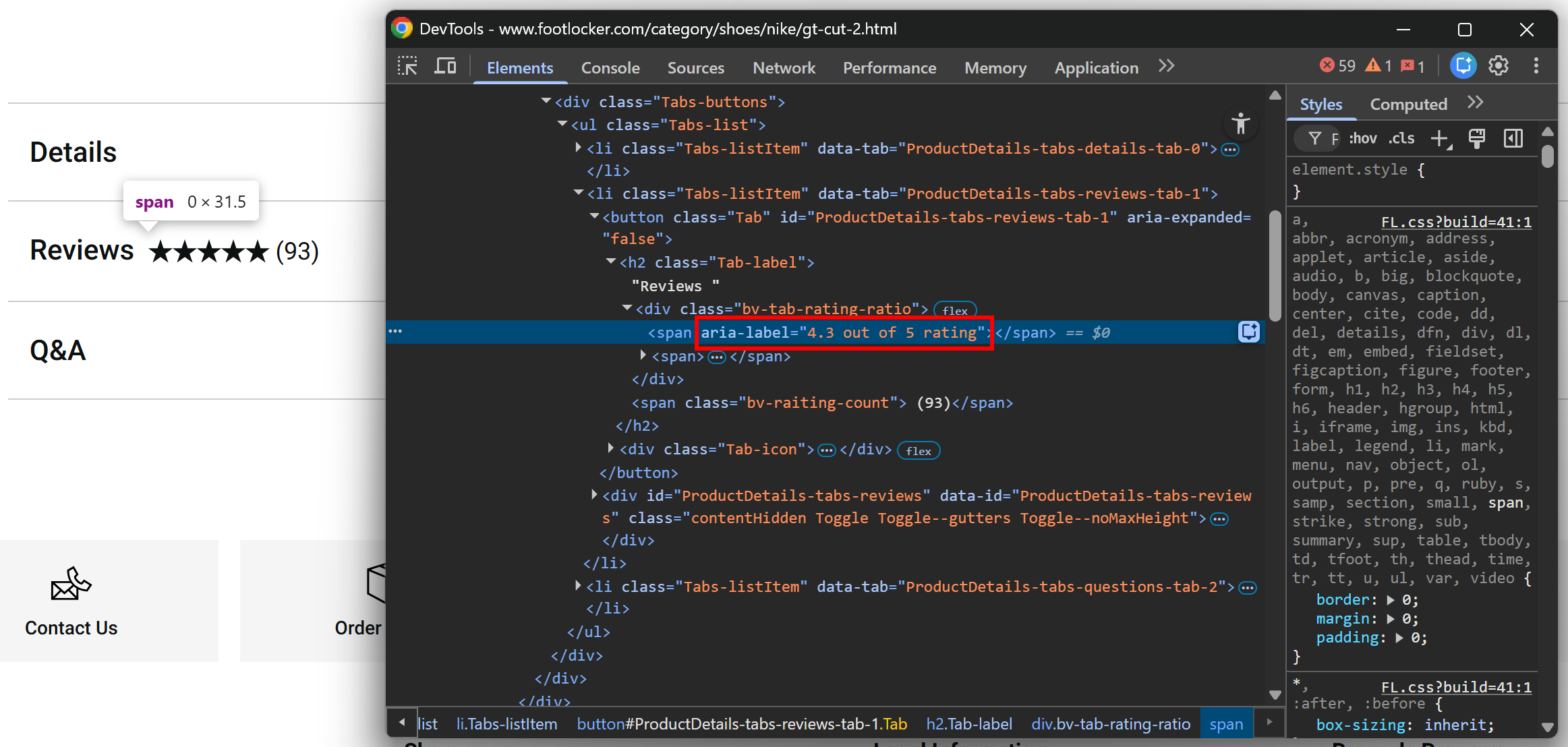
Another common example is visual elements, which often carry semantic information not captured by visible text. For instance, based on the image below, you might think the rating is 5/5, but the aria-label attribute reveals it’s actually 4.3/5:
Note the aria-label attribute
In short—let’s be honest, as it always happens in IT—converting to Markdown isn’t a one-size-fits-all solution. Therefore, it’s no surprise that most web scraping solutions built for direct AI integrations also offer the option to return raw HTML.
That said, based on my experience in the field and everything highlighted here, I highly recommend sticking to Markdown when feeding web pages to LLMs for processing or data parsing, as the benefits far outweigh the downsides in the vast majority of use cases.
The Web Scraping Club is a reader-supported publication. To receive new posts and support my work, consider becoming a free or paid subscriber.
Conclusion
In this post, I’ve outlined why Markdown is the language of LLMs and, consequently, the preferred output format for all web scraping tools that integrate directly into AI systems like workflows, pipelines, agents, and so on.
The reasons are intuitive: Markdown is concise and strips unnecessary markup (reducing token usage) while preserving structure, images, links, lists, tables, and more.
As highlighted, plain HTML-to-Markdown conversion isn’t always optimal, and you need to apply some extra tricks to get the best results.
If you have any questions or comments, drop them below. Until next time!