Over the past few months, web scraping has experienced a major shift, driven by the AI-powered data parsing revolution. In addition to classic web scraping tools, a new wave of LLM-based scraping services has appeared, achieving a simplified developer experience. AnyCrawl is one of these solutions!
In this post, I’ll show you what AnyCrawl is, how it works, what it offers, which endpoints it exposes, how to use it in a real-world example, and its main pros and cons.
What Is AnyCrawl?
AnyCrawl is a web crawling and scraping service that transforms websites into clean, structured, LLM-ready data. It supports a wide range of use cases, from SERP collection and single-page extraction to full-site crawling.
The tool is available through web scraping endpoints that allow you to retrieve ready-to-use data, making it particularly suitable for integration into data pipelines and AI workflows. AnyCrawl is fully open source and released under the MIT license.
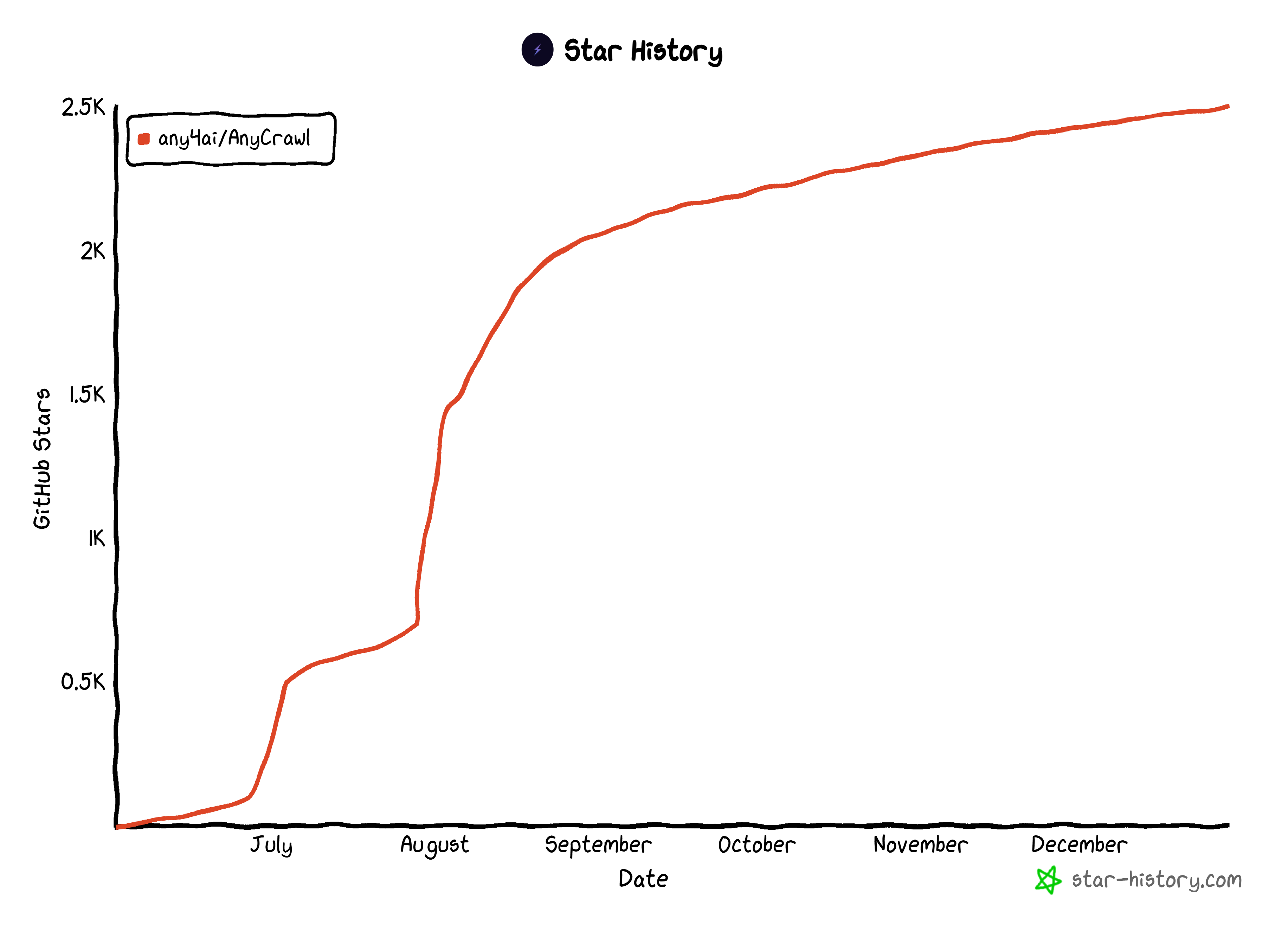
As of this writing, it has around 2.5k GitHub stars, all gained within just a few months:
AnyCrawl’s GitHub star history
Its open-source nature ensures support for self-hosting and local execution, giving you full control over infrastructure and deployment.
Before proceeding, let me thank NetNut, the platinum partner of the month. They have prepared a juicy offer for you: up to 1 TB of web unblocker for free.
Scalable crawling: Built over a multi-threaded and multi-process architecture that supports large-scale crawling and efficient batch jobs.
Flexible crawling modes:Opens the door to SERP scraping, single-page scraping, and crawling discovery.
LLM-optimized extraction:Produces structured JSON outputs designed for direct use with LLMs and AI systems.
OpenAPI support: Provides a clear API interface for integration and automation, with endpoints compliant with the OpenAPI specs.
Open-source foundation: An MIT-licensed codebase with community contributions and support for self-hosting via Docker.
AnyCrawl Scraping and Crawling Endpoints
Now that you know what AnyCrawl is and why you might prefer it over other web scraping services, let me present its scraping and crawling endpoints.
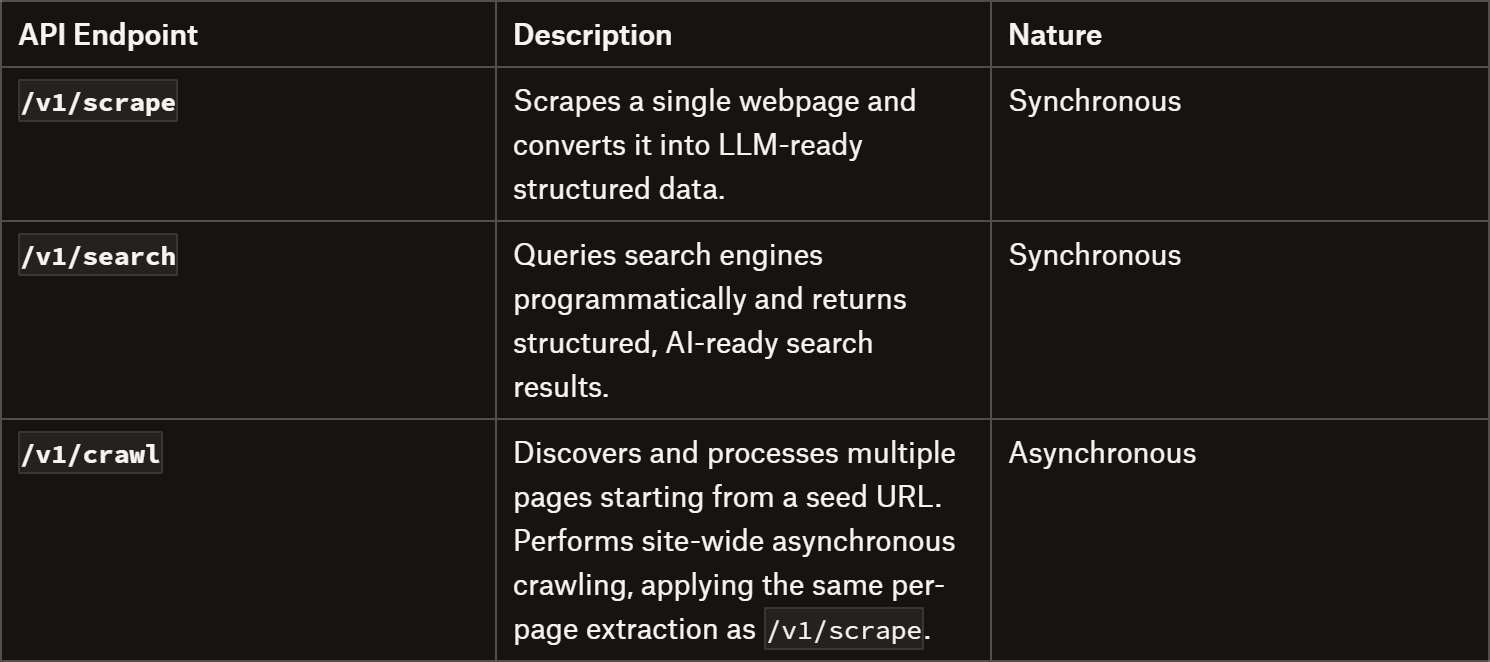
If you’re in a hurry, take a look at the available AnyCrawl endpoints in the summary table below:
AnyCrawl’s endpoints: Summary table
Let’s dive into them!
Scrape
The /v1/scrape endpoint scrapes any webpage and converts it into LLM-ready structured data. This API is synchronous, meaning it returns the scraped results immediately in the API response.
This is how it works:
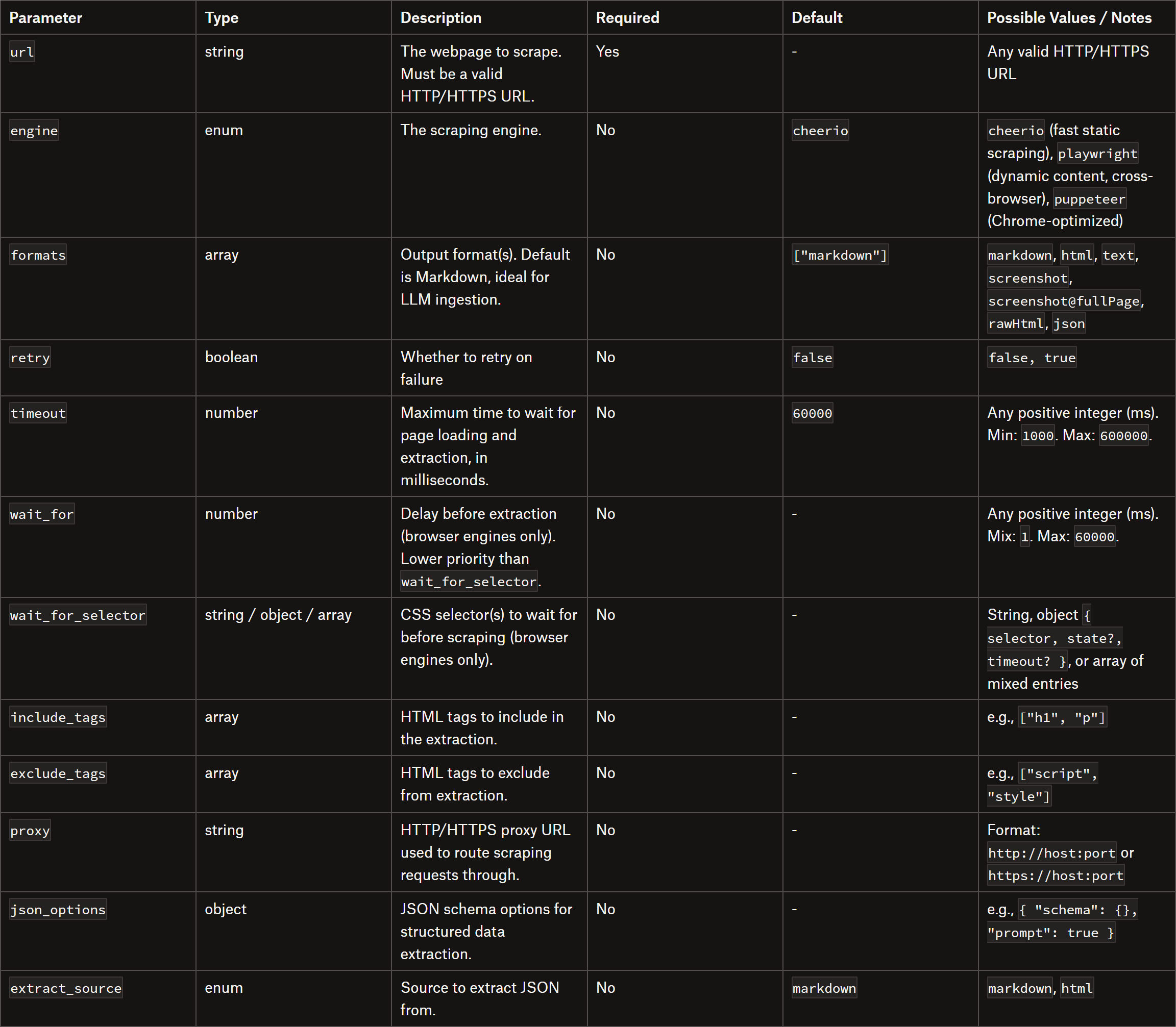
You send a POST request to /v1/scrape with the URL and optional parameters.
The API fetches the page content using the chosen scraping engine.
It extracts content according to the specified options and returns it immediately in the requested format(s).
Note: Optional JSON schema extraction can be applied for structured data outputs (more on this feature later).
The /v1/search endpoint helps you programmatically query search engines and retrieve structured, AI-ready web search results. This API is particularly optimized for LLMs, returning clean JSON data that can be directly used for AI processing, analysis, or content research.
Just like the /v1/scrape endpoint, this API is synchronous. Currently, it supports only Google, but additional search engines should be added in the future. It also allows multi-page result retrieval for more comprehensive data collection.
Here’s how to use it:
Make a POSTrequest to /v1/search with your search query and optional parameters.
The API queries the selected search engine and retrieves the results.
Results are returned in structured JSON format.
Optionally, each search result URL can be further scraped for more detailed content extraction (similar to calling /v1/scrape on each search result).
The above API call retrieves the first 2 pages of Google search results for “best web scraping newsletters,” with up to 10 results per page, in English.
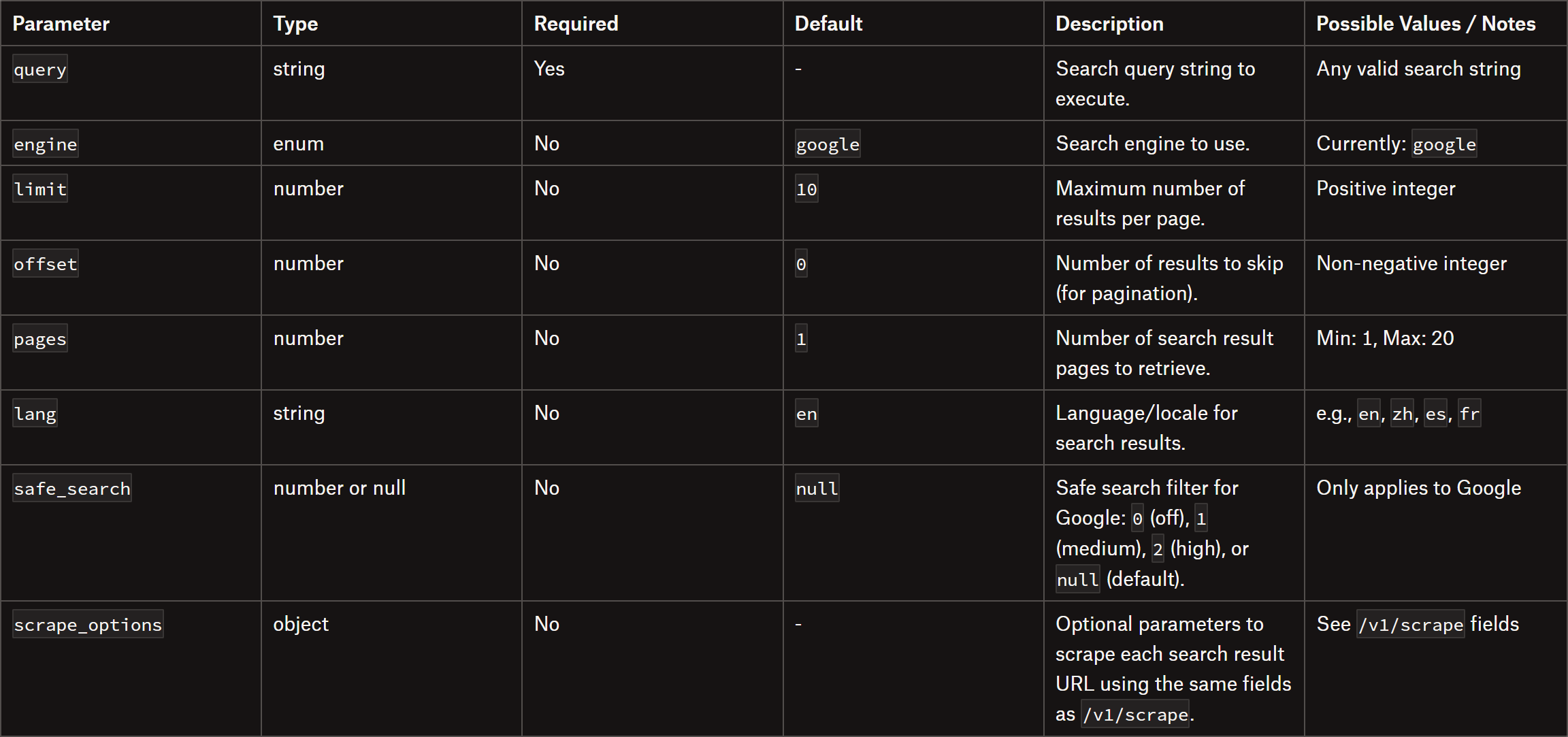
The Search API supports these body parameters:
The body parameters supported by the /v1/search endpoint
The /v1/crawl API endpoints discover and process multiple pages from a seed URL. They empower asynchronous, site-wide crawling, applying the same per-page extraction pipeline as /v1/scrape but on dynamically discovered web pages.
Unlike single-page scraping, crawls are queued as asynchronous jobs. At a high level, you receive a job_id immediately, then poll status and fetch results as pages are scraped. More in detail, you:
Create a crawl job with POST /v1/crawl.
Receive a job_id and check status with GET /v1/crawl/{jobId}/status.
Poll until the resulting “status” field changes from “pending” to “completed”.
Fetch results (paginated) via GET /v1/crawl/{jobId}?skip=0.
Optionally, you can also cancel a crawling job with DELETE /v1/crawl/{jobId}.
url: The seed URL to start crawling. Must be a valid HTTP/HTTPS address.
engine: The per-page scraping engine to use. Options: “cheerio”, “playwright”, “puppeteer”.
strategy: Defines the crawl scope. Options: “same-domain” (crawl only the domain of the seed URL), “all” (crawl all linked domains), “same-hostname” (crawl pages on the same hostname), “same-origin” (crawl pages matching the same origin protocol + host).
max_depth: Maximum link depth to follow from the seed URL. Limits how many levels of links are visited.
limit: Maximum number of pages to crawl in the job. Helps control cost and processing time.
include_paths/exclude_paths: Glob-like patterns to include or exclude pages from crawling.
scrape_paths: Specifies which pages to extract content from. Pages not in this list are visited only for link discovery, reducing cost and storage.
scrape_options: Customizes per-page scraping behavior as in the /v1/scrape endpoint.
That creates an asynchronous crawl job starting from AnyCrawl’s website, using the Cheerio engine, crawling only the same domain up to 5 levels deep, excluding /blog/* pages, extracting Markdown content with a 60-second timeout, and limited to 100 pages.
Time to take a closer look at AnyCrawl’s core features, as highlighted on its official site.
Templates
In AnyCrawl, templates are reusable scraping, crawling, or search configurations that let you define logic, limits, and variables once and reuse them across API calls.
Instead of passing the same parameters every time, you can simply reference a template_id in the API call:
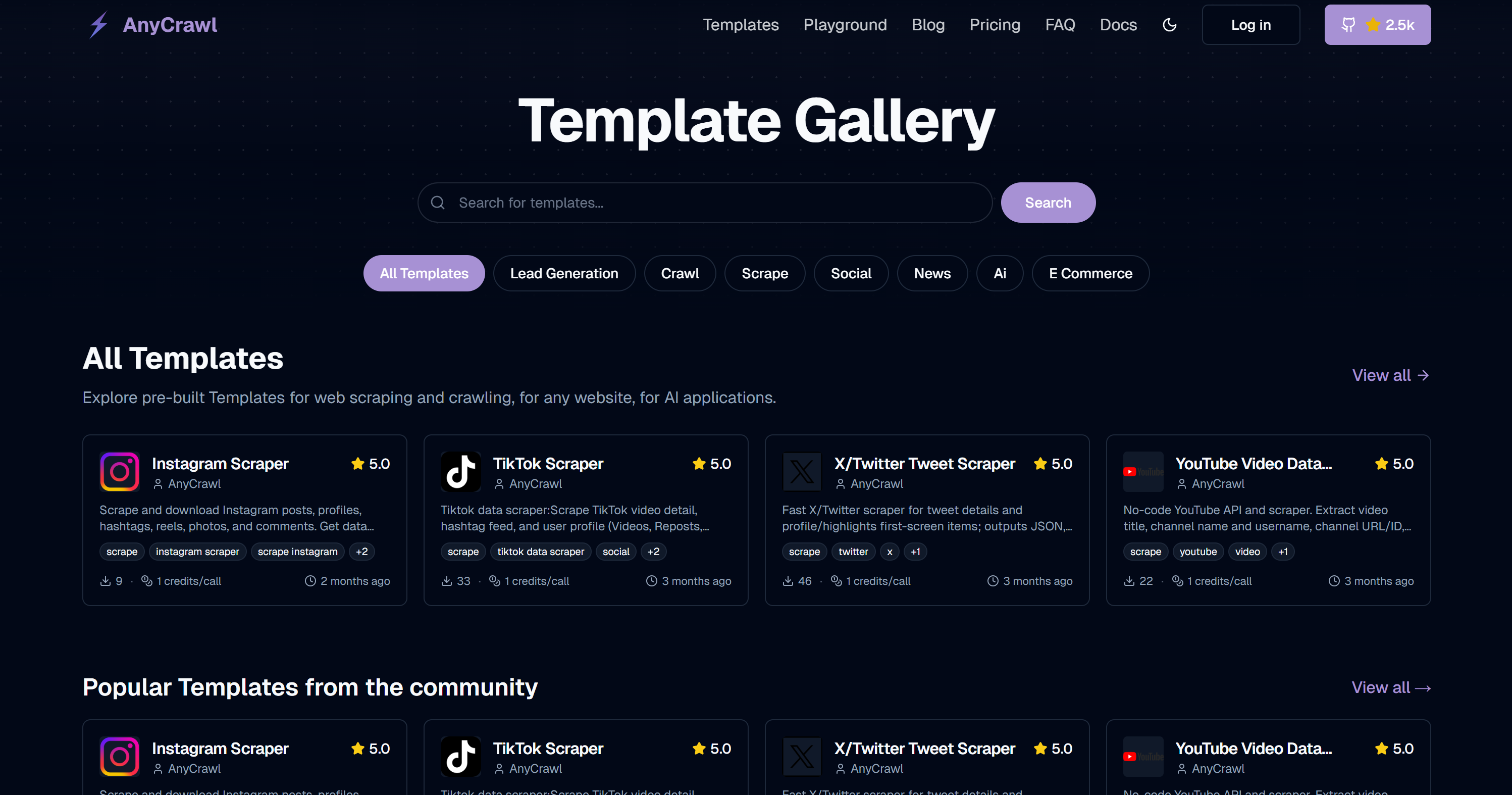
The templates currently available in AnyCrawl’s Template Gallery
That’s a showcase listing all publicly available AnyCrawl templates. Currently, it includes only 4 templates, but users can also publish their own.
The idea is to browse ready-made templates, find one that meets your needs, copy its template_id, and invoke it directly through the API without managing the underlying configuration.
(Note: If you’re familiar with Apify, this is somewhat comparable to Apify Store. The main differences are that published Actors in the Apify Store can also be called and managed via a no-code web interface, and they can be monetized.)
Online Playground
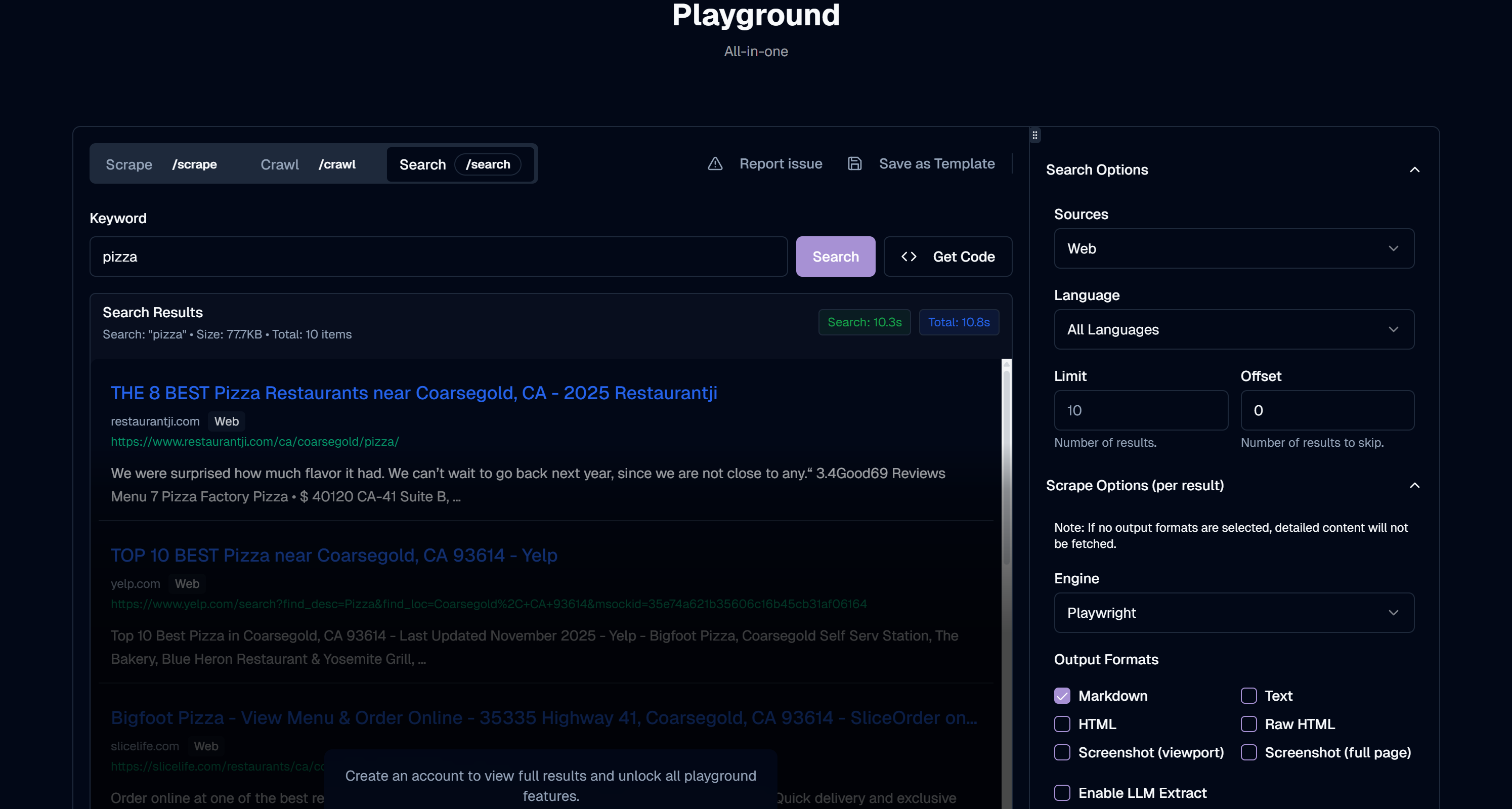
On the official site, AnyCrawl provides a Playground page to test API calls and even create and publish your own templates:
Using the Playground to test the “Search” APi endpoint to search for Google results for “pizza”
This is a web-based tool to fully explore any AnyCrawl API endpoint, with all options configurable through interactive elements. It also gives you corresponding code snippets in cURL, Python, and Node.js, and lets you view possible responses, available endpoints, and more.
Note: The Playground is accessible to public visitors and allows testing of some API requests without creating an account.
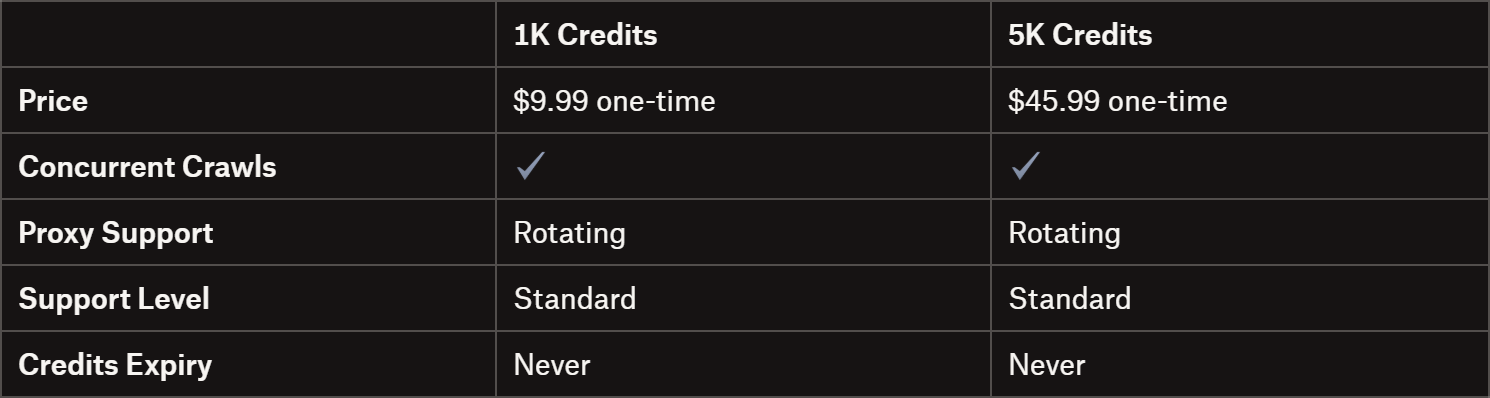
Pay-as-you-go plans: Purchase credits only when you need them, with no monthly commitment.
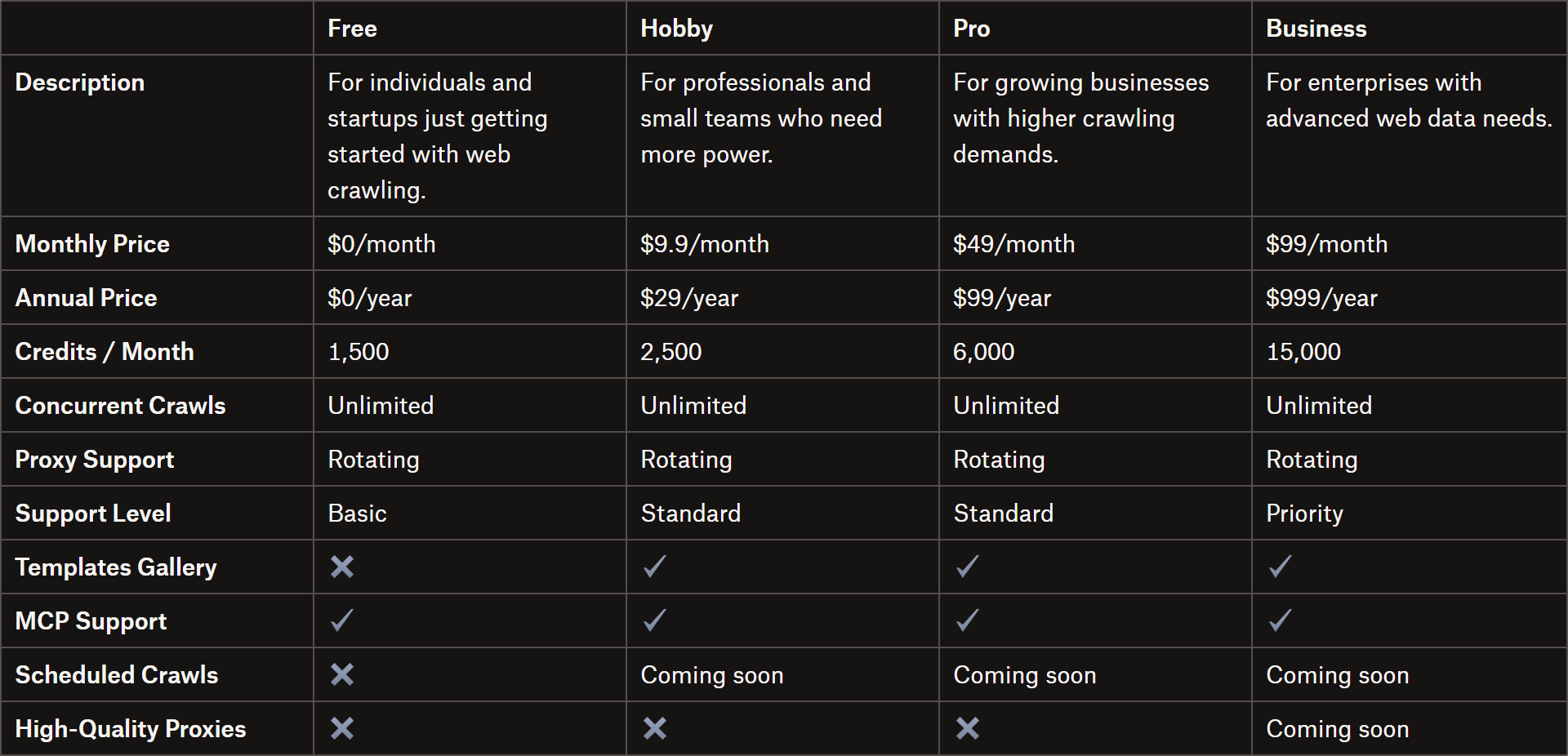
Subscription-based plans: Start for free and scale as you grow, with fixed monthly or annual payments.
Important: In both cases, 1 credit equals 1 page or URL scraped. Yet, that may change in the future.
Pay-as-You-Go Plans
Pay-as-you-go plans
Subscription-Based Plans
Subscription-based plans
AnyCrawl Hands-On: Step-by-Step Example
In this tutorial section, I’ll show you a complete, realistic AnyCrawl scraping scenario:
Search for the page you want to scrape on Google using the /v1/search endpoint.
Select the first page from the search results.
Scrape the page content using AI via the /v1/scrape API call.
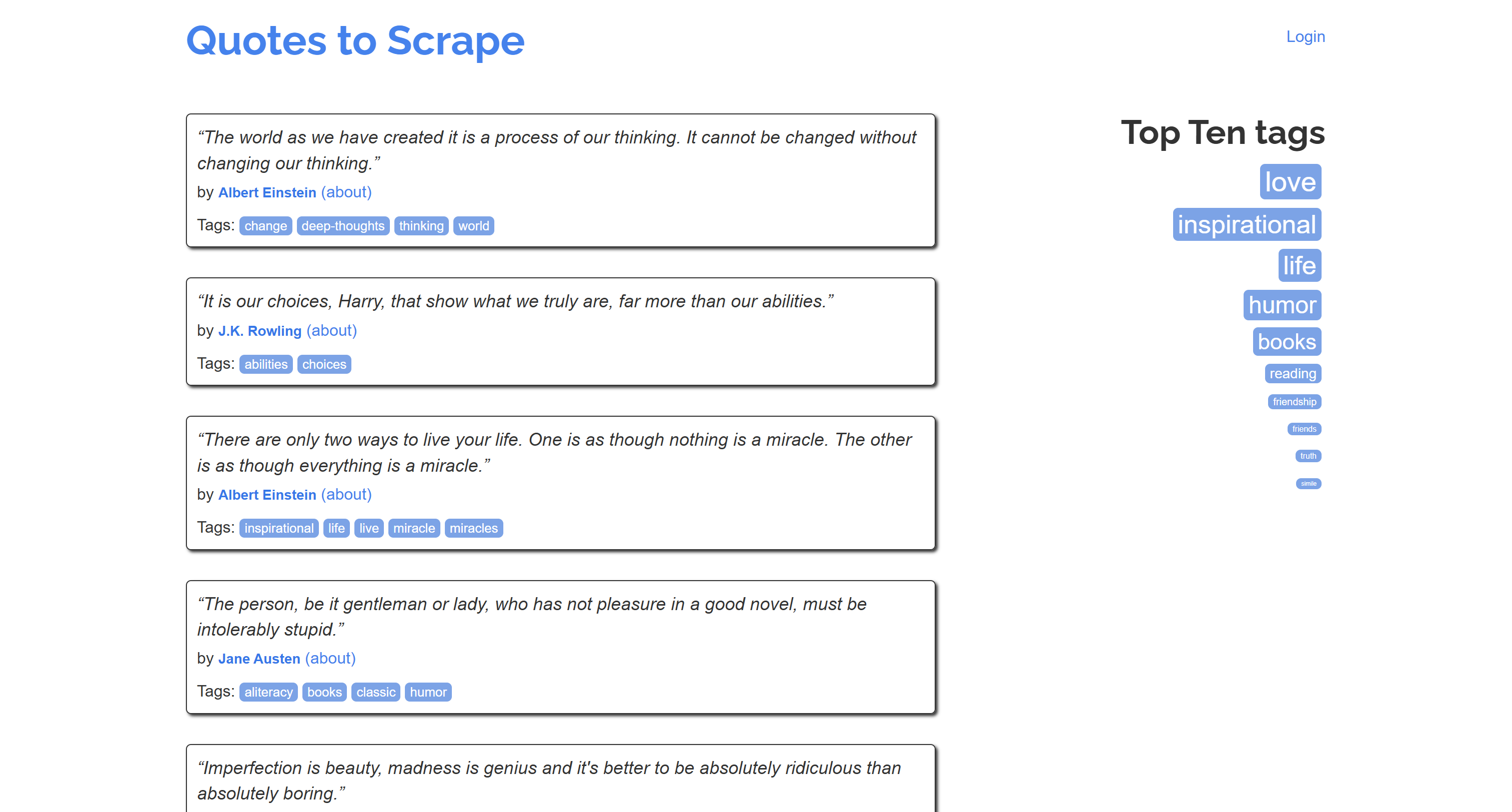
Note: Below, I’ll demonstrate how to connect to the AnyCrawl online service via a Node.js script to scrape the “Quotes to Scrape” sandbox. You can easily adapt this workflow to a self-hosted AnyCrawl instance, use Python or any other language, and target other websites.
Prerequisites
To follow along with this section, make sure you have:
You can now call this function with any search query like this:
const searchResponse = await search("quotes to scrape");
In this example, assume you want to search for “quotes to scrape” on the US version of Google. AnyCrawl will visit the corresponding SERP page:
Searching “quotes to scrape” on Google
Then, it’ll parse the search results and return them in structured JSON:
{
  "success": true,
  "data": [
    {
      "category": "web",
      "title": "Quotes to Scrape",
      "url": "https://quotes.toscrape.com/",
      "description": "“Try not to become a man of success. Rather become a man of value.” by Albert Einstein (about) “I have not failed. I've just found 10,000 ways that won't work.” by Thomas A. Edison (about)",
      "source": "AC-Engine"
    },
    // omitted for brevity...
    {
      "category": "web",
      "title": "Scraping quotes — Analytics & Big Data",
      "url": "https://kirenz.github.io/analytics/docs/webscraping-quotes.html",
      "description": "In this tutorial, you will learn how to: Scrape the web page “Quotes to Scrape” using Requests. Pulling data out of HTML using Beautiful Soup. Use Selector Gadget to inspect the CSS of the …",
      "source": "AC-Engine"
    }
  ]
}
Step #2: Select the Target Page
From the search results, select the target page you want to scrape. Here, let’s simply take the first result returned by the search API:
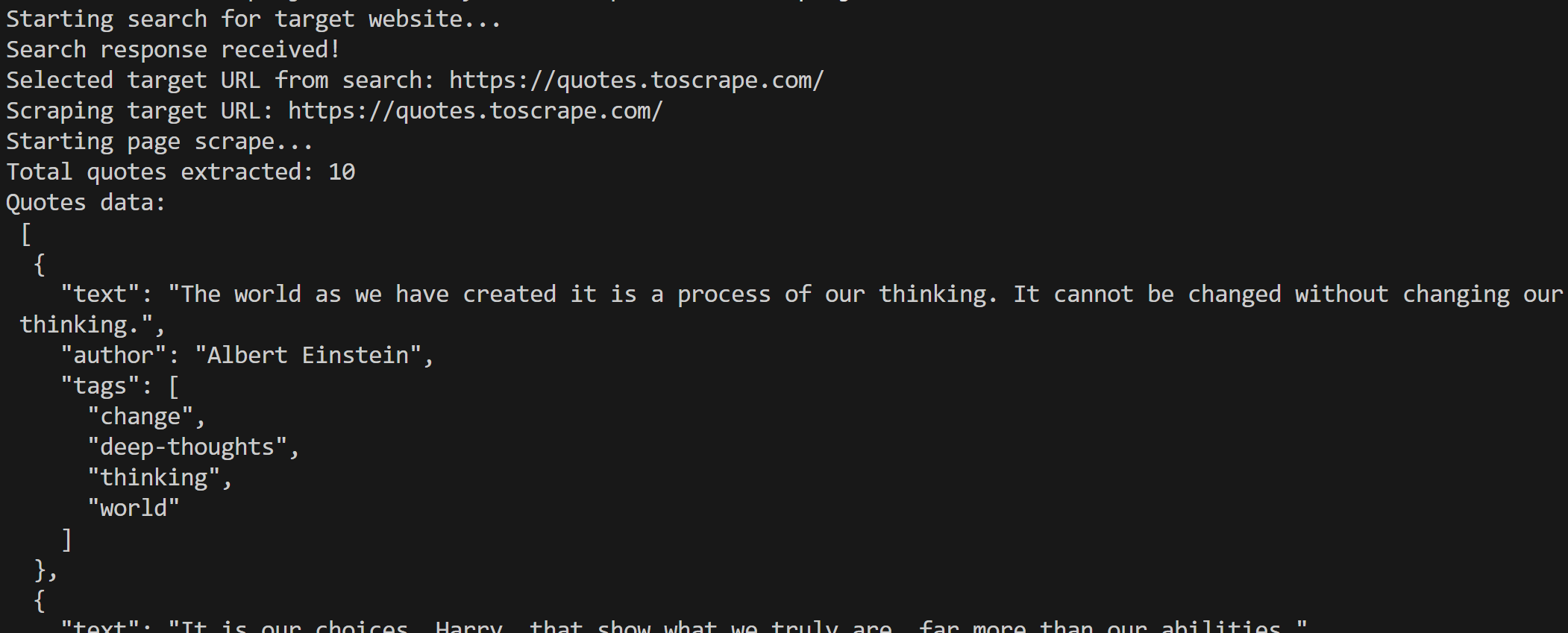
Once you run it, the script produces the following result:
The output produced by the script
In particular, the scraped data consists of the desired quotes returned in a clean, structured format:
[
  {
    "quote": "The world as we have created it is a process of our thinking. It cannot be changed without changing our thinking.",
    "author": "Albert Einstein",
    "tags": ["change", "deep-thoughts", "thinking", "world"]
  },
  {
    "quote": "It is our choices, Harry, that show what we truly are, far more than our abilities.",
    "author": "J.K. Rowling",
    "tags": ["abilities", "choices"]
  },
  // omitted for brevity...
  {
    "quote": "A woman is like a tea bag; you never know how strong it is until it's in hot water.",
    "author": "Eleanor Roosevelt",
    "tags": ["misattributed-eleanor-roosevelt"]
  },
  {
    "quote": "A day without sunshine is like, you know, night.",
    "author": "Steve Martin",
    "tags": ["humor", "obvious", "simile"]
  }
]
Fantastic! AnyCrawl works like a charm.
You can now extend this example by switching from /v1/scrape to the /v1/crawl endpoint to scrape the entire site, which contains multiple pages of quotes, while keeping the same AI-powered extraction logic and JSON schema.
Advanced Features
To get a complete picture of AnyCrawl, the next step is to explore its more complex and sophisticated options.
JSON Mode
JSON mode is a special AnyCrawl feature to get structured data from web pages via AI data parsing.
The supported extraction modes are:
Prompt only: Flexible extraction based on a natural language description.
Self-hosted deployment works on both x86_64 and arm64 architectures, supports background execution, persistent storage, and full customization through environment variables. For more guidance, follow the docs.
Proxy Integration
AnyCrawl supports flexible proxy routing based on URL patterns, letting you assign different proxies to different websites or API endpoints. This feature works both in self-hosted deployments and when using the online service.
The supported proxy URL formats are:
HTTP:
http://username:password@proxy.example.com:8080
HTTPS:
https://username:password@proxy.example.com:8443
The default proxies from AnyCrawl’s proxy network ensure reliable data extraction from sites that enforce anti-bot challenges.
AnyCrawl comes with an official MCP server for simplified integration with AI solutions, helping AI agents perform web scraping, crawling, and web search. It supports batch processing, concurrency, real-time progress tracking, and works with both cloud and self-hosted deployments.
The MCP can be run as a local server via the anycrawl-mcp package:
Slower responses compared to other web scraping APIs.
The Web Scraping Club is a reader-supported publication. To receive new posts and support my work, consider becoming a free or paid subscriber.
Closing Thoughts
Rather than being a “traditional,” general-purpose web scraping API, AnyCrawl is primarily designed for integration into AI agents or pipelines. After all, most features (i.e., JSON mode, MCP support, Markdown output) are optimized for AI workflows.
In detail, it lacks the advanced anti-bot workarounds expected from a dedicated scraping API solution. While Playwright + good proxies may be enough for some sites, it’s often insufficient for sites protected by WAFs (like Cloudflare, Akamai, DataDome, etc.) or using advanced browser fingerprinting.
Additionally, manually specifying the scraping engine requires prior knowledge of the target site’s rendering behavior. That is something most other web scraping APIs handle for you behind the scenes.
In short, AnyCrawl is a valid alternative to FireCrawl (and, in some aspects, ScrapeGraphAI), especially if you’re looking for a fully open-source solution. Yet, it shouldn’t be confused with traditional web scraping API services like Bright Data’s Web Unlocker, Oxylabs Web Scraper API, Zyte’s Web Scraping API, or similar.
Conclusion
In this post, I introduced you to AnyCrawl and highlighted its features as an API-based web scraping solution. As you’ve seen, it’s an LLM-ready, open-source solution ideal for integration into AI workflows, agents, and pipelines.
I hope you found this article helpful—feel free to share your thoughts or questions in the comments. Until next time!



Good stuff.. it's time to take the web back as a personal information source, not a pile of bloated SEO obsessed junk.
This was a great write up, and I appreciate the examples.