Cloudflare just shook the Web by announcing its first API for crawling entire websites. It’s built for RAG systems and website monitoring, but can it really be used for real-world web scraping scenarios?
In this article, you’ll find out this and more. I’ll walk you through a complete guided example of how to use it, and break down its (Spoiler: undoubtedly serious) limitations.
An Introduction to the Cloudflare Crawl Endpoint
Before exploring the technical aspects behind the Cloudflare /crawl endpoint and seeing it in action, let me first give you some context!
What Is the Cloudflare /crawl Endpoint?
The /crawl endpoint is a new addition to Cloudflare’s REST APIs. Its goal is to crawl an entire website (or just a portion of it) starting from a single URL.
Under the hood, it automatically discovers and visits new pages, rendering them in a headless browser. It returns the discovered content as HTML, Markdown, or structured JSON, making it ideal for RAG pipelines, monitoring, or dataset creation.
As I’ll dive into later, it respects robots.txt and doesn’t bypass bot protection or captchas. Thus, it’s designed as a compliant approach to web crawling!
Before proceeding, let me thank NetNut, the platinum partner of the month. They have prepared a juicy offer for you: up to 1 TB of web unblocker for free.
At a high level, the /crawl endpoint involves a two-step flow:
You kick off an asynchronous crawl job, passing a starting URL. Cloudflare returns a job ID.
You use that job ID to periodically check the job’s status or fetch results as they become available, following typical polling behavior.
Important: A crawl job can run for up to seven days!Results remain available for 14 days after completion, after which the job data is deleted.
Behind the scenes, the crawler expands outward from the starting URL. By default, the API follows a clear order:
The initial page.
Sitemap URLs.
Links discovered within pages.
Still, you can tweak that depending on whether you want to prioritize sitemaps, page links, or both.
Supported Use Cases
The officially promoted use cases for the Cloudflare /crawl API are just two:
Creating knowledge bases or training AI systems (like RAG applications) using up-to-date web content.
Collecting and analyzing content across multiple pages for research, summarization, or monitoring purposes.
Pricing
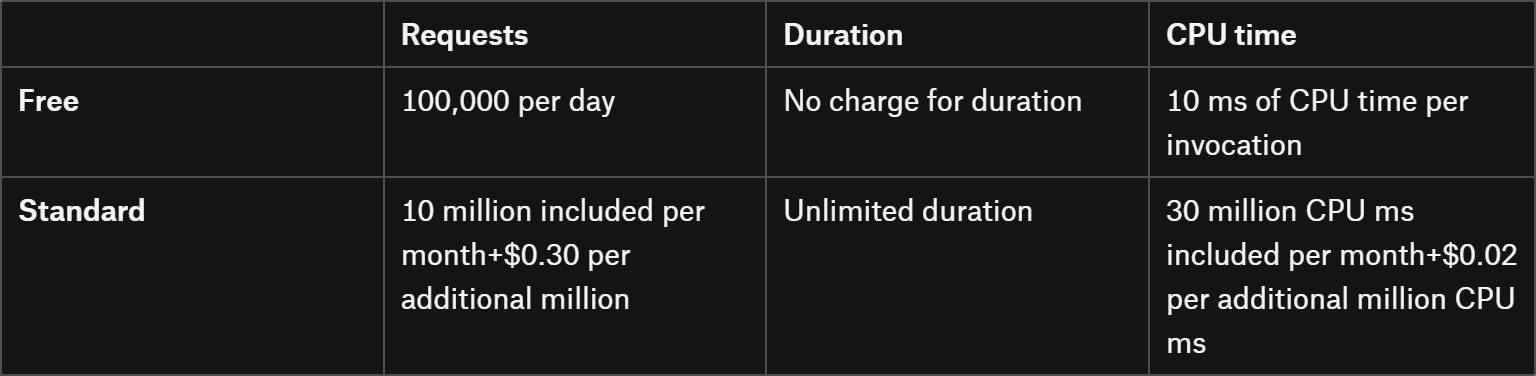
Compared to most other web crawling or discovery APIs on the market, Cloudflare’s /crawl API doesn’t charge by the number of pages. Instead, costs are based on resource usage, which depends on whether you enable the headless browser rendering feature.
If rendering isn’t active, pricing follows the Workers model:
The Workers pricing model
Yeah, I know… It’s honestly a bit confusing, and it’s almost impossible to predict the exact cost of a crawling task. The good news? You can test it for free!
For your scraping needs, having a reliable proxy provider like Decodo on your side improves the chances of success.
Keep in mind that the endpoint supports several parameters, allowing you to greatly customize the crawling behavior, output format (JSON, HTML, or Markdown), rendering options, caching, and more. Check out the full list of supported body parameters for all available options.
Cloudflare immediately returns a job ID that you’ll use to track or retrieve results. A possible response looks like this:
The possible status values are: running, completed, errored, or one of several cancellation states (cancelled_due_to_timeout, cancelled_due_to_limits, cancelled_by_user).
Or, once the job is completed, calling the API returns the full results in the records field:
{
  "result": {
    "id": "3e7a1c92-b4d8-4f6e-9a21-6c0d5b8e2f14",
    "status": "completed",
    "browserSecondsUsed": 98.3,
    "total": 12,
    "finished": 12,
    "records": [
      {
        "url": "https://example.com/",
        "status": "completed",
        "markdown": "# Example Domain\nThis domain is for use in illustrative examples...",
        "metadata": {
          "status": 200,
          "title": "Example Domain",
          "url": "https://example.com/"
        }
      },
      {
        "url": "https://example.com/about",
        "status": "completed",
        "markdown": "## About\nLearn more about this example site...",
        "metadata": {
          "status": 200,
          "title": "About - Example Domain",
          "url": "https://example.com/about"
        }
      }
      // additional entries omitted for brevity...
    ],
    "cursor": 10
  },
  "success": true
}
Note that the response will vary based on the specified query parameters. For example, you can filter by specific statuses, limit the number of results, and navigate through them using a pagination system.
Features
Below is a list of the main, most relevant capabilities provided by the Cloudflare Crawl API:
Asynchronous crawl jobs:Trigger crawling jobs and poll results when they are ready, enabling non-blocking, large-scale crawling workflows.
Automatic URL discovery: Finds pages from the starting URL, sitemaps, and in-page links, with configurable source control.
Fixed User-Agent: The /crawl endpoint sets a non-customizable User-Agentvalue(CloudflareBrowserRenderingCrawler/1.0). You can’t change it, which may cause sites to block requests or serve different content based on the User-Agent.
Content Signals enforcement: If a site disallows AI usage via Cloudflare Content Signals, crawl requests for those purposes are rejected with a 400 Bad Request error. Even if the site allows other uses, attempts to crawl disallowed categories will fail, limiting AI-specific data collection.
Rate limiting and crawl pacing: Sites with strict rate limits can slow down crawling. The crawler respects the robots.txt Crawl-delay directive and implements backoff. Large crawls may need to be split into smaller jobs to avoid throttling or skipped URLs.
Browser usage limits and job cancellation: Accounts on Workers free plans are capped at 10 minutes of browser time per day. Exceeding this limit results in a cancelled_due_to_limits status. To avoid that, you can upgrade to a paid plan.
How to Use the Cloudflare Crawl Endpoint: Step-by-Step Tutorial
In this guided section, I’ll show you how to use the Cloudflare Crawl Endpoint to crawl a website in Python. The target site will be the “Quotes to Scrape” sandbox. The goal here is to demonstrate how to use the API, rather than actually collecting relevant data.
Follow the instructions below!
Prerequisites
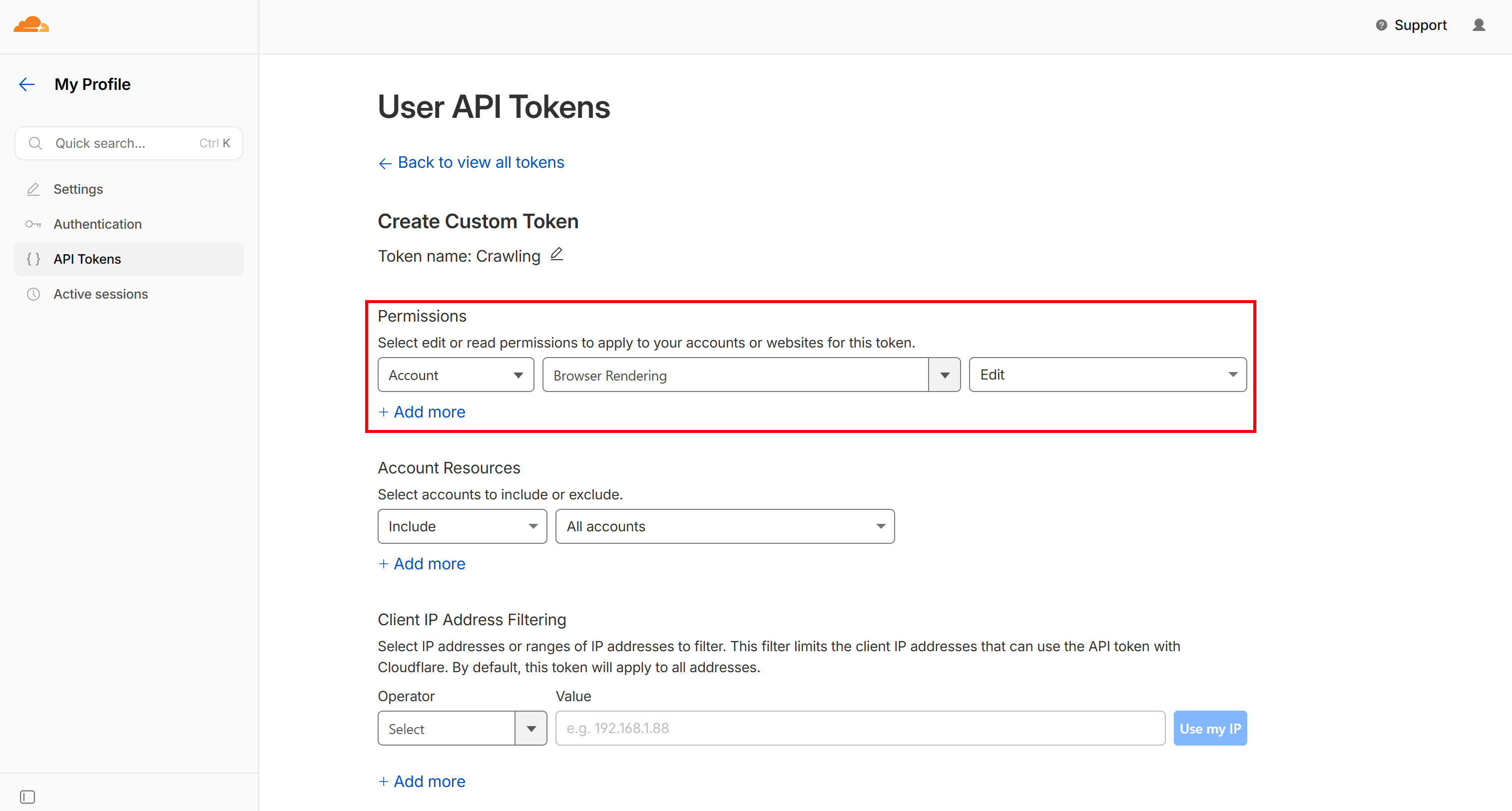
To follow this tutorial section, make sure you have:
Note the API key with the required “Browser Rendering - Edit” permission
For the sake of simplicity and to keep this tutorial concise, I’ll assume you already have a Python project set up with requests installed. That said, you can use any programming language and any HTTP client, because the high-level logic remains the same.
Step #1: Set Up the Configurations
Start by importing the required libraries and reading the necessary secrets (your Cloudflare API token and account ID). Use these secrets to prepare the Cloudflare Crawl base URL and headers. Also, specify the starting target URL as a constant.
import requests
import time
import json

# The Cloudflare secrets required for authenticating Crawl API calls
CLOUDFLARE_API_TOKEN = "<YOUR_CLOUDFLARE_API_TOKEN>"
CLOUDFLARE_ACCOUNT_ID = "<YOUR_CLOUDFLARE_ACCOUNT_ID>"

# The base URL used for all Crawl API calls
CLOUDFLARE_CRAWL_BASE_URL = f"https://api.cloudflare.com/client/v4/accounts/{CLOUDFLARE_ACCOUNT_ID}/browser-rendering/crawl"

# Common headers shared by all API calls
HEADERS = {
    "Authorization": f"Bearer {CLOUDFLARE_API_TOKEN}",
    "Content-Type": "application/json"
}

# The URL to crawl
START_URL = "https://www.ssense.com/en-us/men/product/acne-studios/silver-folded-leather-wallet/18169981"
Tip: In a production script, read the Cloudflare API token and account ID from environment variables rather than hardcoding them.
Step #2: Trigger the Crawling Job
Define a start_crawl() function to send a POST request to Cloudflare’s Crawl API:
This creates a new crawling job for the target URL. Then, it returns a job_id that identifies this specific crawl.
Tip: In a production-level script, make the payload object configurable via function input arguments for greater flexibility and reusability.
Step #3: Poll Over the Job
Next, add a wait_for_completion() function to repeatedly check the job status every few seconds until the crawl finishes or times out:
def wait_for_completion(job_id, max_attempts=60, delay=5):
    status_url = f"{CLOUDFLARE_CRAWL_BASE_URL}/{job_id}?limit=1"

    for attempt in range(max_attempts):
        res = requests.get(status_url, headers=HEADERS)
        res.raise_for_status()

        status = res.json()["result"]["status"]
        print(f"Attempt {attempt+1}: {status}")

        if status != "running":
            return status

        time.sleep(delay)

    raise Exception("Timeout waiting for crawl job")
This makes GET calls to the Cloudflare /crawl endpoint. It ensures you’re waiting for the task to complete processing before fetching the crawled records.
Tip: The limit=1 query parameter is recommended to restrict the number of retrieved records, keeping the response lightweight. After all, at this stage, you’re only interested in checking the job status, not in retrieving the actual output data.
Build a fetch_records() function to collect all crawled pages:
def fetch_records(job_id):
    print("Fetching results...")

    all_records = []
    cursor = None

    while True:
        url = f"{CLOUDFLARE_CRAWL_BASE_URL}/{job_id}"
        # Getting 10 records at a time
        params = {
            "limit": 10
        }

        if cursor:
            params["cursor"] = cursor

        response = requests.get(url, headers=HEADERS, params=params)
        response.raise_for_status()

        result = response.json()["result"]
        records = result.get("records", [])

        all_records.extend(records)
        print(f"+{len(records)} records (Total: {len(all_records)})")

        cursor = result.get("cursor")
        if not cursor:
            break

    return all_records
This handles pagination using a cursor, accessing records in batches (10 per request) until all results are returned.
Step #5: Put It All Together
Finally, in the main() function, orchestrate the workflow:
Start the crawl
Wait for completion
Fetch all results
Then, you can export the crawled records to a local JSON file for further use, store the retrieved data in a database, process it there, etc.
def main():
    job_id = start_crawl(START_URL)
    status = wait_for_completion(job_id)

    if status != "completed":
        raise Exception(f"Crawl failed: {status}")

    print("Crawl completed!")

    records = fetch_records(job_id)

    # Export the crawled pages to an output JSON file
    with open("records.json", "w", encoding="utf-8") as f:
        json.dump(records, f, indent=2, ensure_ascii=False)

if __name__ == "__main__":
    main()
Step #6: Complete Code
This is what your Python script for interacting with the Cloudflare Crawl API will look like:
# pip install requests

import requests
import time
import json

# The Cloudflare secrets required for authenticating Crawl API calls
CLOUDFLARE_API_TOKEN = "<YOUR_CLOUDFLARE_API_TOKEN>"
CLOUDFLARE_ACCOUNT_ID = "<YOUR_CLOUDFLARE_ACCOUNT_ID>"

# The base URL used for all Crawl API calls
CLOUDFLARE_CRAWL_BASE_URL = f"https://api.cloudflare.com/client/v4/accounts/{CLOUDFLARE_ACCOUNT_ID}/browser-rendering/crawl"

# Common headers shared by all API calls
HEADERS = {
    "Authorization": f"Bearer {CLOUDFLARE_API_TOKEN}",
    "Content-Type": "application/json"
}

# The URL to crawl
START_URL = "http://quotes.toscrape.com/"

def start_crawl(start_url):
    """
    Triggers the Cloudflare Crawl API job
    """

    # Customize according to your needs
    payload = {
        "url": start_url,
        "limit": 20,
        "depth": 2,
        "formats": ["markdown"],
        "render": True
    }

    response = requests.post(CLOUDFLARE_CRAWL_BASE_URL, headers=HEADERS, json=payload)
    response.raise_for_status()

    job_id = response.json()["result"]
    return job_id

def wait_for_completion(job_id, max_attempts=60, delay=5):
    """
    Waits for the crawling task to complete
    """

    status_url = f"{CLOUDFLARE_CRAWL_BASE_URL}/{job_id}?limit=1"

    for attempt in range(max_attempts):
        res = requests.get(status_url, headers=HEADERS)
        res.raise_for_status()

        status = res.json()["result"]["status"]
        print(f"Attempt {attempt+1}: {status}")

        if status != "running":
            return status

        time.sleep(delay)

    raise Exception("Timeout waiting for crawl job")

def fetch_records(job_id):
    """
    Collects all records from the paginated results
    """

    print("Fetching results...")

    all_records = []
    cursor = None

    while True:
        url = f"{CLOUDFLARE_CRAWL_BASE_URL}/{job_id}"
        # Getting 10 records at a time
        params = {
            "limit": 10
        }

        if cursor:
            params["cursor"] = cursor

        response = requests.get(url, headers=HEADERS, params=params)
        response.raise_for_status()

        result = response.json()["result"]
        records = result.get("records", [])

        all_records.extend(records)
        print(f"+{len(records)} records (Total: {len(all_records)})")

        cursor = result.get("cursor")
        if not cursor:
            break

    return all_records

def main():
    job_id = start_crawl(START_URL)
    status = wait_for_completion(job_id)

    if status != "completed":
        raise Exception(f"Crawl failed: {status}")

    print("Crawl completed!")

    records = fetch_records(job_id)

    # Export the crawled pages to an output JSON file
    with open("records.json", "w", encoding="utf-8") as f:
        json.dump(records, f, indent=2, ensure_ascii=False)

if __name__ == "__main__":
    main()
Step #7: Test the Script
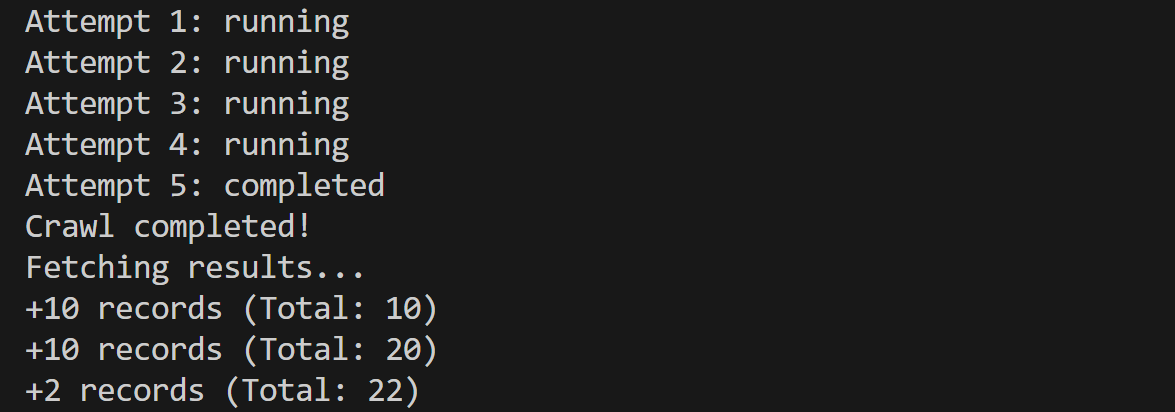
Launch the script, and it’ll produce an output like this:
The output produced by the script in the terminal
The polling mechanism required 5 attempts (~25 seconds), and the API discovered and retrieved 22 pages.
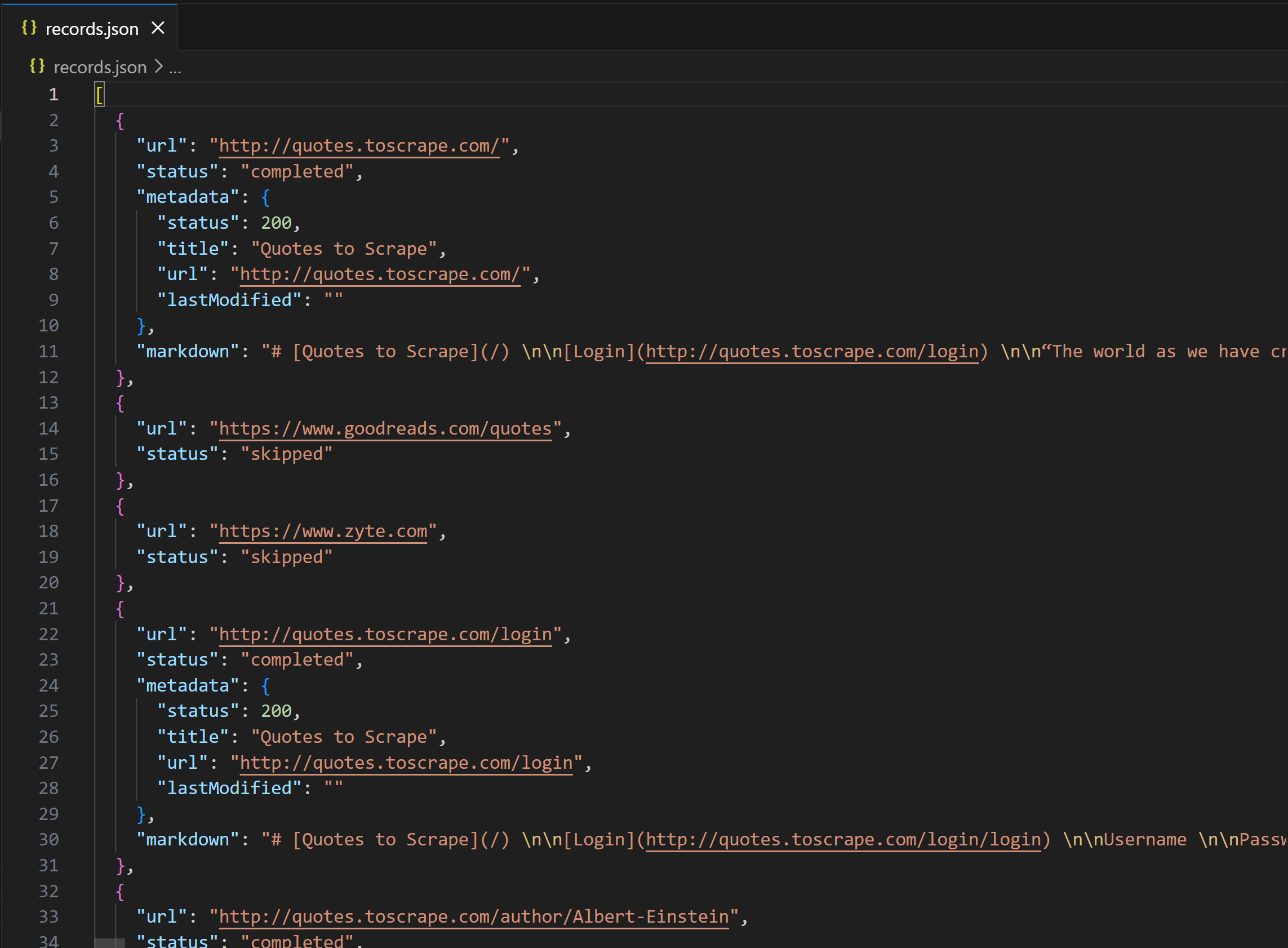
A records.json file will appear in your project directory. Open it, and you’ll see:
The output produced by the script
Notice how the “Quotes to Scrape” entries contain a markdown field with the Markdown version of the page. Instead, external links like Zyte’s homepage and Goodreads.com are skipped, since includeExternalLinks is set to false by default. In other words, the Cloudflare Crawl API doesn’t automatically attempt to fetch data from different domains than the target source URL.
Cool! The Cloudflare Crawl endpoint works like a charm and is easy to use. However, I was particularly concerned about its documented limitations and wanted to verify whether they actually hold up in practice…
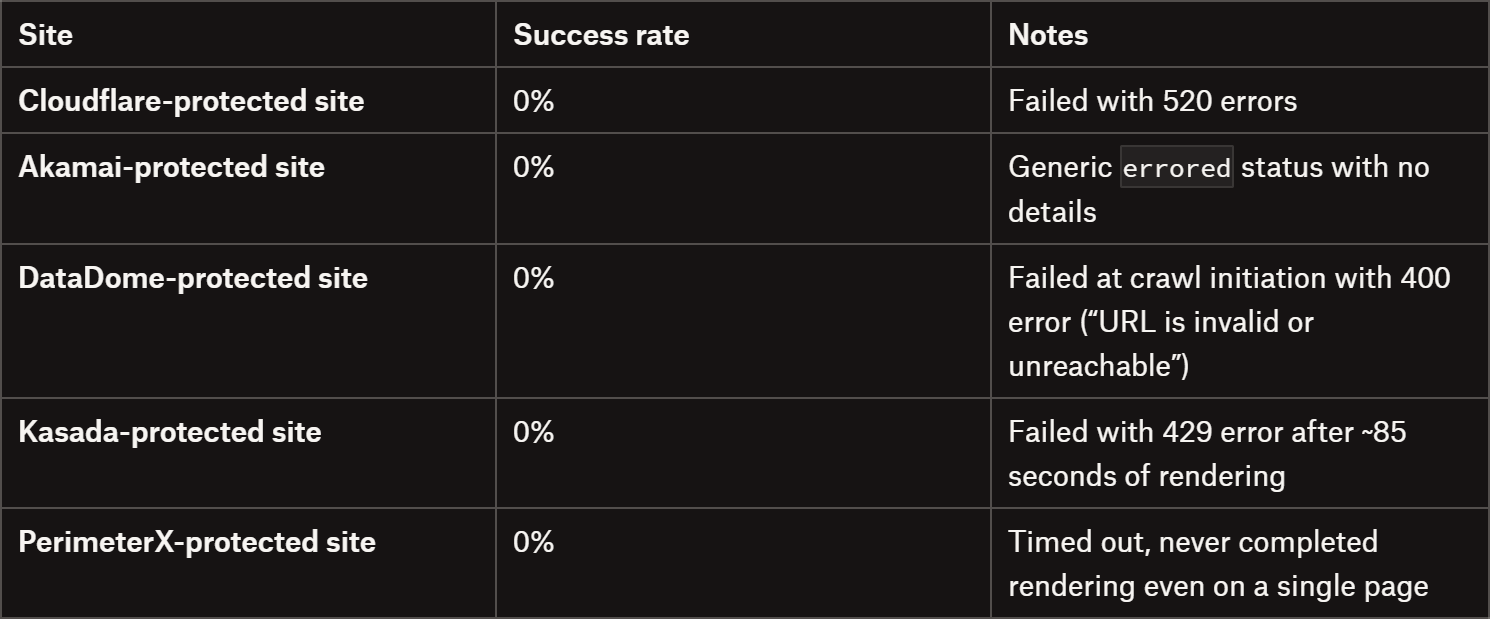
So, I ran tests against several well-known sites protected by common WAF and anti-bot solutions (from different providers). Here’s a summary of the results:
Cloudflare Crawl API vs anti-bot solutions
As you can tell, the limitations are very real. The results are quite discouraging: the Cloudflare Crawl API failed against all anti-bot–protected websites I tested.
So, is this solution reliable for web scraping? When (and how) should you actually use it? Let me break that down in a final comment!
The Web Scraping Club is a reader-supported publication. To receive new posts and support my work, consider becoming a free or paid subscriber.
Final Comment
In this article, I introduced you to one of the newest tools in Cloudflare’s growing ecosystem: the Crawl API! This endpoint is designed to help you crawl entire websites using distributed crawling tasks running on Cloudflare’s infrastructure.
Sure, the crawling mechanism works and is easy to launch, control, and implement. With just a few lines of code, you can get started. Still, several concerns should be raised:
Opaque pricing: Costs are tied to resource usage rather than the number of pages crawled, making them harder to predict.
Fixed User-Agent: The API doesn’t allow User-Agent customization, meaning even basic server-side checks can block it.
Limited effectiveness on protected sites: The API has an intended very low success rate against anti-bot–protected websites (unless you specify in Cloudflare Bot Protection settings that you allow it against your site).
Rate limiting constraints: It strictly respects robots.txt directives and crawl delays, which can significantly slow or limit large crawls.
In simple terms, if you want to use it for general-purpose, large-scale web crawling, I wouldn’t recommend it. The market offers more effective solutions that can actually bypass anti-bot limitations. Plus, remember that around 35% of the entire Internet is estimated to be protected against bots (i.e., you won’t be able to crawl it with this API).
Yet, if you know the target site is not protected, budget isn’t a concern, and you want to remain (overly?) ethical and compliant, the Cloudflare Crawl API can be an option.
I hope this breakdown helps you better understand this new solution and make an informed decision on whether to adopt it. Lastly, remember that the Cloudflare Crawl API is still in beta, so things may change soon. Just keep an eye on the docs for updates. Until next time!
One important takeaway that’s worth highlighting for anyone thinking about real-world scraping:
The Cloudflare Crawl API is clearly designed for compliant crawling, not adversarial environments. As your tests show, it struggles (or completely fails) against sites protected by Cloudflare Bot Management, Akamai, DataDome, Kasada, PerimeterX, etc.
So if your use case involves:
-protected e-commerce sites
-large-scale data extraction
-or anything beyond “friendly” crawling
you’ll need a very different stack.
At Kameleo, we focus exactly on this problem - helping teams maximize success rate in heavily protected environments through advanced browser fingerprinting and automation workflows.
If you’re curious how different solutions perform in practice, check out our masking report - we update it weekly with benchmark results across major anti-bot systems: https://kameleo.io/masking-status-report






One important takeaway that’s worth highlighting for anyone thinking about real-world scraping:
The Cloudflare Crawl API is clearly designed for compliant crawling, not adversarial environments. As your tests show, it struggles (or completely fails) against sites protected by Cloudflare Bot Management, Akamai, DataDome, Kasada, PerimeterX, etc.
So if your use case involves:
-protected e-commerce sites
-large-scale data extraction
-or anything beyond “friendly” crawling
you’ll need a very different stack.
At Kameleo, we focus exactly on this problem - helping teams maximize success rate in heavily protected environments through advanced browser fingerprinting and automation workflows.
If you’re curious how different solutions perform in practice, check out our masking report - we update it weekly with benchmark results across major anti-bot systems: https://kameleo.io/masking-status-report