If you’ve built a competitive intelligence scraper before, you know the feeling…
You set it up, it works, and you forget about it. Three months later, someone asks: “Hey, did our competitor change their pricing last week?”
You check the pipeline dashboard, and everything looks fine: all green, no errors, last run successful some hours ago. Then you dig deeper and realize your scraper has been returning empty strings for weeks. The competitor did change their pricing, and you don’t know when this happened or what was on their website before.
In this article, you’ll learn how to build competitive scraping pipelines that make failure structurally (almost) impossible. Let’s get into it!
Before proceeding, let me thank NetNut, the platinum partner of the month. Their set of solutions cover all your needs for scraping.
Let’s start by understanding the most common failure modes that competitive scraping pipelines have:
Structural drift: This is probably the most common. A competitor renames a CSS class, and your scraper starts returning empty strings. Your database fills with nulls, and nobody notices for weeks because the pipeline is still running.
Soft blocks: These are nastier. You get valid HTTP responses, but the content is a CAPTCHA page or a bot-detection redirect. Your parser sees it as valid HTML, but it finds no data. So, it stores nothing, or, worse, it stores the CAPTCHA page’s text as if it were real data.
Schema rot: This happens when a competitor evolves their product, but your data model doesn’t. They add a new pricing tier or split one pricing plan into three. Your scraper extracts what it can and drops the rest. Your competitive analysis is now based on an incomplete picture of their offering.
Timezone and locale traps: This probably needs more attention than the others. The same competitor page can return different prices, currencies, or date formats depending on where the request originates. If your scraper runs from a US server but your competitor detects it and serves EU pricing, you’re tracking the wrong numbers.
What makes these failures dangerous is that you caused them yourself, unintentionally. Every defensive pattern you added to prevent crashes is exactly what turns a broken scraper into a quietly running one. No exceptions, no alerts, no red dashboards. Just weeks of nulls that nobody notices.
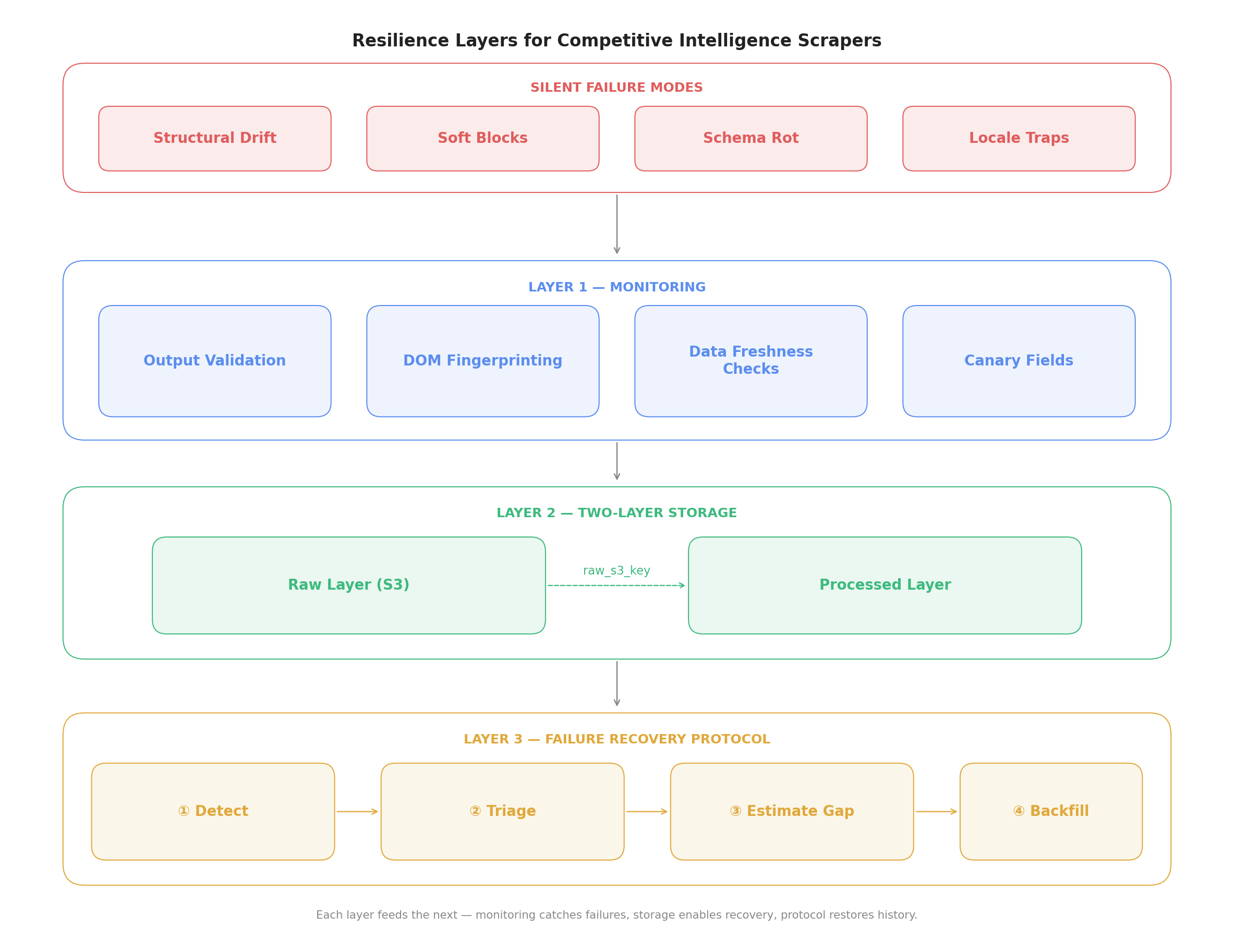
The rest of this article is about making that invisible failure visible again. Here’s a visual schema to get you introduced to the solutions proposed below:
The schema for creating competitive scraping pipelines that are resilient through time
For your scraping needs, having a reliable proxy provider like Decodo on your side improves the chances of success.
The first thing you should do to avoid such failures is to implement a monitoring layer. This is the part that the majority of scraping engineers skip. Because, you know how things go: the business needed the data yesterday, and you can’t lose time with monitoring…
But if you want your competitive scrapers to be resilient over time, you need to implement a monitoring system. A good one is made on top of four parts: output validation, structural fingerprinting, data freshness checks, and canary fields. Let’s discuss them!
How to Validate What Your Scraper Extracted
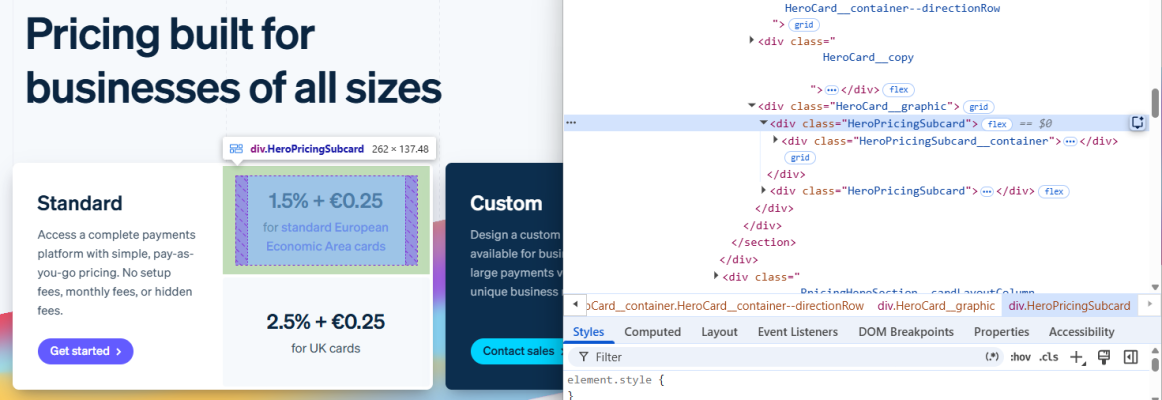
Managing HTTP status codes in your scrapers is not enough. You need to assert that the data you extracted is actually meaningful. The following example is taken from Stripe’s pricing page:
The Stripe’s pricing page your scraper “sees” from the EU
Here’s a practical validator using Pydantic that you can implement:
# In an activated virtual environment run: pip install httpx, bs4, pydantic

import httpx
from bs4 import BeautifulSoup
from pydantic import BaseModel, field_validator, ValidationError
from typing import Optional
import re

# Define Pydantic model
class CompetitorPricingData(BaseModel):
    plan_name: str
    monthly_price: float
    currency: str
    features: list[str]

    @field_validator("monthly_price")
    @classmethod
    def price_must_be_positive(cls, v):
        if v <= 0:
            raise ValueError(f"Price must be positive, got {v}")
        return v

    @field_validator("currency")
    @classmethod
    def currency_must_be_valid(cls, v):
        valid_currencies = {"USD", "EUR", "GBP"}
        if v.upper() not in valid_currencies:
            raise ValueError(f"Unexpected currency: {v}")
        return v.upper()

    @field_validator("features")
    @classmethod
    def features_must_not_be_empty(cls, v):
        if len(v) == 0:
            raise ValueError("Features list is empty: possible extraction failure")
        return v

# Define scraper logic
def scrape_stripe_pricing() -> list[dict]:
    url = "<https://stripe.com/pricing>"
    headers = {
        "User-Agent": (
            "Mozilla/5.0 (Windows NT 10.0; Win64; x64) "
            "AppleWebKit/537.36 (KHTML, like Gecko) "
            "Chrome/124.0.0.0 Safari/537.36"
        ),
        "Accept-Language": "en-US,en;q=0.9",
    }

    response = httpx.get(url, headers=headers, follow_redirects=True, timeout=15)
    response.raise_for_status()

    soup = BeautifulSoup(response.text, "html.parser")
    plans = []

    # Get class name from selectors
    plan_cards = soup.select("div.HeroPricingSubcard")

    for card in plan_cards:
        container = card.select_one(".HeroPricingSubcard__container")
        if not container:
            plans.append({
                "plan_name": "",
                "monthly_price": 0.0,
                "currency": "USD",
                "features": [],
            })
            continue

        # Get all text nodes inside the container
        text_blocks = [t.get_text(strip=True) for t in container.find_all(True) if t.get_text(strip=True)]

        # Pull the first block that looks like a price
        price_text = ""
        for block in text_blocks:
            if re.search(r"[\\d]+[.,]?[\\d]*%?\\s*\\+?\\s*[€$£]?[\\d]*", block):
                price_text = block
                break

        price_match = re.search(r"[\\d]+\\.?[\\d]*", price_text.replace(",", "."))
        monthly_price = float(price_match.group()) if price_match else 0.0

        if "$" or "¢" in price_text:
            currency = "USD"
        elif "€" in price_text:
            currency = "EUR"
        elif "£" in price_text:
            currency = "GBP"
        else:
            currency = "UNKNOWN"

        # Use all text blocks as features
        features = text_blocks if text_blocks else []

        plans.append({
            "plan_name": "Standard",  # HeroPricingSubcard is the Standard card
            "monthly_price": monthly_price,
            "currency": currency,
            "features": features,
        })

    return plans

# Define validator logic
def send_alert(message: str):
    # Wire this to Slack, PagerDuty, email, etc.
    print(f"[ALERT] {message}")

def validate_scraped_data(raw_data: dict) -> Optional[CompetitorPricingData]:
    try:
        return CompetitorPricingData(**raw_data)
    except ValidationError as e:
        # Don't silently swallow this — alert immediately
        print(f"[VALIDATION FAILED] {e}")
        send_alert(f"Scraper validation failed: {e}")
        return None

if __name__ == "__main__":
    raw_plans = scrape_stripe_pricing()

    print(f"Found {len(raw_plans)} plan(s) on Stripe's pricing page.\\n")

    for raw in raw_plans:
        validated = validate_scraped_data(raw)
        if validated:
            print(f"[OK]   {validated.plan_name} — {validated.currency} {validated.monthly_price}/mo")
            print(f"       Features: {validated.features[:2]}{'...' if len(validated.features) > 2 else ''}")
        else:
            print(f"[FAIL] Raw data that broke validation: {raw}")
Here’s what this code does:
Defines a Pydantic model: It leverages Pydantic to define the expected shape and rules of the scraped data. It enforces that the price is positive, the currency is one of USD, EUR, or GBP, and the features list is not empty. Any violation raises a ValidationError.
scrape_stripe_pricing(): Fetches Stripe’s pricing page using the library httpx, parses the HTML with BeautifulSoup, and extracts pricing data using CSS selectors. If a container isn’t found, it appends a zeroed-out dict, which will intentionally fail validation downstream.
validate_scraped_data(): Passes each raw scraped dict through the Pydantic model. On failure, it calls send_alert() instead of silently swallowing the error.
send_alert(): A stub you can wire to your alerting stack (Slack, PagerDuty, email) in a production environment. Note that, for educational purposes, throughout the entire article, this is used to print alerts via the command line.
The result is the following:
Found 2 plan(s) on Stripe's pricing page.

[OK]   Standard — EUR 1.5/mo
       Features: ['1.5% + €0.25', '1.5% + €0.25']...
[OK]   Standard — EUR 2.5/mo
       Features: ['2.5% + €0.25', '2.5% + €0.25']...
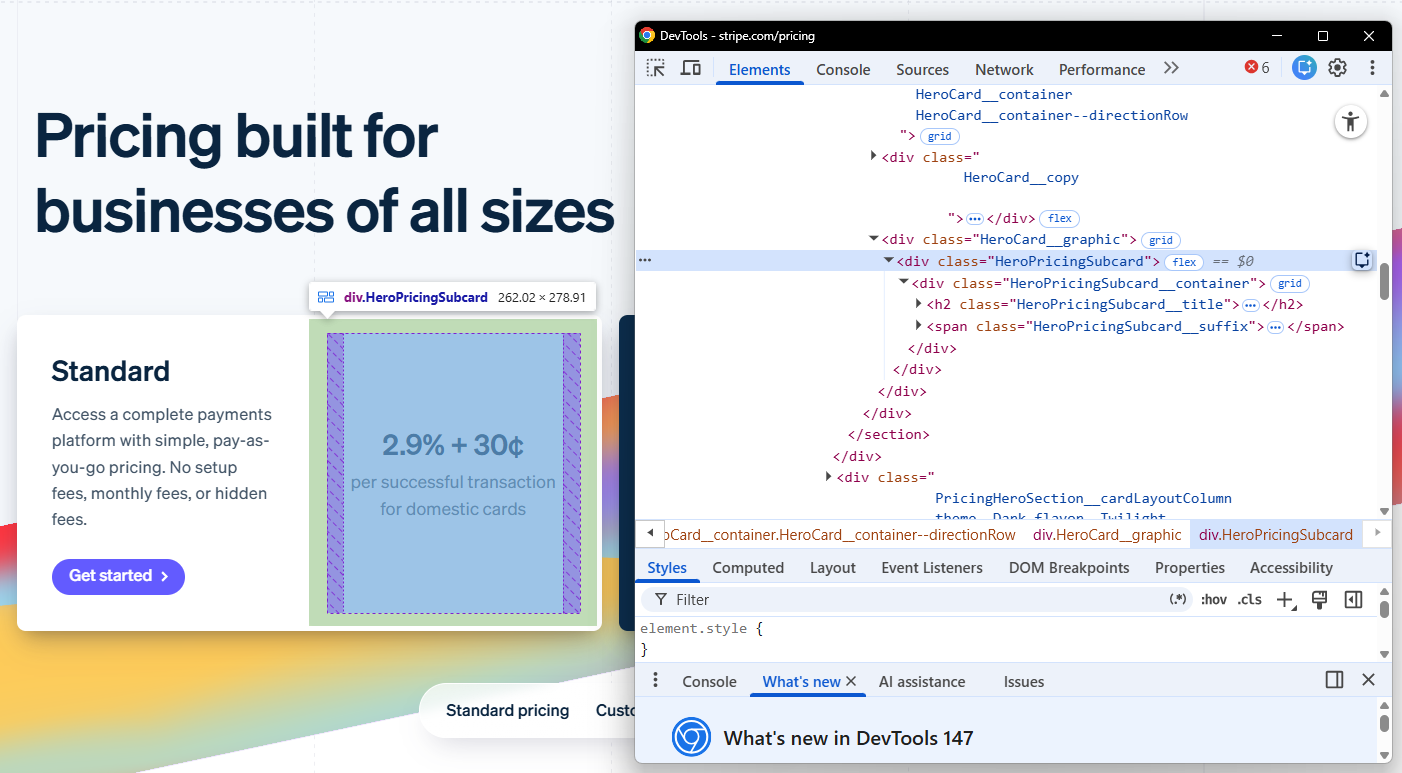
If it’s not clear why this matters, here’s what your scraper “sees” when it’s pushed from another location:
The Stripe’s pricing page your scraper “sees” from the US
The class is the same, but the data (the currency) is completely different! This is a common example of why you need validation that goes beyond a specific location.
Using DOM Fingerprints to Get Ahead of Structural Drift
This method is one of the most valuable things you can add to a competitive intelligence pipeline.
The idea is simple: periodically hash the DOM structure of the pages you’re scraping and store its value. When the hash changes, flag it for human review before your scraper breaks. Here is how you can implement it:
# In an activated virtual environment run: pip install requests

import hashlib
import httpx
from bs4 import BeautifulSoup
import requests

# Define parsing logic
def extract_structural_fingerprint(html: str, selector: str) -> str:
    """
    Extract a structural fingerprint from a specific section of the page.
    We hash the tag names and class names, NOT the content.
    This way, price changes don't trigger false alarms — only structural changes do.
    """
    soup = BeautifulSoup(html, "html.parser")
    container = soup.select_one(selector)

    if not container:
        return "CONTAINER_NOT_FOUND"

    # Build a structural signature
    structure = []
    for tag in container.find_all(True):
        classes = sorted(tag.get("class", []))
        structure.append(f"{tag.name}:{','.join(classes)}")

    fingerprint_str = "|".join(structure)
    return hashlib.md5(fingerprint_str.encode()).hexdigest()

# Compare hashes
def check_fingerprint(url: str, selector: str, stored_fingerprint: str) -> bool:
    """
    Returns True if the structure is unchanged, False if it has drifted.
    """
    response = requests.get(url, timeout=10)
    response.raise_for_status()

    current_fingerprint = extract_structural_fingerprint(response.text, selector)

    if current_fingerprint == "CONTAINER_NOT_FOUND":
        send_alert(f"[CRITICAL] Selector '{selector}' not found on {url}. Site may have been redesigned.")
        print("\\n[OK] Structure unchanged, safe to scrape.")
        return False

    if current_fingerprint != stored_fingerprint:
        send_alert(
            f"[WARNING] Structural change detected on {url} "
            f"(selector: {selector}). "
            f"Old: {stored_fingerprint[:8]}... New: {current_fingerprint[:8]}..."
        )
        print("\\n[WARNING] Structural change detected: hashes differ")
        print(f"  Old: {fingerprint[:8]}...")
        print(f"  New: {drifted_fingerprint[:8]}...")
        print("  → Scrape skipped. Human review required before next run.")
        return False

    return True
Below is a description of what this snippet does:
extract_structural_fingerprint(): Parses the HTML, finds the target container via CSS selector, and builds a structural signature by iterating over every tag inside it. In this specific case, it records tag names and sorts class names, but deliberately ignores text content. That signature string is then hashed with MD5 and returned. If the selector finds nothing, it returns “CONTAINER_NOT_FOUND” instead of crashing.
check_fingerprint(): Fetches the live page, computes the current fingerprint, and compares it against the stored one. Two failure cases are handled separately: the selector disappearing entirely (CONTAINER_NOT_FOUND) and the structure changing (hash mismatch). Both call send_alert() and return False: this signals to the caller to skip the scrape entirely.
hashlib.md5(): Used to compress the structural signature into a short and comparable string. MD5 is not used here for security purposes; it’s used because it’s fast and collision-resistant enough for DOM comparison. Any change in tag names or class names produces a completely different hash.
In the case of a drifted fingerprint, the expected result is the following:
[STORED]  Fingerprint: 248363464b2da9b3814ea9a6dc5bd0df
[DRIFTED] Fingerprint: 7532ae7466c1f0fbc2c96471acd86ea7

[WARNING] Structural change detected: hashes differ
  Old: 24836346...
  New: 7532ae74...
  → Scrape skipped. Human review required before next run.
Note that this approach to DOM changes can be considered “classical” because it is fully based on finding a meaningful selector for the target page. The problem is that the DOM could change, but not the “meaningful” selector you choose. To improve it, you can target several selectors, or you can add a check on the whole body, but this would add more noise.
Using Canary Fields as a Heartbeat for Your Scraping Pipeline
A canary field is a field that you know changes frequently. This could be a “last updated” timestamp, a dynamic element, a session token in the page: you name it. You scrape it as a heartbeat, and if it stops changing, your pipeline is probably broken. Below is a snippet that checks on a canary field:
def send_alert(message: str):
    print(f"[ALERT] {message}")

def check_canary_field(
    current_value: str,
    stored_value: str,
    field_name: str,
    competitor: str,
    max_unchanged_hours: int = 48) -> None:
    if current_value == stored_value:
        send_alert(
            f"[WARNING] Canary field '{field_name}' for {competitor} "
            f"has not changed in over {max_unchanged_hours} hours. "
            f"Possible scraper failure or soft block."
        )
    else:
        print(f"[OK] Canary field '{field_name}' for {competitor} has changed. Pipeline looks healthy.")
When something changes, the expected output is the following:
[ALERT] [WARNING] Canary field 'last_updated' for <COMPETITOR NAME> has not changed in over 48 hours.
Possible scraper failure or soft block.
Building a Storage Architecture You Can Actually Trust
Many scraping engineers make the same mistake: they store only the processed output and throw away the raw HTML.
But in the case of competitive intelligence, that’s an issue that can cause you to work on weekends. Why? Because when a competitor changed their pricing 6 months ago, and you want to reconstruct the exact timeline, you need the raw data. Without it, history is gone forever.
The solution is a two-layer storage model: a raw and a processed layer. Here’s how the two relate:
             ┌─────────────────────────────────────────────────────┐
             │                     RAW LAYER                       │
             │  S3: raw/{competitor}/{page_type}/{date}.html.gz    │
             │  What's stored: full HTML, compressed, timestamped  │
             │  Why: so you can re-parse history if your logic     │
             │  changes or your scraper had a bug                  │
             └─────────────────────┬───────────────────────────────┘
                                   │ raw_s3_key (reference)
                                   ▼
             ┌─────────────────────────────────────────────────────┐
             │                  PROCESSED LAYER                    │
             │  SQLite/Postgres: pricing_history table             │
             │  What's stored: structured, queryable records       │
             │  Why: this is what your dashboards and alerts       │
             │  consume                                            │
             └─────────────────────────────────────────────────────┘
Basically, every record in the processed layer carries a raw_s3_key that points back to the exact HTML it was extracted from. That reference is what makes the whole architecture auditable.
The Raw Layer: Keep Every HTML Response
Store the full HTML or JSON response, timestamped, for every successful scrape. S3 is a cheap option to do so, and a year of raw HTML for a handful of competitor pages costs almost nothing. Below is an example you can implement in your pipeline:
# In an activated virtual environment run: pip install boto3

import boto3
import gzip
from datetime import datetime

def store_raw_response(
    html: str,
    competitor: str,
    page_type: str,
    bucket_name: str
) -> str:
    """
    Store the raw HTML response in S3 with a structured key.
    Compress it — HTML compresses extremely well (often 10:1).
    Returns the S3 key for reference in the processed layer.
    """
    s3 = boto3.client("s3")
    timestamp = datetime.utcnow().strftime("%Y/%m/%d/%H%M%S")
    s3_key = f"raw/{competitor}/{page_type}/{timestamp}.html.gz"

    compressed = gzip.compress(html.encode("utf-8"))

    s3.put_object(
        Bucket=bucket_name,
        Key=s3_key,
        Body=compressed,
        ContentEncoding="gzip",
        ContentType="text/html",
        Metadata={
            "competitor": competitor,
            "page_type": page_type,
            "scraped_at": datetime.utcnow().isoformat()
        }
    )

    return s3_key

def retrieve_raw_response(s3_key: str, bucket_name: str) -> str:
    """
    Retrieve and decompress a raw HTML response from S3.
    Useful for re-parsing historical data when your scraper logic changes.
    """
    s3 = boto3.client("s3")
    response = s3.get_object(Bucket=bucket_name, Key=s3_key)
    compressed_data = response["Body"].read()
    return gzip.decompress(compressed_data).decode("utf-8")
Notice the S3 structure: raw/{competitor}/{page_type}/{year}/{month}/{day}/{timestamp}.html.gz. This makes it trivial to list all scrapes for a specific competitor and page type within a date range, which is exactly what you need when reconstructing a pricing history.
The Processed Layer: What Your Dashboards Actually Consume
The processed layer is your structured, queryable data: the thing your dashboards and alerts actually read. Every record here has two fields that make the whole architecture work:
raw_s3_key, which links back to the exact HTML this record was extracted from.
fingerprint, which captures the structural state of the page at scrape time.
The first one makes your data auditable. The second one tells you, later, whether the page had already changed when this record was written.
Below is a Python example to implement it:
import sqlite3
from dataclasses import dataclass
from datetime import datetime
from typing import Optional

@dataclass
class ProcessedPricingRecord:
    competitor: str
    page_type: str
    plan_name: str
    monthly_price: float
    currency: str
    scraped_at: datetime
    raw_s3_key: str  # The link back to the raw layer
    fingerprint: str  # The structural fingerprint at time of scrape

def store_processed_record(record: ProcessedPricingRecord, db_path: str) -> None:
    conn = sqlite3.connect(db_path)
    cursor = conn.cursor()

    cursor.execute("""
        CREATE TABLE IF NOT EXISTS pricing_history (
            id INTEGER PRIMARY KEY AUTOINCREMENT,
            competitor TEXT NOT NULL,
            page_type TEXT NOT NULL,
            plan_name TEXT NOT NULL,
            monthly_price REAL NOT NULL,
            currency TEXT NOT NULL,
            scraped_at TEXT NOT NULL,
            raw_s3_key TEXT NOT NULL,
            fingerprint TEXT NOT NULL
        )
    """)

    cursor.execute("""
        INSERT INTO pricing_history
        (competitor, page_type, plan_name, monthly_price, currency, scraped_at, raw_s3_key, fingerprint)
        VALUES (?, ?, ?, ?, ?, ?, ?, ?)
    """, (
        record.competitor,
        record.page_type,
        record.plan_name,
        record.monthly_price,
        record.currency,
        record.scraped_at.isoformat(),
        record.raw_s3_key,
        record.fingerprint
    ))

    conn.commit()
    conn.close()
A note on storage: this example uses SQLite, which is fine for a single scraper running on one machine. If you’re scraping multiple competitors in parallel or need concurrent writes, consider moving to Postgres (the schema remains the same).
A Concrete Example of Why the Raw Layer Saves You on Weekends
Imagine your competitor runs a Black Friday promotion in November and your scraper captures it. In January, your CEO asks: “When exactly did they drop prices, and by how much?”
With only the processed layer, you can answer that if your scraper was working correctly. But what if your scraper had a bug in November that caused it to extract prices incorrectly? With the raw layer, you can go back, fix the extraction logic, and re-parse the November HTML. Without it, that data is gone.
Here’s a utility function that makes re-parsing straightforward:
import boto3

def reparse_historical_data(
    competitor: str,
    page_type: str,
    start_date: str,
    end_date: str,
    bucket_name: str,
    new_parser_fn,
    db_path: str
) -> int:
    """
    Re-parse all raw HTML for a competitor/page_type within a date range.
    Useful when your extraction logic changes and you need to backfill.

    new_parser_fn: a callable that takes raw HTML and returns a list of dicts
    Returns the number of records reprocessed.
    """
    s3 = boto3.client("s3")
    prefix = f"raw/{competitor}/{page_type}/"

    paginator = s3.get_paginator("list_objects_v2")
    pages = paginator.paginate(Bucket=bucket_name, Prefix=prefix)

    reprocessed = 0

    for page in pages:
        for obj in page.get("Contents", []):
            key = obj["Key"]
            # Filter by date range based on key structure
            key_date = key.split("/")[3] + "-" + key.split("/")[4] + "-" + key.split("/")[5]
            if start_date <= key_date <= end_date:
                raw_html = retrieve_raw_response(key, bucket_name)
                parsed_records = new_parser_fn(raw_html)
                for record_data in parsed_records:
                    # Store with updated extraction, linked to same raw key
                    record = ProcessedPricingRecord(
                        **record_data,
                        raw_s3_key=key,
                        scraped_at=datetime.utcnow()
                    )
                    store_processed_record(record, db_path)
                    reprocessed += 1

    return reprocessed
Note that you’re not re-scraping anything. You’re just running your new parser against HTML you already have in storage. That’s the whole point of the raw layer.
The Web Scraping Club is a reader-supported publication. To receive new posts and support my work, consider becoming a free or paid subscriber.
Recovering From a Full Scraper Failure Without Losing History
Imagine this scenario: a competitor does a full site redesign, and your scraper is dead. This is not a hypothetical scenario: it happens more frequently than you can think, and most teams have no protocol for it.
Here’s a concrete recovery process.
How to Know Your Scraper Is Dead (Not Just Slow)
If you’ve implemented structural fingerprinting as discussed previously, you’ll know about the redesign before your scraper breaks. The fingerprint check will fail, you’ll get an alert, and you can investigate before storing bad data.
If you haven’t, and you’re reading this article after the fact, the first sign is usually a spike in validation failures or a sudden drop in scraped records. Consider implementing the following code:
import sqlite3

def detect_scraper_health(db_path: str, competitor: str, lookback_days: int = 7) -> dict:
    """
    Returns a health summary for a competitor's scraper over the last N days.
    Useful for spotting gradual degradation before it becomes a full failure.
    """
    conn = sqlite3.connect(db_path)
    cursor = conn.cursor()

    cursor.execute("""
        SELECT
            DATE(scraped_at) as scrape_date,
            COUNT(*) as total_attempts,
            SUM(CASE WHEN status = 'success' THEN 1 ELSE 0 END) as successes,
            SUM(CASE WHEN status = 'validation_failed' THEN 1 ELSE 0 END) as validation_failures,
            SUM(CASE WHEN status = 'error' THEN 1 ELSE 0 END) as errors
        FROM scrape_log
        WHERE competitor = ?
          AND scraped_at >= DATE('now', ?)
        GROUP BY DATE(scraped_at)
        ORDER BY scrape_date DESC
    """, (competitor, f"-{lookback_days} days"))

    rows = cursor.fetchall()
    conn.close()

    return [
        {
            "date": row[0],
            "total": row[1],
            "successes": row[2],
            "validation_failures": row[3],
            "errors": row[4],
            "success_rate": round(row[2] / row[1] * 100, 1) if row[1] > 0 else 0
        }
        for row in rows
    ]
The degradation pattern is immediately readable. A success rate dropping from 95% to 60% over three days is probably a sign of a redesign in progress. A drop from 95% to 0% in a short time signals a full redesign, or a hard block.
Diagnosing What Actually Broke Before You Rewrite Anything
Not every structural change is a full redesign. Rewriting the major part of a scraper can cost you days if not weeks. To avoid that, you can write a script that checks what actually changed, pointing to meaningful parts of the target website:
from bs4 import BeautifulSoup

def triage_structural_change(
    url: str,
    selector: str,
    old_fingerprint: str,
    bucket_name: str,
    competitor: str,
    page_type: str) -> dict:
    """
    Diagnose the nature of a structural change.
    Returns a triage report to guide the recovery effort.
    """
    response = requests.get(url, timeout=10)
    current_html = response.text
    soup = BeautifulSoup(current_html, "html.parser")

    report = {
        "url": url,
        "http_status": response.status_code,
        "selector_found": soup.select_one(selector) is not None,
        "old_fingerprint": old_fingerprint,
        "new_fingerprint": extract_structural_fingerprint(current_html, selector),
        "page_title": soup.title.string if soup.title else "N/A",
        "recommendation": None
    }

    if not report["selector_found"]:
        report["recommendation"] = "FULL_REWRITE: primary selector is gone. Site likely redesigned."
    elif report["old_fingerprint"] != report["new_fingerprint"]:
        report["recommendation"] = "PARTIAL_UPDATE:selector exists but structure changed. Review child selectors."
    else:
        report["recommendation"] = "FALSE_ALARM: fingerprint mismatch may be transient. Re-check in 1 hour."

    # Store the current raw HTML for reference during rewrite
    store_raw_response(current_html, competitor, f"{page_type}_triage", bucket_name)

    return report

def print_report(report: dict) -> None:
    print(f"  URL:             {report['url']}")
    print(f"  Selector found:  {report['selector_found']}")
    print(f"  Old fingerprint: {report['old_fingerprint'][:8]}...")
    print(f"  New fingerprint: {report['new_fingerprint'][:8]}...")
    print(f"  Page title:      {report['page_title']}")
    print(f"  Recommendation:  {report['recommendation']}")
The expected output for the case of a full rewrite is the following:
	URL:             https://...
  Selector found:  False
  Old fingerprint: 4a7f92bc...
  New fingerprint: CONTAINER_NOT_FOUND
  Page title:      Pricing page
  Recommendation:  FULL_REWRITE: primary selector is gone. Site likely redesigned.
So, in this case, the script checks a specific URL of the target website. But the code can be, of course, generalized to more than just one. The same applies to the target selector.
Estimating How Much of the Gap You Can Recover From Raw Storage
Once you’ve rewritten the scraper, you have a gap in your data. If you’ve been storing raw HTML, you can partially fill it using a snippet like the following:
import boto3

def estimate_gap_coverage(
    competitor: str,
    page_type: str,
    failure_start_date: str,
    bucket_name: str) -> dict:
    """
    Estimate how much of the gap period can be recovered from raw storage.
    """
    s3 = boto3.client("s3")
    prefix = f"raw/{competitor}/{page_type}/"

    paginator = s3.get_paginator("list_objects_v2")
    pages = paginator.paginate(Bucket=bucket_name, Prefix=prefix)

    available_keys = []
    for page in pages:
        for obj in page.get("Contents", []):
            key = obj["Key"]
            key_date = "/".join(key.split("/")[3:6])
            if key_date >= failure_start_date.replace("-", "/"):
                available_keys.append(key)

    return {
        "gap_start": failure_start_date,
        "recoverable_snapshots": len(available_keys),
        "oldest_recoverable": available_keys[0] if available_keys else None,
        "newest_recoverable": available_keys[-1] if available_keys else None,
        "recommendation": (
            "Run reparse_historical_data() with your new parser to backfill."
            if available_keys else
            "No raw snapshots available for this period. Gap cannot be recovered."
        )
    }

# Print values
print(f"Gap start:              {result['gap_start']}")
print(f"Recoverable snapshots:  {result['recoverable_snapshots']}")
print(f"Oldest recoverable:     {result['oldest_recoverable']}")
print(f"Newest recoverable:     {result['newest_recoverable']}")
print(f"Recommendation:         {result['recommendation']}")
The expected result is:
Gap start:              2026-04-12
Recoverable snapshots:  3
Oldest recoverable:     <COMPETITOR_NAME>/pricing/2026/04/12/143022.html.gz
Newest recoverable:     <COMPETITOR_NAME>/pricing/2026/04/14/143022.html.gz
Recommendation:         Run reparse_historical_data() with your new parser to backfill.
As a final note on this recovery section, consider that, in practice, these three steps run in sequence:
When something breaks, you start with detect_scraper_health() to confirm there’s actually a problem and understand how long it’s been degrading.
Then you run triage_structural_change() to understand what broke. That tells you whether you need a full rewrite or a 10-minute fix.
Once you’ve updated your scraper, you call estimate_gap_coverage() to see how much of the gap period you can recover from raw storage, and then reparse_historical_data() to actually backfill it. If estimate_gap_coverage() comes back with zero recoverable snapshots, that gap is gone, which is exactly why the raw layer exists in the first place.
Conclusion
Building competitive intelligence scrapers is not as easy as it seems for two reasons:
Developing the scrapers is only half the effort.
Keeping the scrapers honest 12 months from now probably needs even harder efforts than coding the scrapers themselves.
The layers presented in this article can make your competitive intelligence scrapers resilient through time (with the right adjustments for production environments). So, if you’re implementing this from scratch, don’t try to build everything at once. Add one piece at a time and take your time to verify everything works fine before you add the next step.