What do popular developer technologies like ZeroClaw, IronClaw, Codex CLI, and many others have in common, besides thousands of GitHub stars, tons of downloads, and growing communities? They are all developed in Rust!
Rust is becoming increasingly popular thanks to its advantages in performance, stability, and security. But what about using it for web scraping?
In this post, I’ll show you what Rust brings to the table for web scraping, why it makes sense (and when it doesn’t), and how to build a web scraper in Rust.
Main Characteristics of Rust: Quick Overview
Rust stands out because it combines performance, safety, and control in a way few programming languages do. According to the 2025 Stack Overflow Developer Survey, 14.8% of respondents reported using Rust that year, making it the 14th most popular option.
Personally, what I find most compelling about Rust is its memory safety model. Thanks to ownership and borrowing, it avoids entire classes of bugs like memory leaks or race conditions. All of that, without needing a garbage collector!
Before proceeding, let me thank NetNut, the platinum partner of the month. Their set of solutions cover all your needs for scraping.
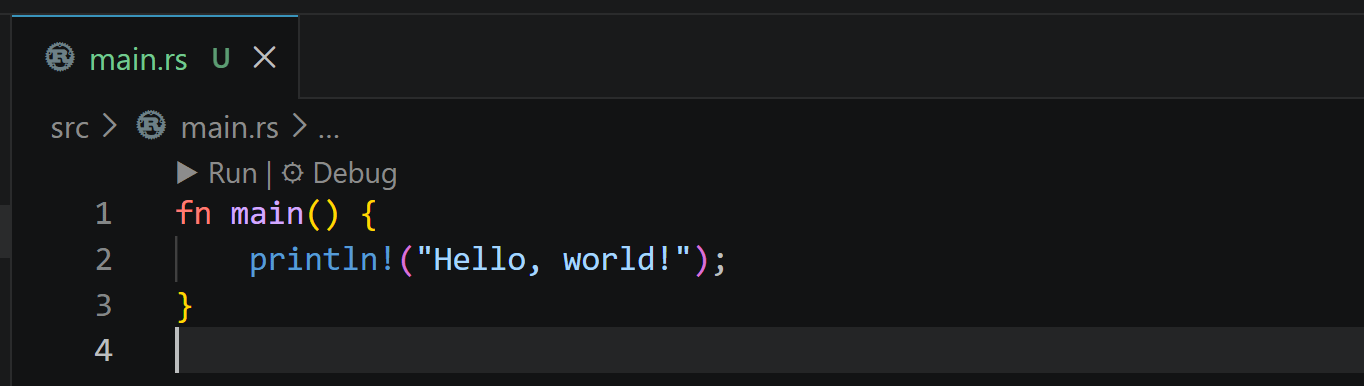
Even in this minimal example, you can see Rust’s explicit structure and compile-time guarantees.
Remember: In Rust, println! is not a function. It’s a macro. The ! tells the compiler: “this is a macro invocation, not a normal function call.”
Performance is another big win. Rust is compiled and extremely fast, making it ideal for high-throughput parsing on heavy HTML pages or large volumes of pages (e.g., in an offline web scraping scenario). Concurrency is also first-class, helping you manage thousands of requests in parallel without the usual headaches.
On the flip side, Rust has a steeper learning curve. If you’re coming from Python or JavaScript, getting used to the syntax and strict compiler won’t be trivial. In my experience, the first steps can feel a bit unforgiving…
Why AI Has Made Rust a Solid Choice for Web Scraping
AI is changing the nature of software development, including web development. And, as you may already have noticed, not always in a “lighter” direction. Humans struggle to deal with long scripts and source code files, but machines don’t!
Thus, AI tends to produce very long and complex HTML with a lot of elements embedded in the same page. On top of that, AI makes it trivial to generate large amounts of content, which further increases HTML size. In addition, semantic HTML is more verbose than traditional HTML.
As a result, modern web pages are getting bigger and more complex. From a scraping perspective, this translates into slower and more resource-intensive parsing. What used to be lightweight DOM trees are now dense, deeply nested structures that require more CPU and memory to process.
This is exactly where Rust starts to make sense…
Sure, it may not be the easiest programming language, but Rust’s performance makes it compelling (and in some cases even necessary). Its low-level control and zero-cost abstractions allow Rust HTML parsers to process large documents in fractions of a second, even under high concurrency.
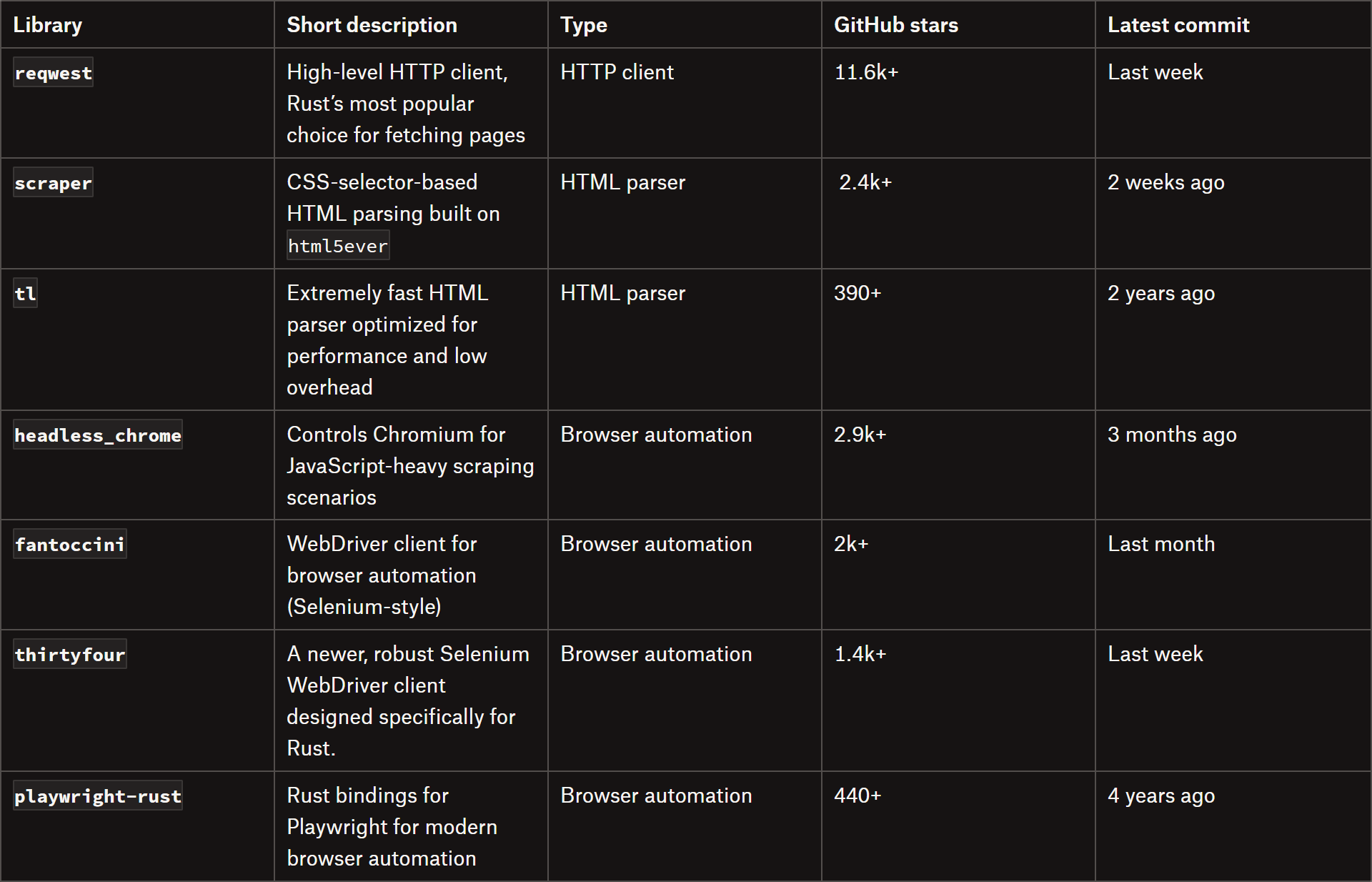
Independent benchmarks show Rust HTML parsers ranking among the fastest available. In particular, libraries like tl stand out for their exceptional speed and low overhead.
How to Build a Scraper in Rust: A Step-by-Step Guide
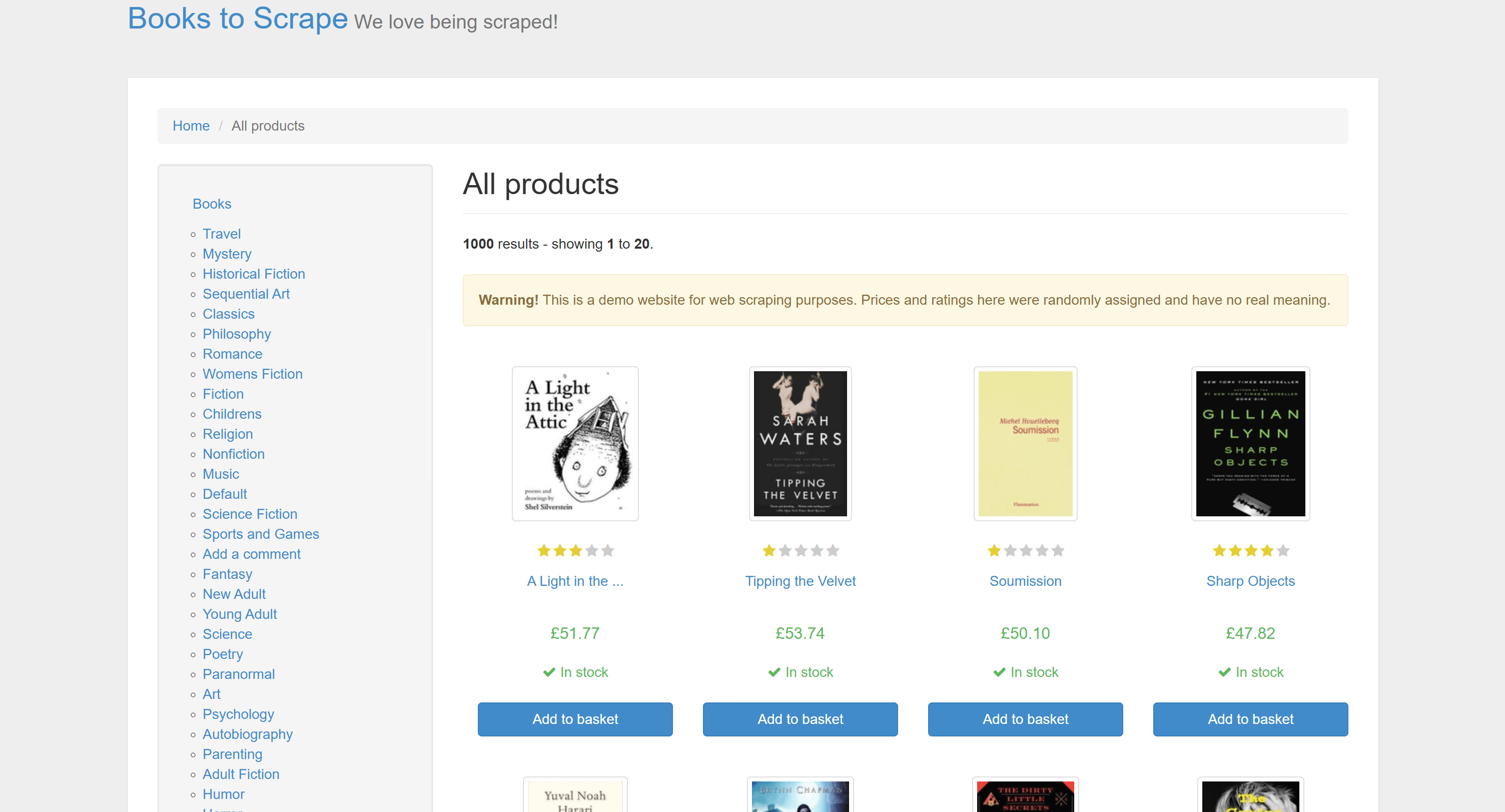
In this section, I’ll guide you through the process of building a web scraper in Rust. The target web page will be Books to Scrape’s homepage. This is a static page, which is the ideal scenario for high-speed HTML parsing in Rust.
The Books to Scrape homepage
The end goal is to scrape all the book information and export it to a CSV file. Follow the instructions below!
Trusted by teams running ad verification, web scraping, SERP tracking, and market research. Ethically sourced proxies, globally accessible, and fairly priced.
After running the commands above, your Cargo.toml file should look similar to this:
[package]
name = "books_rust_scraper"
version = "0.1.0"
edition = "2024"

[dependencies]
csv = "1.4.0"
reqwest = "0.13.3"
scraper = "0.26.0"
tl = "0.7.8"
tokio = { version = "1.52.1", features = ["full"] }
Nice! You now have all the dependencies in place to start building your Rust scraper.
Step #3: Retrieve the Target Page
Use reqwest to fetch the target page with:
use std::error::Error;
use reqwest::Client;

#[tokio::main]
async fn main() -> Result<(), Box<dyn Error>> {
    // Initialize the HTTP client
    let client = Client::builder()
        .build()?;

    // Retrieve the target page
    let url = "https://books.toscrape.com/";
    let response = client
    .get(url)
    .send()
    .await?;

    // Extract the HTML content from the response
    let html = response.text().await?;

    // Parsing logic...

    // Data export logic...

    Ok(())
}
This snippet initializes an asynchronous HTTP client using Tokio, sends a GET request to the target URL, retrieves the HTML response body, and prepares it for parsing and data extraction.
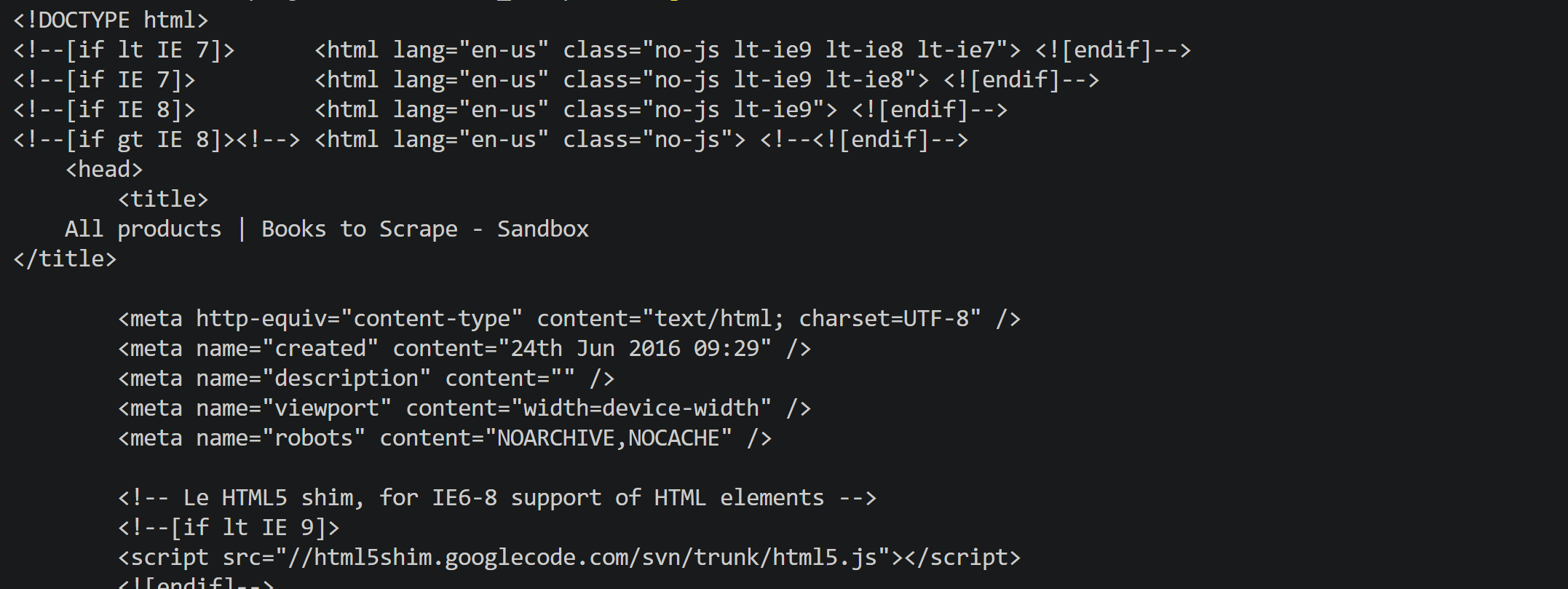
If you print html, you’ll observe:
The HTML of the target page
Excellent! Get ready to apply the Rust data parsing logic.
Step #4: Implement the Parsing Logic
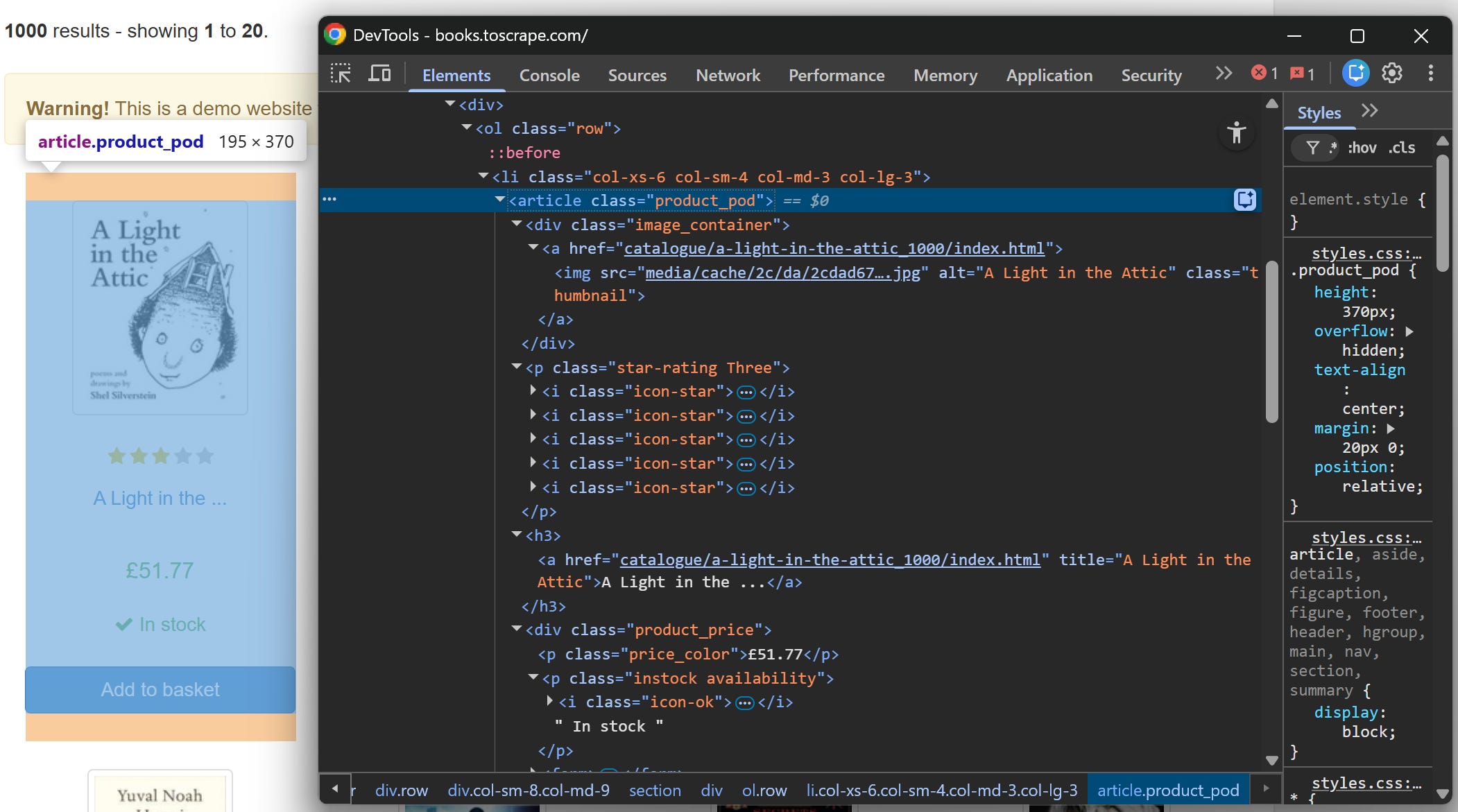
Before implementing the web scraping logic in Rust, study the DOM of the target page. Inspect a book HTML element in the browser:
Inspecting a book HTML element
From this structure, notice how you can select all books using the article.product_pod CSS selector. For each book element, you can retrieve:
Next, define the parse_books() function that extracts and structures the data:
use scraper::{Html, Selector};
// ...
// ...
fn parse_books(html: &str) -> Result<Vec<Book>, Box<dyn Error>> {
// Parse the HTML content
let document = Html::parse_document(html);
// Define CSS selectors for the HTML elements of interest
let book_selector = Selector::parse("article.product_pod")?;
let title_selector = Selector::parse("h3 a")?;
let image_selector = Selector::parse(".image_container img")?;
let price_selector = Selector::parse(".price_color")?;
let rating_selector = Selector::parse("p.star-rating")?;
let stock_selector = Selector::parse(".instock.availability")?;
// Where to store the scraped data
let mut books = Vec::new();
// Iterate over each book element and extract the relevant data
for book_el in document.select(&book_selector) {
// Apply the parsing logic
let title_el = book_el.select(&title_selector).next().unwrap();
let relative_url = title_el.value().attr("href").unwrap_or("");
let url = format!(
"https://books.toscrape.com/catalogue/{}",
relative_url
);
let image_url = book_el
.select(&image_selector)
.next()
.and_then(|img| img.value().attr("src"))
.unwrap_or("")
.to_string();
let image_url = format!(
"https://books.toscrape.com/{}",
image_url.trim_start_matches('/')
);
let title = title_el
.value()
.attr("title")
.unwrap_or("")
.to_string();
let price = book_el
.select(&price_selector)
.next()
.map(|e| e.text().collect::<String>())
.unwrap_or_default();
let rating = book_el
.select(&rating_selector)
.next()
.and_then(|e| e.value().attr("class"))
.unwrap_or("no rating")
.replace("star-rating", "")
.trim()
.to_lowercase();
let in_stock = book_el
.select(&stock_selector)
.next()
.map(|e| {
let text = e.text().collect::<String>();
text.to_lowercase() == "in stock"
})
.unwrap_or(false);
// Collect the scraped book data
books.push(Book {
title,
price,
rating,
in_stock,
image_url,
url,
});
}
Ok(books)
}
This function parses raw HTML into structured data using the scraper crate. Html::parse_document() creates a DOM-like representation of the page, while Selector::parse() defines CSS selectors for targeting elements.
document.select(&book_selector) iterates over each book container. Inside each element, .select() extracts nested elements, while .value().attr() retrieves attributes such as links and titles. The .text() method collects visible text content.
Finally, all extracted values are assembled into a Book struct, and each instance is stored in a vector for later export or processing.
Right now, the scraped data is returned by the parse_books() function as a vector of Book structs. Next, add a function that uses the csv crate to export that data into a CSV file:
use csv::Writer;
// ...
//...
fn write_csv(books: &[Book], file_path: &str) -> Result<(), Box<dyn std::error::Error>> {
let mut wtr = Writer::from_path(file_path)?;
// Write the header row
wtr.write_record(&[
"url",
"image_url",
"title",
"price",
"rating",
"in_stock",
])?;
for book in books {
wtr.write_record(&[
&book.url,
&book.image_url,
&book.title,
&book.price,
&book.rating,
&book.in_stock.to_string(),
])?;
}
wtr.flush()?;
Ok(())
}
Step #6: Put It All Together
This is the final code of your Rust web scraper:
// src/main.rs
use std::error::Error;
use reqwest::Client;
use scraper::{Html, Selector};
use csv::Writer;
#[derive(Debug)]
struct Book {
    url: String,
    image_url: String,
    title: String,
    price: String,
    rating: String,
    in_stock: bool,
}
#[tokio::main]
async fn main() -> Result<(), Box<dyn Error>> {
// Initialize the HTTP client
let client = Client::builder()
.build()?;
// Retrieve the target page
let url = "https://books.toscrape.com/";
let response = client
.get(url)
.send()
.await?;
// Extract the HTML content from the response
let html = response.text().await?;
// Parse the books data from the HTML
let books = parse_books(&html)?;
// Export the scraped data to a CSV file
write_csv(&books, "books.csv")?;
Ok(())
}
fn parse_books(html: &str) -> Result<Vec<Book>, Box<dyn Error>> {
// Parse the HTML content
let document = Html::parse_document(html);
// Define CSS selectors for the HTML elements of interest
let book_selector = Selector::parse("article.product_pod")?;
let title_selector = Selector::parse("h3 a")?;
let image_selector = Selector::parse(".image_container img")?;
let price_selector = Selector::parse(".price_color")?;
let rating_selector = Selector::parse("p.star-rating")?;
let stock_selector = Selector::parse(".instock.availability")?;
// Where to store the scraped data
let mut books = Vec::new();
// Iterate over each book element and extract the relevant data
for book_el in document.select(&book_selector) {
// Apply the parsing logic
let title_el = book_el.select(&title_selector).next().unwrap();
let relative_url = title_el.value().attr("href").unwrap_or("");
let url = format!(
"https://books.toscrape.com/catalogue/{}",
relative_url
);
let image_url = book_el
.select(&image_selector)
.next()
.and_then(|img| img.value().attr("src"))
.unwrap_or("")
.to_string();
let image_url = format!(
"https://books.toscrape.com/{}",
image_url.trim_start_matches('/')
);
let title = title_el
.value()
.attr("title")
.unwrap_or("")
.to_string();
let price = book_el
.select(&price_selector)
.next()
.map(|e| e.text().collect::<String>())
.unwrap_or_default();
let rating = book_el
.select(&rating_selector)
.next()
.and_then(|e| e.value().attr("class"))
.unwrap_or("no rating")
.replace("star-rating", "")
.trim()
.to_lowercase();
let in_stock = book_el
.select(&stock_selector)
.next()
.map(|e| {
let text = e.text().collect::<String>();
text.to_lowercase() == "in stock"
})
.unwrap_or(false);
// Collect the scraped book data
books.push(Book {
title,
price,
rating,
in_stock,
image_url,
url,
});
}
Ok(books)
}
fn write_csv(books: &[Book], file_path: &str) -> Result<(), Box<dyn std::error::Error>> {
let mut wtr = Writer::from_path(file_path)?;
// Write the header row
wtr.write_record(&[
"url",
"image_url",
"title",
"price",
"rating",
"in_stock",
])?;
for book in books {
wtr.write_record(&[
&book.url,
&book.image_url,
&book.title,
&book.price,
&book.rating,
&book.in_stock.to_string(),
])?;
}
wtr.flush()?;
Ok(())
}
Note how all previously defined functions are now called inside main(). Et voila! In just around 150 lines of code, you’ve built an efficient web scraper in Rust.
Run your scraper with:
cargo run
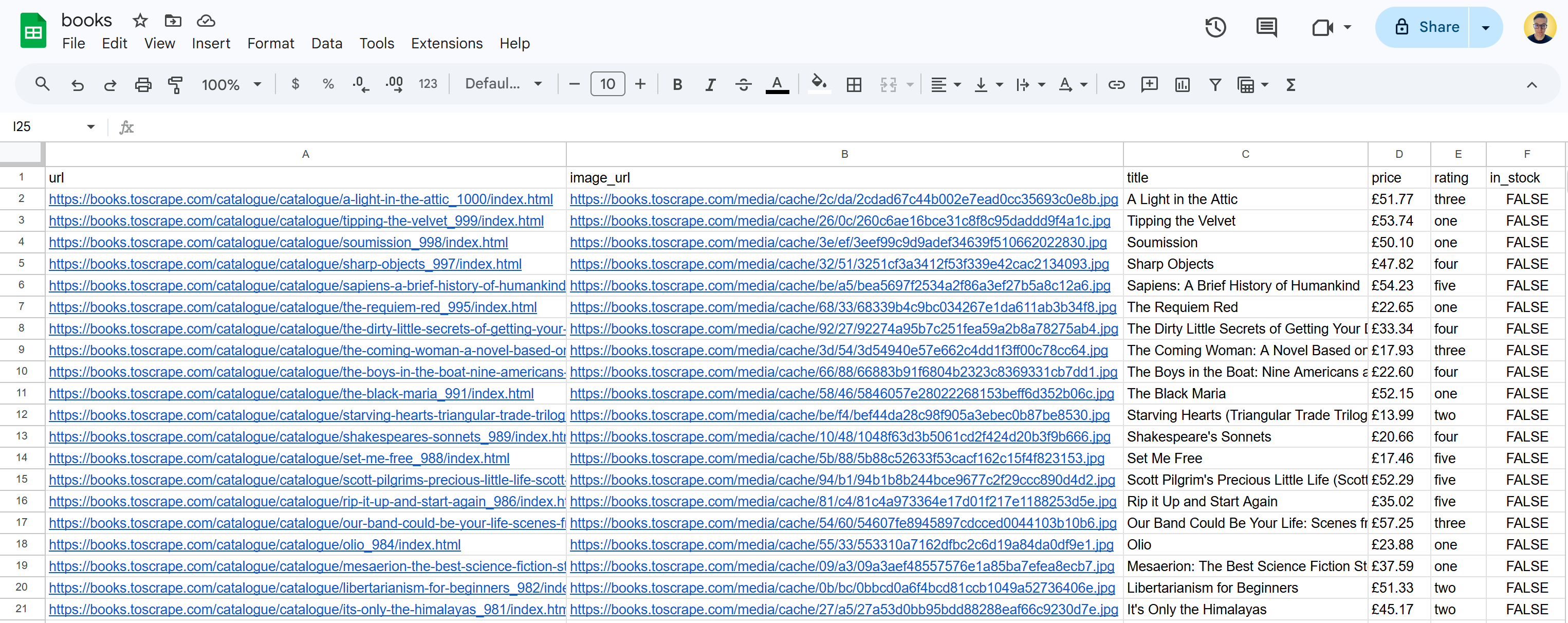
After execution, a books.csv file will be created in your project folder. Open it, and you will see:
The output books.csv file
This matches exactly the data shown on the target website, but now in a structured format. Mission complete!
Browser Automation in Rust: Does It Make Sense?
First of all, it’s worth noting that the ecosystem for browser automation in Rust is quite small compared to JavaScript or Python. Also, most libraries aren’t official, but rather community-backed ports like Playwright Rust or the Selenium bindings.
Now, from a technical standpoint, browser automation happens inside the browser itself. So, Chrome, Chromium, or Firefox do most of the heavy lifting. What you define through the library’s API simply orchestrates operations like clicking, waiting for elements, and extracting data. These commands are then translated into browser actions via WebDriver, CDP, or WebDriver BiDi.
Because of that, using a systems-level language like Rust can be more of a burden than an advantage. The main strength of Rust (i.e., raw performance) doesn’t really matter here, since the controlled browser instances are the actual bottleneck, not your automation code.
That means we lose Rust’s biggest advantage while still paying its costs. On top of that, Rust’s strict compiler and steeper learning curve can slow down development speed.
To be honest, I see Rust as excellent for the parsing and data processing layer, but I wouldn’t recommend it for browser automation…
If I had to summarize my experience with Rust for web scraping, I’d say this: it really shines when you’re parsing large HTML pages at scale or handling a high number of parsing tasks in parallel.
In those scenarios, the combination of performance, memory safety, and concurrency makes a real difference. That said, I wouldn’t recommend Rust for everyday scraping tasks… The entry barrier is just too high, the learning curve too steep, and the ecosystem around scraping too small.
On top of that, finding experienced Rust developers specifically focused on web scraping, or even just translating those skills into job opportunities, can be way more challenging than in more mainstream stacks.
So my take is pretty simple: consider Rust when performance and scale truly matter. For everything else, prefer Python or JavaScript.
👍 Pros:
Can efficiently handle thousands of requests in parallel.
Rust HTML parsers are extremely.
Strict compiler checks and static guarantees lead to stable scraping pipelines.
👎 Cons:
Slower development and prototyping speed.
Smaller ecosystem of scraping libraries compared to Python or JavaScript.
Not a practical choice for browser automation.
The Web Scraping Club is a reader-supported publication. To receive new posts and support my work, consider becoming a free or paid subscriber.
Conclusion
Here, I’ve guided you through the world of web scraping in Rust. In a world dominated by AI slops, security flaws, and neglected best practices, this programming language is gaining traction thanks to its focus on efficiency and strict compilation.
As you’ve seen, Rust is excellent for CPU-intensive or memory-intensive tasks like HTML parsing and data processing. Still, it might not be ideal for browser automation or quick prototyping. You also learned how to go from zero to scraped data in CSV format by building a Rust scraper.
I hope you found this helpful and insightful. If you have any questions, feel free to share them in the comments below!