You may have built dozens of scraping or automation scripts using Selenium, Playwright, or Puppeteer. But have you ever stopped to wonder how these libraries actually control the underlying browser instances?
It’s not magic, but the result of a few very specific mechanisms—namely, browser automation protocols. The most important ones are:
WebDriver
Chrome DevTools Protocol (CDP)
WebDriver BiDi
In this post, I’ll break down each of them to cover what they are, how they work at a low level, and how they enable programmatic browser control. You’ll also discover where browser automation is headed next!
Before proceeding, let me thank NetNut, the platinum partner of the month. They have prepared a juicy offer for you: up to 1 TB of web unblocker for free.
Let me start this WebDriver vs Chrome DevTools Protocol (CDP) vs WebDriver BiDi piece by focusing first on the protocol at the top of the list: WebDriver!
What It Is
WebDriver is a W3C Recommendation that standardizes a remote control interface for automating and inspecting “user agents” (in other words, web browsers). In practical terms, it lets external programs interact with a browser through a language- and platform-agnostic protocol.
In detail, WebDriver exposes a concise, object-oriented API for cross-browser control. This makes it a reliable and realistic foundation for end-to-end testing and automation, whether the browser runs locally or on a remote machine.
The W3C WebDriver protocol isn’t tied to any specific programming language or framework. Because of that, browser automation client libraries built on top of it—regardless of the language they’re written in—are essentially thin wrappers. Their main job is to translate application-level API calls into WebDriver-compliant commands and then deal with the results produced by the browser.
More in depth, there are 3 main components you need to keep in mind:
The WebDriver-based browser automation client library (e.g., Selenium) that exposes a developer-friendly, application-level API.
A browser-specific driver server (e.g., ChromeDriver, geckodriver). That’s usually a standalone executable that runs on your machine or in a remote environment. It understands the WebDriver protocol and maps incoming commands to the browser’s native automation interfaces. Depending on the automation tool you’re using, this driver may be downloaded and managed automatically, or you may have to install and version-match it yourself.
The browser application itself (Chrome, Firefox, Edge, Safari, etc.), which ultimately performs the actions.
At runtime, every WebDriver interaction follows a strict client–server communication model defined by the W3C specification. Thus, when a script built with a browser automation client issues a command (e.g., element.click()), the following happens under the hood:
The client serializes the command into a standardized request (targeting a specific endpoint and including a well-defined JSON payload) as defined by the W3C WebDriver specification.
That request is sent over HTTP to a browser-specific WebDriver server endpoint exposed by the driver.
The driver server receives the request, interprets the WebDriver protocol command, and maps it to the appropriate native browser automation call.
The browser executes the action as a real user would.
The browser returns the execution result (e.g., status, errors, or requested data) back to the driver using browser-internal communication mechanisms.
The driver wraps that result into a WebDriver-compliant response, including a standardized status code and JSON payload.
The response is sent back over HTTP to the client, which deserializes it into application-level objects.
One of the biggest advantages of modern WebDriver servers speaking the W3C WebDriver protocol directly is predictability. Because the communication language is standardized, different browser drivers implement the same semantics, resulting in more consistent behavior across browsers and environments.
This architecture also explains why WebDriver requires a browser-specific driver server in the first place. The protocol itself is browser-agnostic, while the driver is responsible for bridging that standardized protocol to each browser’s internal automation APIs.
Scraping and Automation Libraries Built on Top of It
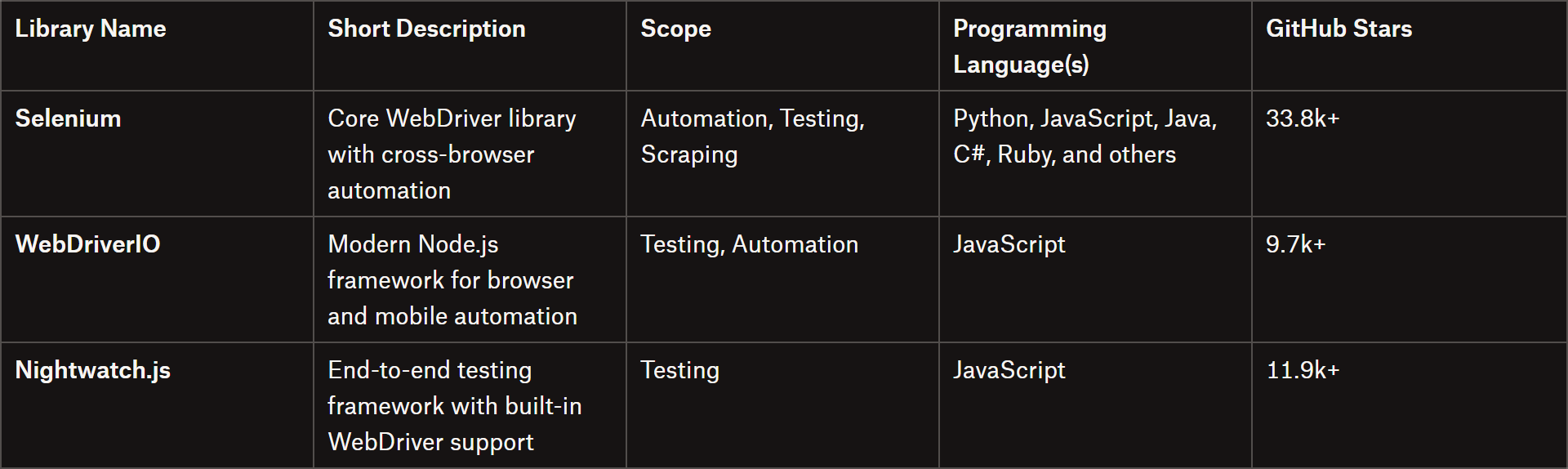
Out of the libraries built on top of the WebDriver mechanism, Selenium is by far the most popular and widely adopted. Other interesting libraries include WebDriverIO and Nightwatch.js.
Libraries supporting the WebDriver protocol
The main challenge with this type of library is configuring the correct browser driver server. Luckily, as of Selenium 4.10 (release in June 2023), you no longer need to manually download the correct browser driver for your specific browser type and version. Selenium now automatically detects, downloads, and configures the appropriate driver, ensuring that your tests or scraping scripts run smoothly out of the box.
Extra: What About Selenium 3’s JSON Wire Protocol? A Bit of History…
Before the W3C standardized the WebDriver protocol in 2018, older versions of Selenium (especially before 3.8) relied on a non-standard JSON Wire Protocol.
In this architecture, the client library serialized commands into JSON, but there was no unified specification. Thus, each browser driver (developed by different teams) had to implement its own logic to map those instructions to the browser’s native automation APIs.
That created a kind of “dialect problem,” where the same command could behave slightly differently or have different timing across Chrome, Firefox, Internet Explorer, and Safari. These inconsistencies were a major source of latency and flaky behavior.
Selenium 4 resolved that by adopting the W3C WebDriver protocol as its standard, eliminating the intermediary translation layer and ensuring consistent, predictable automation across browsers.
Chrome DevTools Protocol (CDP) Explained
Time to dive into the second protocol under analysis: the Chrome DevTools Protocol (also known simply as CDP).
What It Is
The Chrome DevTools Protocol (CDP) is a low-level, JSON-based protocol that lets you inspect, debug, and instrument web pages in Chromium-based browsers, such as Chrome, Edge, Brave, and Opera.
It provides programmatic access to browser internals, enabling control over the DOM, network requests, and performance metrics. The protocol is designed by Google and is commonly used for automation, testing, and scraping.
CDP is organized into domains. Domains represent functional areas in the browser and handle specific tasks, such as DOM manipulation, network interception, console logging, performance profiling, and device or network emulation.
Each domain exposes commands and events:
Commands are JSON requests sent to the browser.
Events are JSON messages sent by the browser back to the client.
Both commands and events can be transmitted over HTTP or WebSocket, with WebSocket being the preferred approach due to its support for quick, bidirectional communication.
When it comes to browser control via CDP, there are only 2 elements at play:
The CDP-based browser automation client: A library (e.g., Playwright) that communicates with the browser using JSON commands over the Chrome DevTools Protocol.
A Chromium-based browser: Expose a CDP endpoint (by default on ws://localhost:9222 for local instances). For remote browsers, libraries like Playwright can control them using a CDP URL, which typically starts with wss:// (WebSocket over TLS).
Now, here’s what happens under the hood when you call a high-level API like page.screenshot() in a CDP-based library:
The client library establishes a WebSocket session with the browser’s CDP endpoint. This creates a bidirectional communication channel between the automation library and the browser.
The client sends a JSON command targeting a specific domain and method, with the required parameters (e.g., {”cmd”:”Page.captureScreenshot”,”args”:{”format”:”jpeg”}}).
The browser receives the JSON request and maps it to the corresponding native browser operation, such as capturing a screenshot.
The browser executes the action as if a real user or system process had triggered it.
The browser sends a JSON response back to the client over the WebSocket, containing execution results, metrics, or errors.
The browser automation client framework parses the response and converts it into usable objects or data structures for scripts or tests.
Note: Asynchronous events, like network requests or DOM mutations, are sent by the browser over the same WebSocket channel and can be subscribed to.
Unlike the W3C WebDriver protocol, which standardizes client-server browser automation across all major browsers, the Chrome DevTools Protocol (as the name suggests) is Chromium-specific.
Scraping and Automation Libraries Built on Top of It
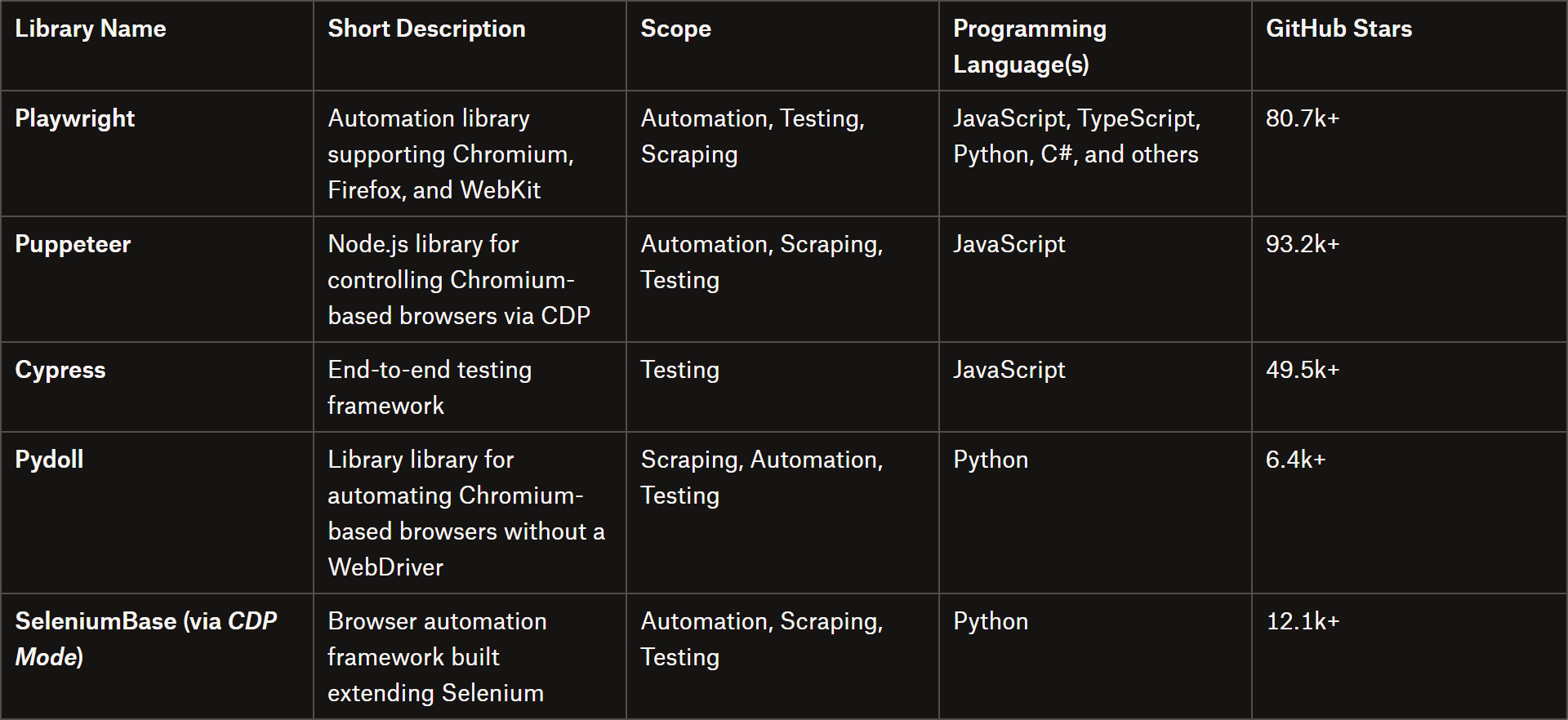
Many libraries and frameworks leverage the Chrome DevTools Protocol to provide higher-level browser automation capabilities for testing, monitoring, or scraping, such as:
Libraries using CDP
Note: Until full support for the WebDriver BiDi protocol is fully implemented, Selenium 4 plans to also give access to CDP features where applicable, in addition to the standard W3C WebDriver protocol (of course).
Extra: What About the Firefox Remote Debug Protocol?
CDP works specifically with Chromium-based browsers, but how can Playwright (and other automation libraries) control Firefox? The answer is the Firefox Remote Debug Protocol.
Similar to CDP, the Mozilla protocol allows a debugger or automation client to connect to Gecko-based browsers. In particular, it provides a unified view of the DOM, CSS rules, and other client-side web technologies.
(And for Safari? The CDP-equivalent protocol is the WebKit Debug Protocol!)
Understanding WebDriver BiDi: The What, Why, How, and When
WebDriver relies on a strict request-response model over HTTP. Commands are synchronous and unidirectional: the client sends a request to the browser, waits for a response, and then sends the next command.
That approach works well for standard UI testing, ensuring actions like clicks, typing, and navigation occur in the correct order. Still, it limits asynchronous interactions (such as monitoring network requests, console logs, or DOM changes) because the client must continuously poll the browser for updates.
To overcome those limitations, the Selenium team, together with major browser vendors, is developing the WebDriver BiDi (Bidirectional) Protocol. Currently (as of this writing) aW3C Working Draft (WDC), WebDriver BiDi is designed to provide real-time, cross-browser automation.
WebDriver BiDi introduces bidirectional communication via WebSockets, allowing the browser to push events directly to the client as they occur. This enables streaming of logs, network activity, JavaScript exceptions, and other runtime events without the overhead of repeated HTTP requests, resulting in faster, more responsive, and richer automation.
Basically, BiDi combines the strengths of traditional WebDriver and the Chrome DevTools Protocol (CDP). While CDP offers low-level control over Chromium-based browsers, it isn’t standardized across browsers. BiDi fills that gap by providing true cross-browser support, while also opening the door to features that were previously limited to Chromium—such as network interception, performance monitoring, and console logging—in a consistent way across Firefox and Safari.
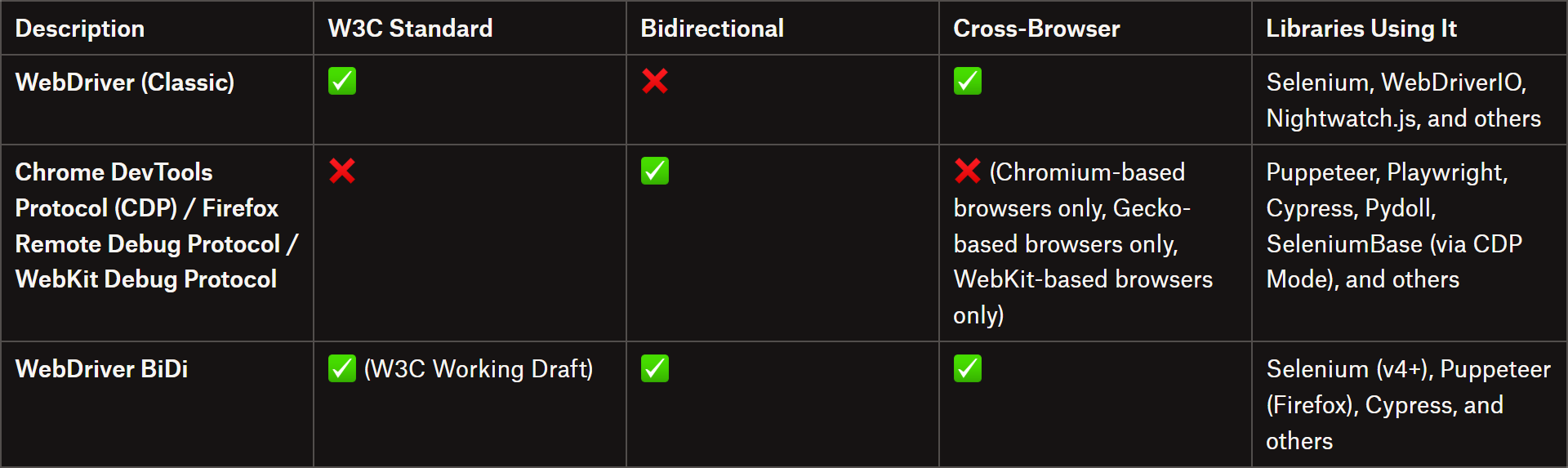
Compare the most important protocols for browser control in the summary table below:
WebDriver vs CDP vs BiDi
WebDriver (Classic)
👍 Pros:
W3C standard
Stable and predictable model
Cross-browser consistency
👎 Cons:
Unidirectional and synchronous, with no real-time event streaming
Limited low-level browser access
Polling-based architecture, which can be slower for advanced use cases
Requires external browser-specific driver binaries (e.g., ChromeDriver, GeckoDriver) that must be downloaded, managed, and kept in sync with browser versions
Yes, it appears so! But some explanation is needed…
Note: Since the WebDriver BiDi is the next-generation iteration of the WebDriver protocol, the request-response model used by Selenium is now referred to as “WebDriver Classic.”
So, if WebDriver Classic will eventually be replaced by BiDi, what about CDP?
WebDriver BiDi doesn’t aim to replace CDP!
Chrome DevTools Protocol remains optimized for low-level, Chromium-specific debugging and browser control. In contrast, BiDi is a modern, cross-browser standard focused on test automation. That’s why Puppeteer still uses CDP when launching Chrome (as CDP features aren’t yet fully supported by BiDi).
BiDi’s goal is to standardize automation across browsers, not to replace engine-specific debugging tools like CDP, Firefox Remote Debug Protocol, or WebKit Web Inspector.
For the foreseeable future, WebDriver Classic will gradually be phased out. Chromium browsers will continue to support CDP for low-level debugging, while BiDi complements it by providing standardized, real-time, cross-browser automation and testing capabilities.
The Web Scraping Club is a reader-supported publication. To receive new posts and support my work, consider becoming a free or paid subscriber.
Conclusion
In this post, I’ve outlined the three main protocols used by browser automation libraries for testing and web scraping to programmatically control browser instances.
As you’ve seen, Playwright and Selenium follow different approaches, relying on distinct sets of protocols. However, WebDriver and CDP are ultimately complementary, each serving its own purpose in the automation ecosystem.
Feel free to share your thoughts or questions in the comments. Until next time!
One practical challenge across all these protocols and frameworks is detection. Modern websites often fingerprint automated browsers regardless of whether they are controlled via WebDriver, or CDP. At Kameleo, we put a lot of effort into minimizing this risk. When using Kameleo's custom-built browsers like Chroma and Junglefox, these automation frameworks can operate in a much more realistic, undetectable way, even in advanced scraping and automation scenarios. If you are interested, give it a try, if need help: contact me



One practical challenge across all these protocols and frameworks is detection. Modern websites often fingerprint automated browsers regardless of whether they are controlled via WebDriver, or CDP. At Kameleo, we put a lot of effort into minimizing this risk. When using Kameleo's custom-built browsers like Chroma and Junglefox, these automation frameworks can operate in a much more realistic, undetectable way, even in advanced scraping and automation scenarios. If you are interested, give it a try, if need help: contact me