Next.js is one of the most widely adopted full-stack JavaScript frameworks on the planet. If you’ve ever built or deployed a web app, you definitely know it—or at least you’ve heard of it.
Behind the scenes, it relies on hydration to make server-rendered pages interactive. And here’s the interesting part: the same mechanism that makes Next.js fast and popular also exposes a significant amount of structured data in the HTML sent by the server. From a scraping perspective, that’s a huge opportunity!
In this post, I’ll show you a simple trick to scrape data from virtually any Next.js website. Follow along as I break down how it works and how you can apply it yourself.
Before proceeding, let me thank NetNut, the platinum partner of the month. They have prepared a juicy offer for you: up to 1 TB of web unblocker for free.
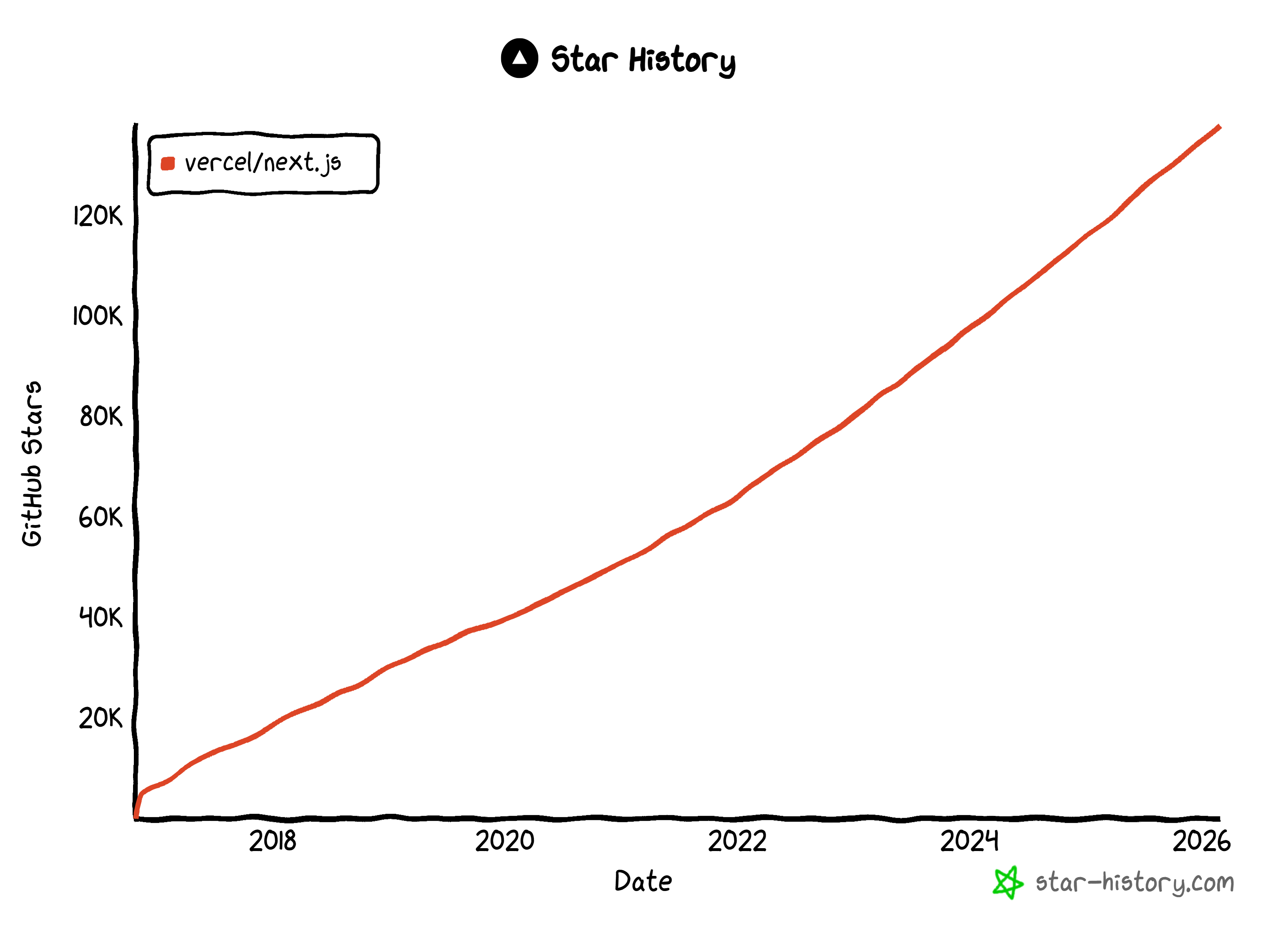
Next.js needs no introduction, but it’s worth giving some context to truly understand how popular it is (and therefore how useful the trick I’m about to present for Next.js web scraping can be):
Before Getting Started: A Bit of Context on Hydration
I know you probably just want the trick… Still, let me take a minute to explain why it works in the first place, why it’s even possible, and what kind of data you’ll actually retrieve with it!
Hydration is the process that makes a server-rendered page interactive in the browser.
Frameworks like Next.js, Remix, Nuxt, and SvelteKit employ this mechanism to combine the performance benefits of server-side rendering (SSR) with the interactivity of client-side applications.
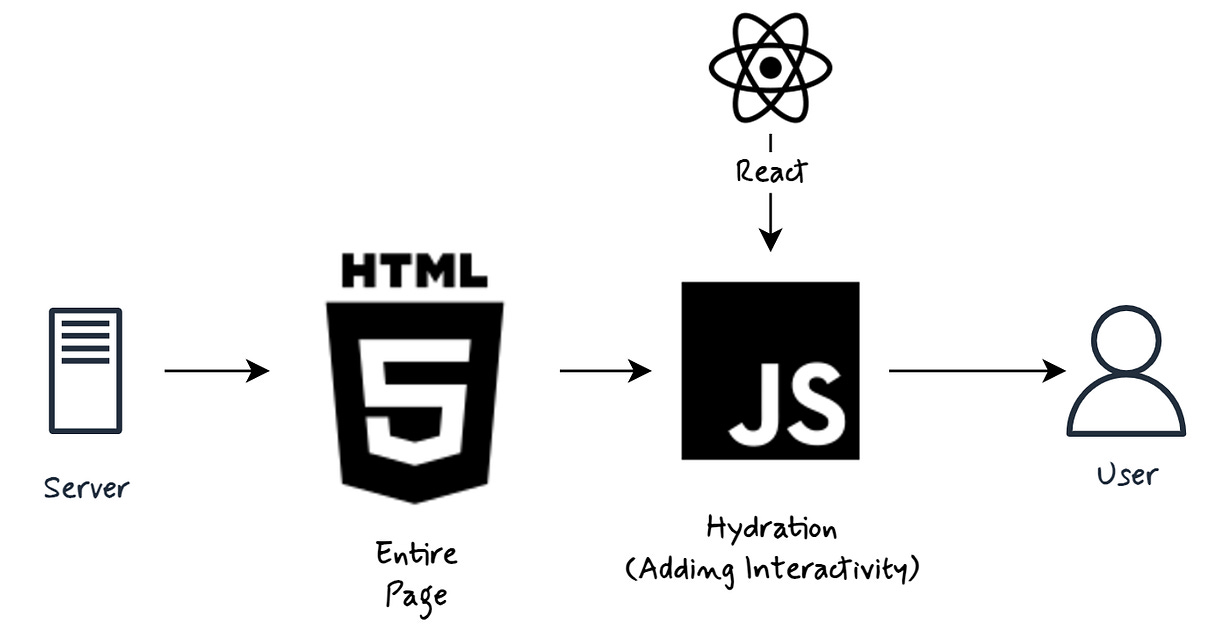
The idea is that the server first sends fully rendered static HTML to the browser. Then, hydration happens next.
The JavaScript hydration mechanism (source: https://thefrontenddev.medium.com/demystifying-hydration-and-streaming-in-react-19-core-concepts-for-modern-web-development-bef8479b8a26)
The browser downloads the JavaScript bundle, and the frontend framework reconstructs the component tree in memory, attaches event listeners, and links that virtual tree to the existing DOM instead of re-rendering it from scratch. The result is a fully interactive application built on top of server-rendered HTML.
How Does the Hydration Mechanism Work?
It’s now clear that in Next.js and similar frameworks, hydration is the process where a static, server-rendered HTML page “comes to life” and becomes fully interactive in the browser. But what’s actually happening under the hood?
At a high level, hydration is a 3-step process:
The server generates and sends a fully rendered HTML snapshot. The user immediately sees the content (great for First Contentful Paint). At this point, though, the page is just static HTML. Buttons, forms, and other interactive elements are visible, but they don’t work yet because no JavaScript is attached.
The client’s browser downloads the JavaScript bundle (which includes React and your frontend application code) and executes it.
React rebuilds the component tree in memory and attaches event listeners to the existing DOM nodes. Instead of discarding the HTML and re-rendering everything from scratch, React “hydrates” the existing markup, meaning it reuses it and wires it up with state and interactivity.
Once hydration completes, the page behaves like a normal single-page application: it responds to clicks, manages state, and updates dynamically.
And here’s an important detail: if the browser doesn’t support JavaScript (or it fails to load), the user still sees the server-rendered HTML. It won’t be interactive, but the core content is there. That’s great for SEO and perceived performance!
Why It Matters for Scraping Next.js (and Other Full-Stack Frameworks…)
The key insight you need to understand is simple: hydration requires data, and that data must be embedded somewhere in the HTML sent by the server!
In Next.js, when the server renders a page, it doesn’t only send markup. It also serializes the data required to rebuild the React component tree on the client. That serialized payload is embedded directly into the page’s HTML.
That’s exactly why hydration matters for scraping. Instead of parsing the DOM or simulating user interactions through browser automation, you can extract the structured data that React itself uses to hydrate the page.
In many cases, hydration data is cleaner and easier to parse than the rendered HTML. It can also contain more information than what’s visibly displayed on the page, including hidden and interesting metadata.
Keep in mind that this principle applies not only to Next.js! All other full-stack frameworks that rely on hydration, such as Remix, Nuxt, Angular Universal, and SvelteKit, tend to dehydrate state on the server and rehydrate it on the client.
So remember this simple rule. If a framework hydrates, it must serialize data. And if it serializes data into the HTML, you can scrape it.
How to Scrape Next.js Websites: 2 Approaches
The approach to scraping Next.js by targeting hydration data depends on how that data is embedded in the HTML generated on the server side.
I won’t go too deep into framework internals here (if you’re a Next.js dev, you already know things shift depending on whether you’re using theApp Router or thePages Router), but there are essentially two scenarios you’ll run into.
In this section, I’ll walk through both of them and show you exactly how I retrieve data from each!
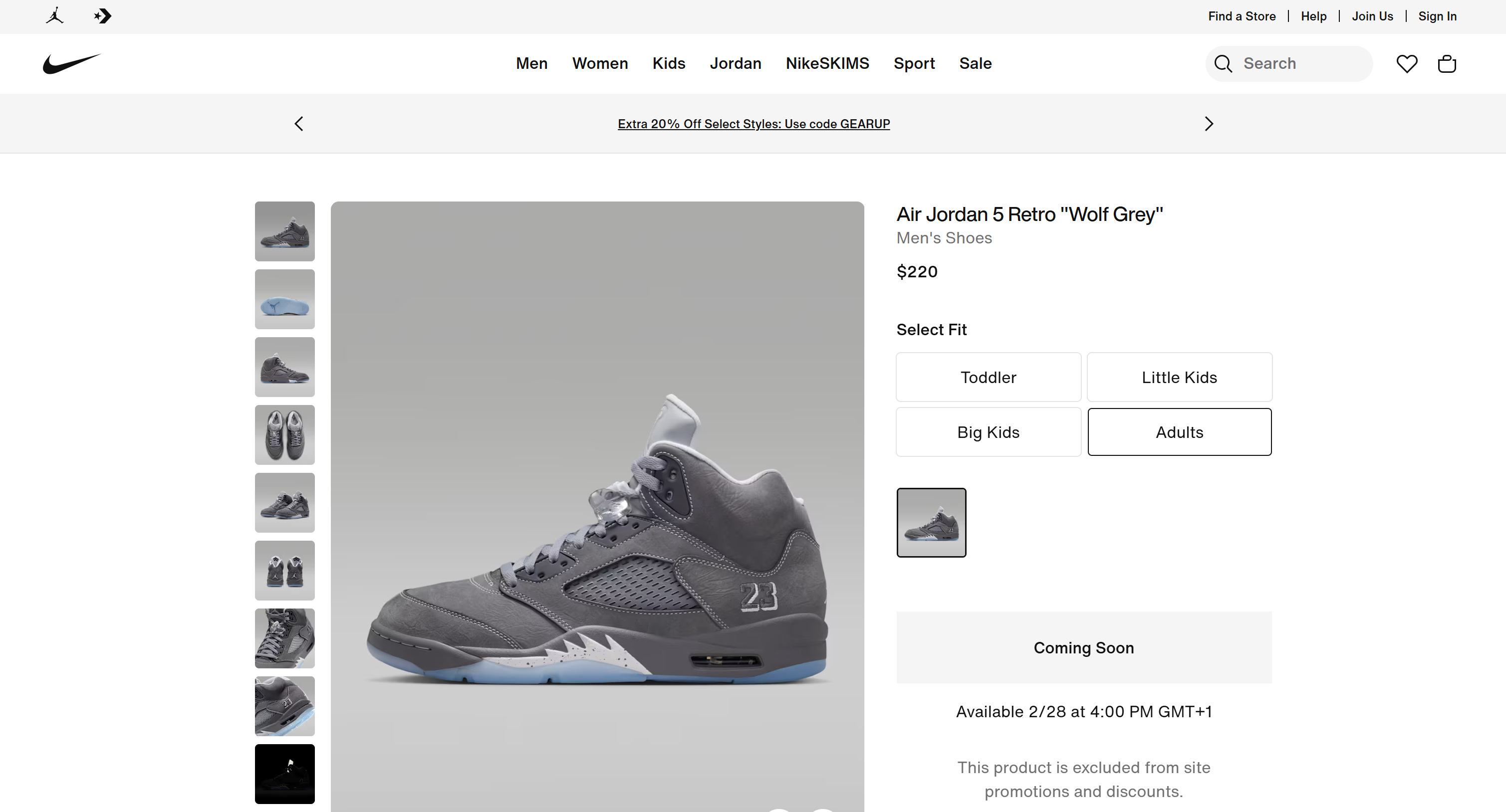
That’s actually a great example because Nike.com is even showcased on the Next.js homepage as a real-world site built with the framework.
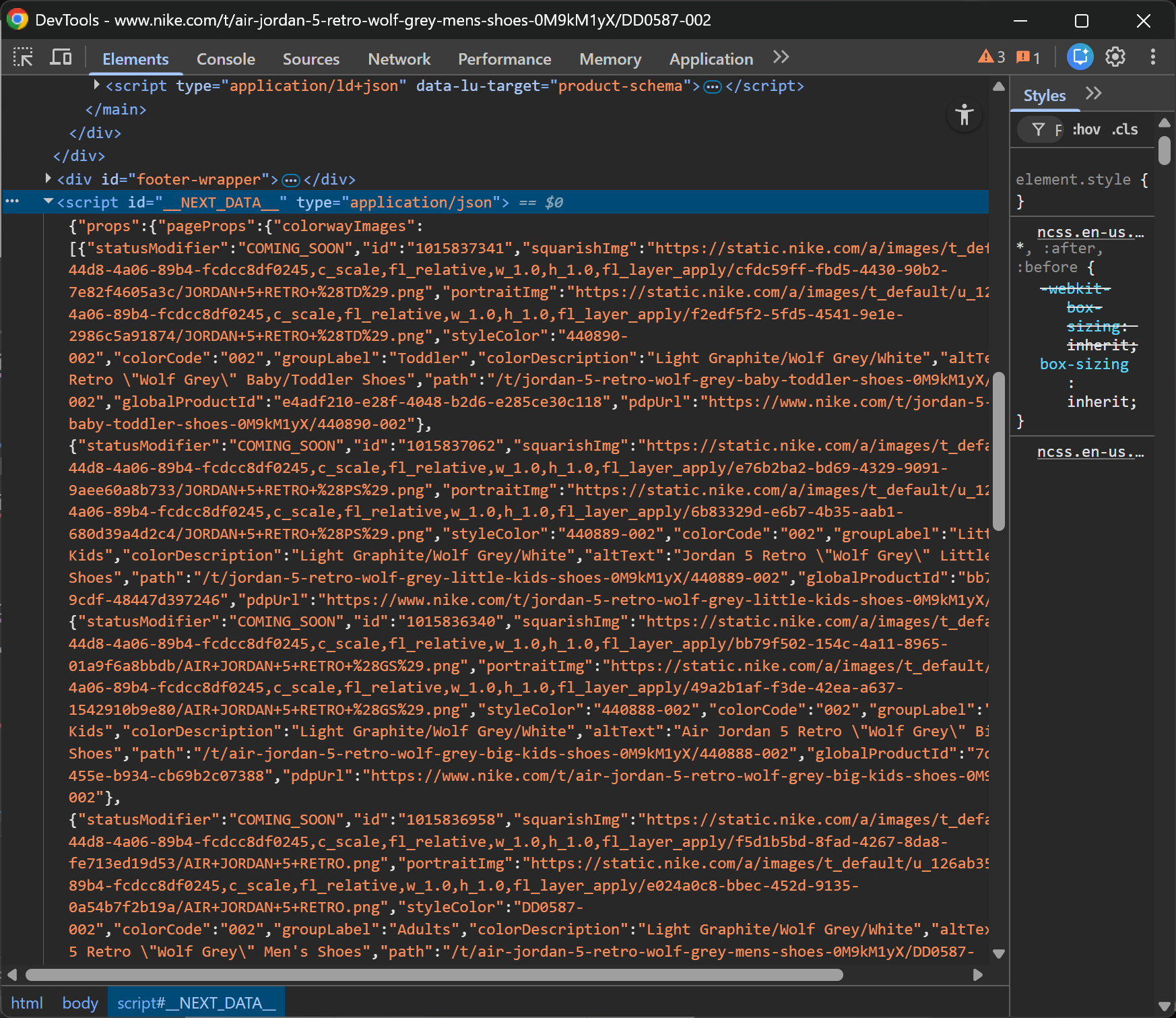
Now, right-click on the page and select the “Inspect” option in your browser to open the DevTools. Scroll through the DOM and get familiar with the page structure. If the Next.js site is using the Pages Router, you’ll notice a <script> tag with the id __NEXT_DATA__ containing a large JSON blob:
Note the JSON data inside the #__NEXT_DATA__ element
That JSON data is precisely the hydration data I was referring to earlier.
When a site uses the Pages Router approach in Next.js, the server embeds all the page data directly into that <script> tag. From a scraping perspective, that’s gold, as the data is already structured and ready to be captured.
Below’s a simple JavaScript snippet to extract it:
What’s happening here is straightforward. The JS script:
Selects the <script> element with id__NEXT_DATA__.
Reads its inner HTML (which is a JSON string).
Parses it into a JavaScript object.
Logs it to the console.
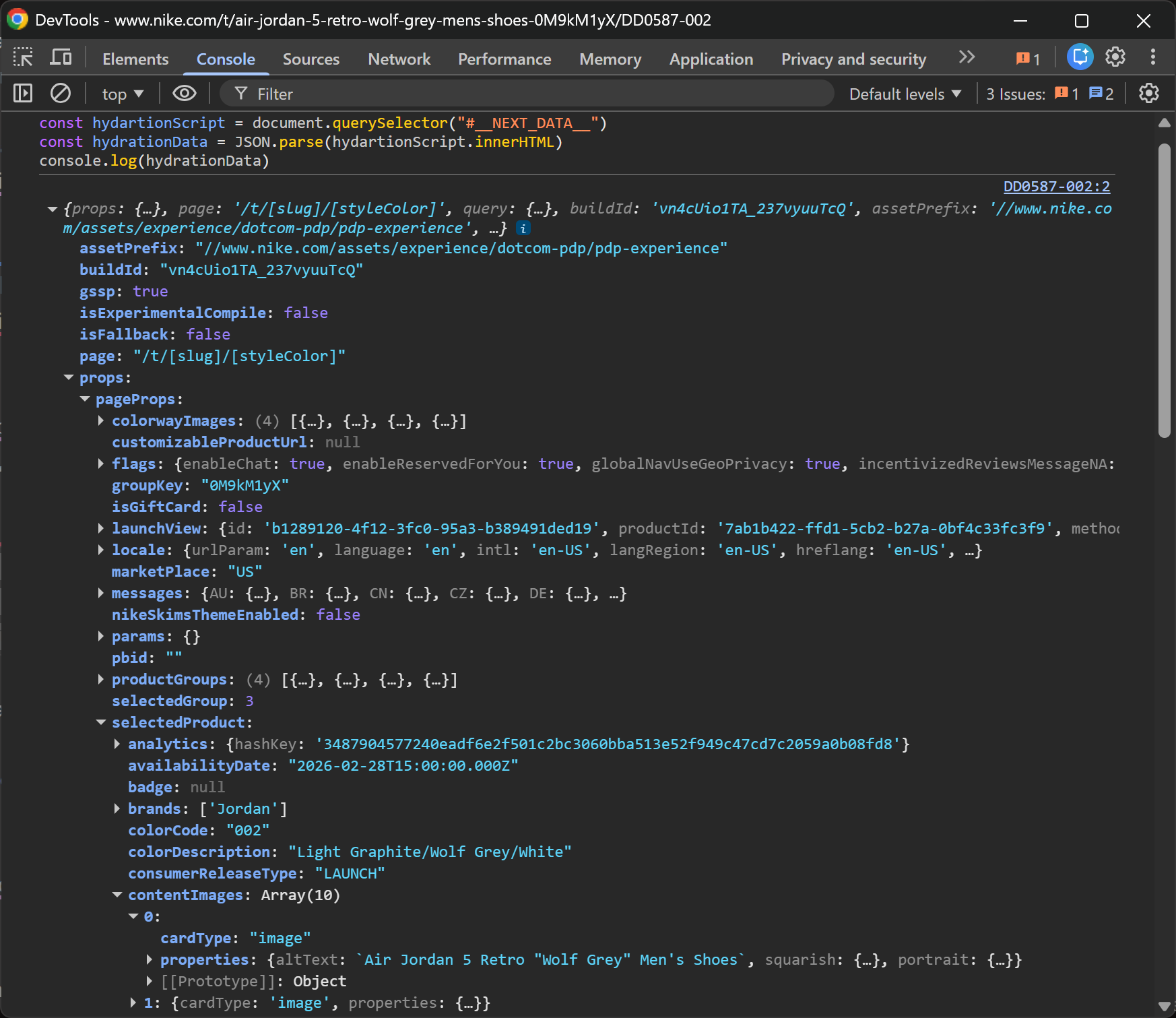
Run this directly in the DevTools Console, and you’ll immediately see the result:
Note the structured hydration data
What’s interesting is how much structured data you get right away. This includes product details, images, metadata, and more. All is neatly organized, and it only took three lines of code!
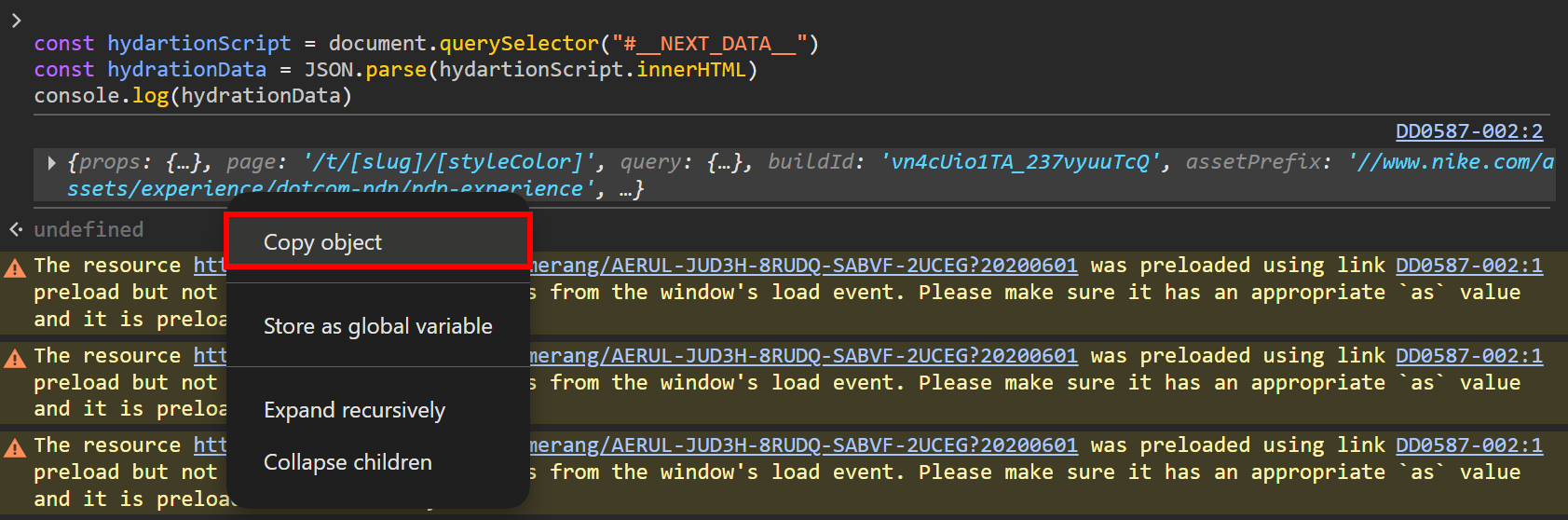
If you want to store the JSON hydration object, just right-click the object in the Console and select the “Copy object” option:
Selecting the “Copy object” option
From there, you can paste it wherever you need (e.g., into a local .json file, a MongoDB collection, etc.).
Approach #2: Target the self.__next_f.push() Elements
Another, more complex approach to scraping Next.js involves pages built with the App Router.
Even if the App Router has been the recommended direction for a while, in my experience, it’s still not as widely adopted as the Pages Router. And honestly, that’s a bit of a gift for us (as scraping hydration data in App Router sites is definitely more complex!)
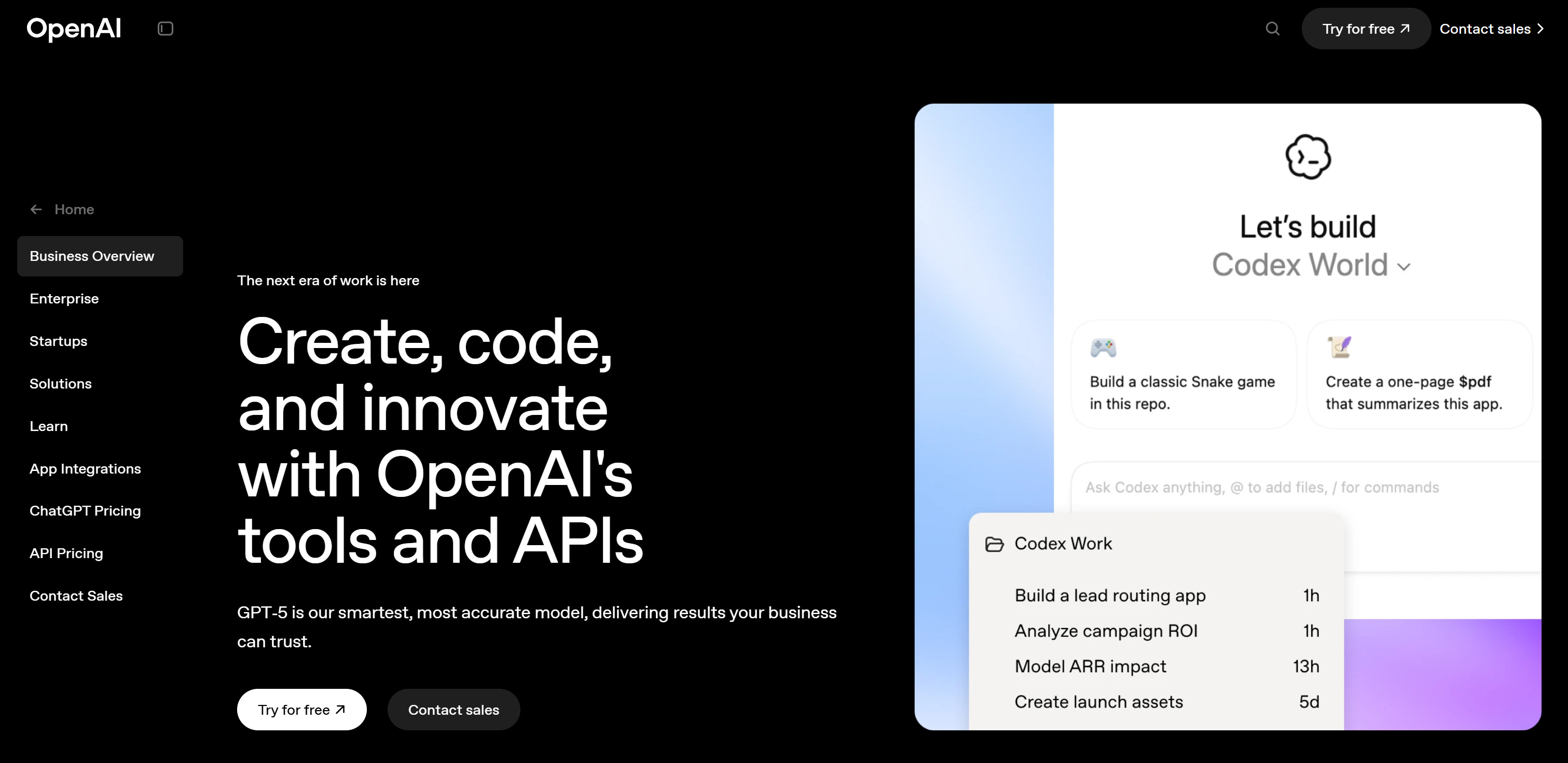
As a reference, let’s look at the “Business Overview” page on the OpenAI website, which is built with Next.js App Router:
The target page
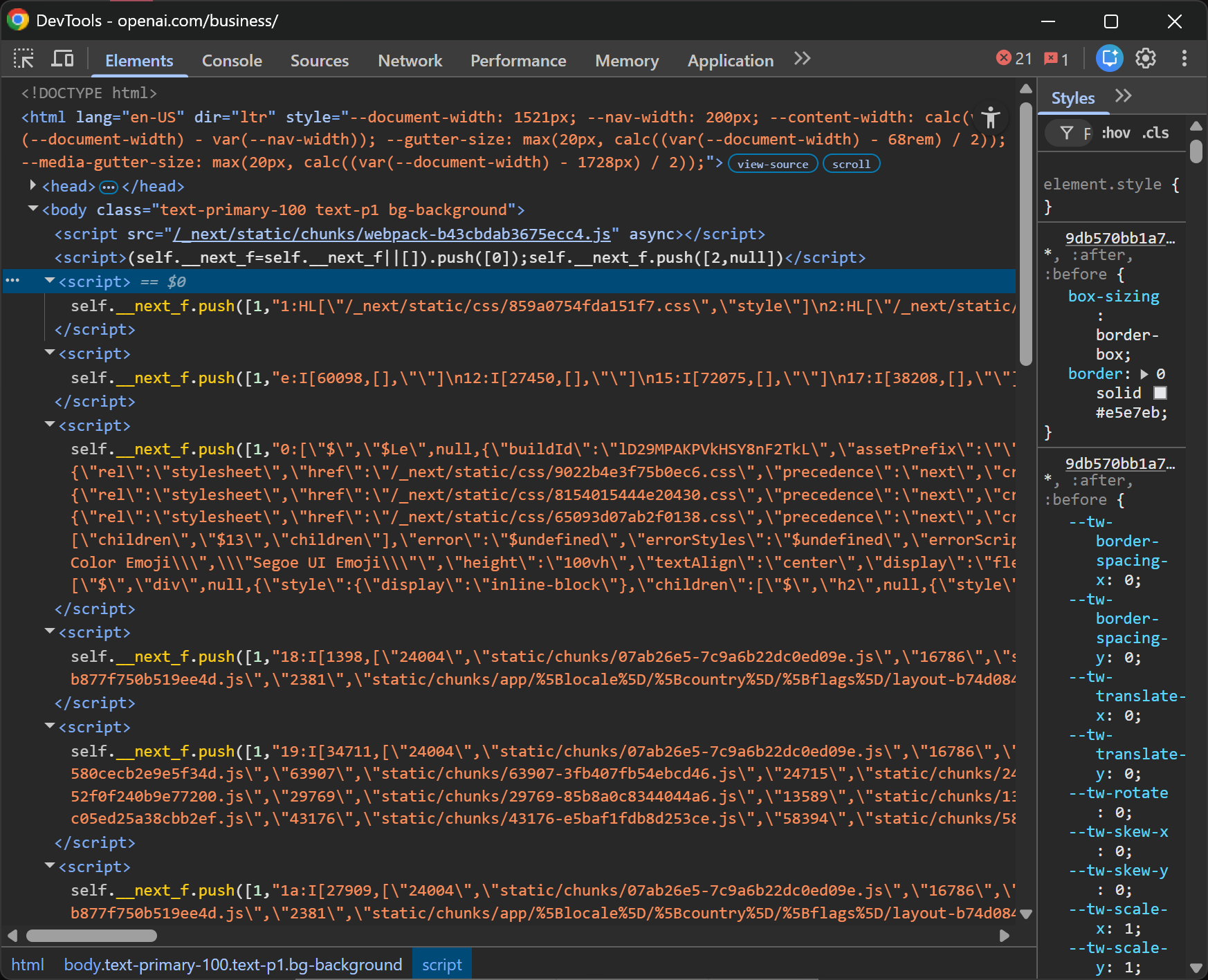
Just like before, open DevTools and inspect the page. This time, focus on the <script> tags inside the <body>:
Note the hydration script elements
You’ll notice several scripts containing content like:
self.__next_f.push(<some_data>)
That “<some_data>” is serialized using the React Flight protocol for React Server Components (RSC). I won’t go too deep into the internals here (it’s a dense topic!), but what matters is that deserializing that data is not straightforward!
React Flight isn’t plain JSON. It mixes control records (HL, I, J, etc.), module references, streaming boundaries, and serialized model fragments into a transport format that React incrementally resolves at runtime.
You might think: “Why not just reuse the frontend deserialization library?” In practice, that doesn’t work well because:
It relies on module maps and webpack IDs generated at build time.
It resolves component references against the exact bundle that produced the stream.
It assumes streaming semantics and internal React wiring.
Basically, outside that exact environment, you don’t have the module graph, build manifest, or hydration context. So even if you import the decoder, you can’t reconstruct the component tree the way the browser does.
There have been recent security issues in the React Flight payload deserialization system, highlighting just how sensitive and complex this layer is. For more details, refer to:
Thus, instead of fighting the protocol, I’d simplify and accept that in this case, it’s better to extract the unparsed React Flight string data. Achieve that with the JS script below:
This selects all <script> elements containing “self.__next_f” and builds an array of their raw contents.
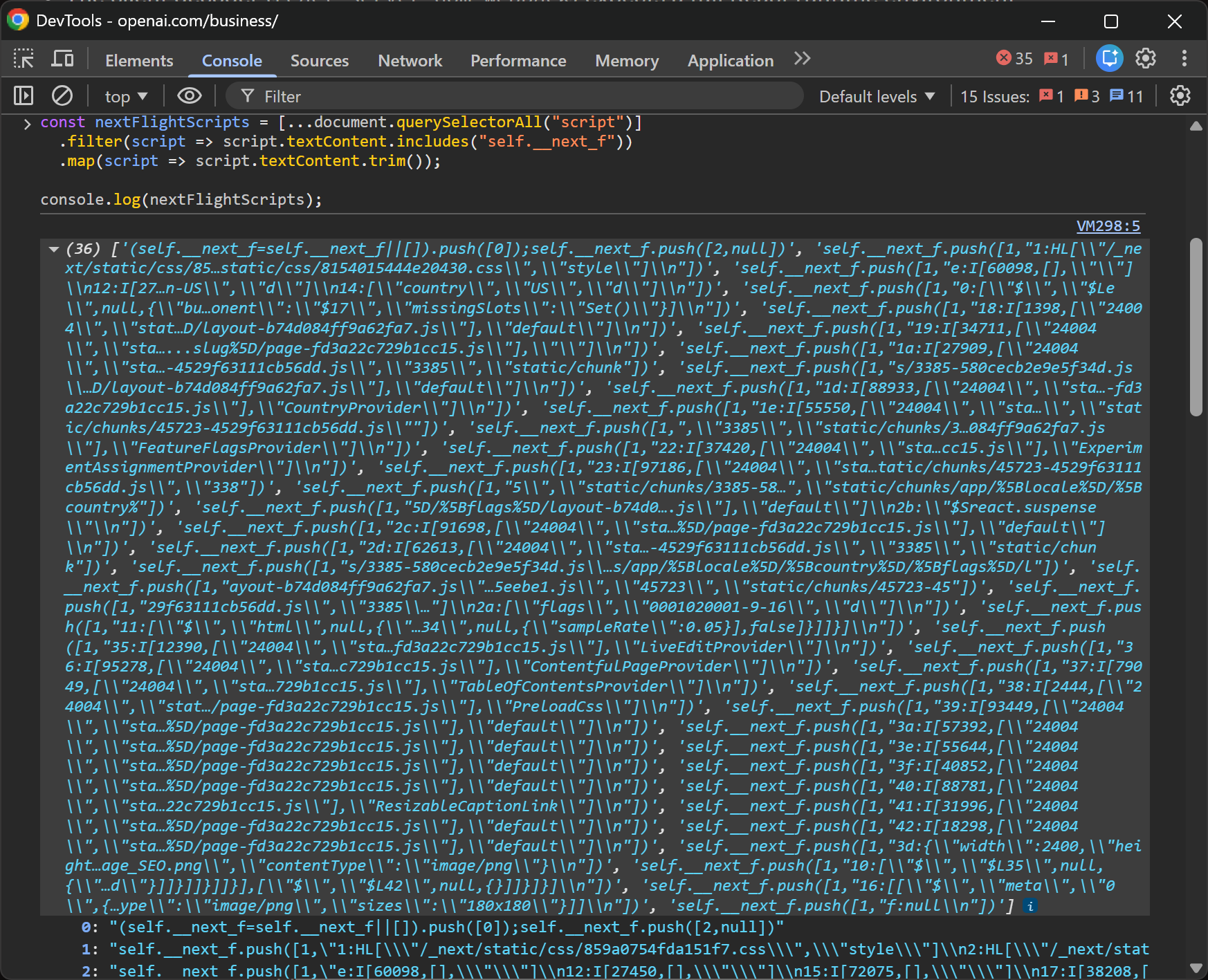
Run it in the Console, and you’ll get an array of React Flight chunks:
Note the React Flight strings
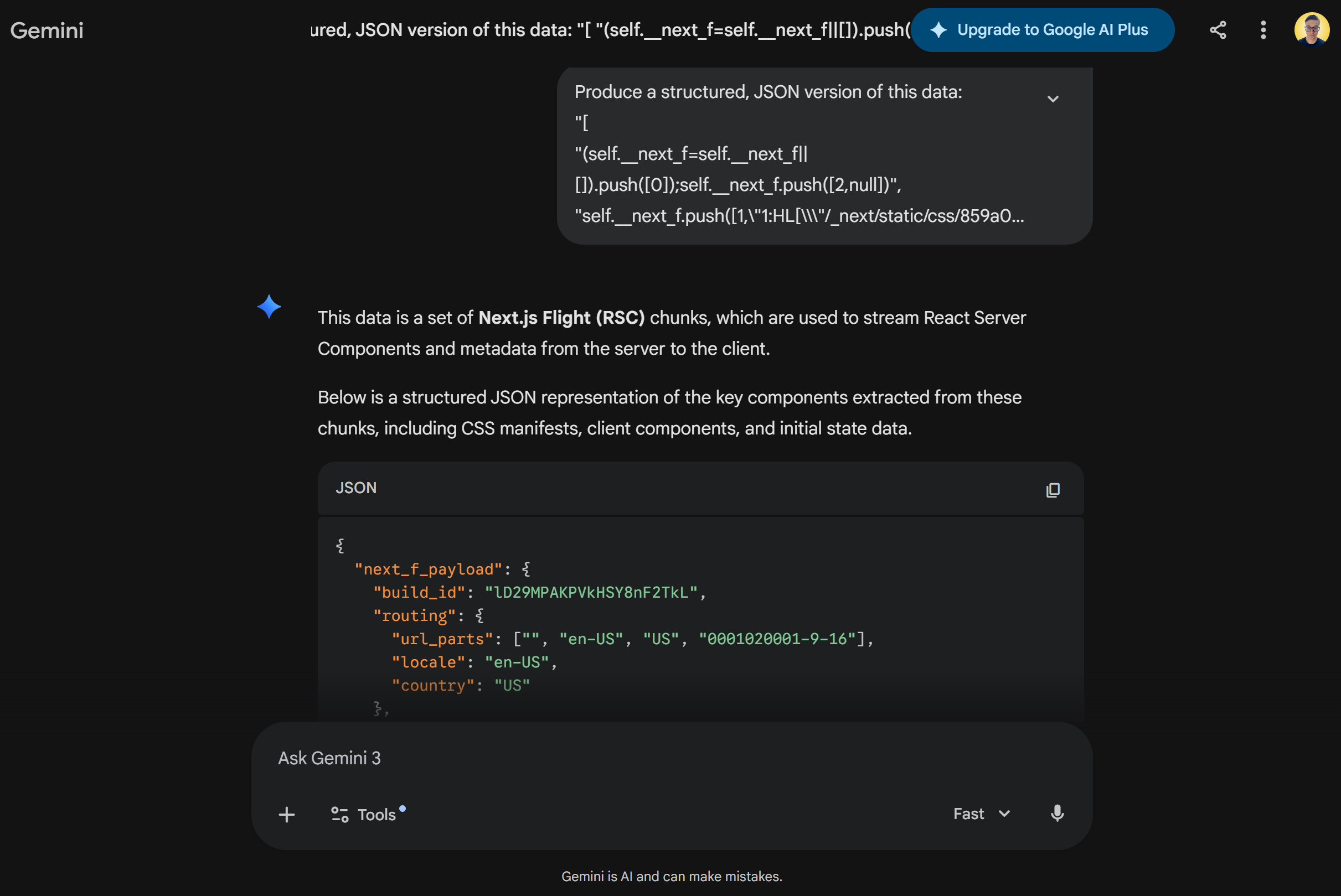
From there, the simplest way to extract structured data is often to copy the array, feed it to an AI, and ask it to reconstruct a parsed JSON representation of the meaningful payload sections:
Note the parsed version of the source data produced by Gemini
Is this more complicated than the __NEXT_DATA__ trick? Absolutely! Yet, it’s still a powerful way to access a large amount of page data with just a few lines of code.
Final Script to Quickly Access Data From Next.js Sites
If you combine the two approaches, you can build a production-ready script for brute-force hydration data scraping in Next.js:
To test it, just open the Console in DevTools, paste the script, and run it.
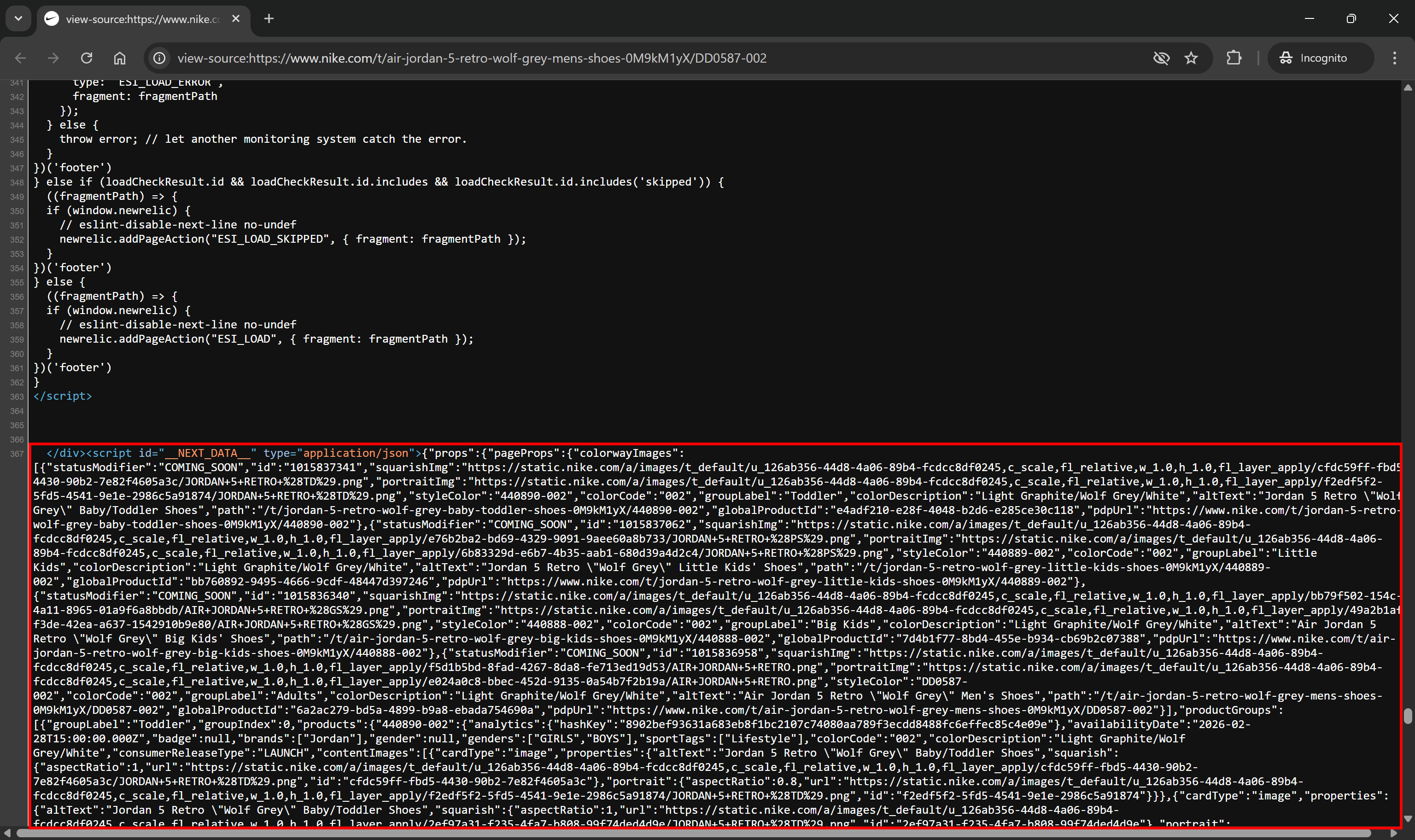
Important: The <script> components containing hydration data aren’t loaded dynamically via client-side rendering. They’re embedded directly in the HTML generated by the server.
Note the #__NEXT_DATA__ element in the page source
That means you can:
Fetch the target Next.js-powered page with an HTTP client.
Parse the HTML using an HTML parsing library like Beautiful Soup or Cheerio.
Apply a similar version of the JavaScript script above, but adapt it to the API provided by your HTML parser.
In other words, this trick for scraping Next.js doesn’t only work in the browser DevTools. It also works perfectly in regular scraping scripts!
Pros and Cons of This Approach to Next.js Scraping
👍 Pros:
Simple and effective, requiring only a few lines of code.
Works on all Next.js websites (and, more generally, on most sites that rely on hydration).
Can let you access more data than what is actually displayed on the page.
No need for browser automation, waiting for client-side rendering, or simulating user interactions.
👎 Cons:
You may only get partial data, meaning you might still need to complement it with a more traditional scraping approach.
React Flight data is difficult to parse and may require custom logic or even AI-assisted parsing.
The Web Scraping Club is a reader-supported publication. To receive new posts and support my work, consider becoming a free or paid subscriber.
Conclusion
Here, I’ve shared a trick I personally documented years ago, and that still works to this day. It allows you to quickly scrape data from virtually any Next.js site by targeting the hydration data embedded in the HTML document generated by the server and sent to the client for rendering.
As you’ve seen, with just a few lines of JavaScript, you can extract hydration data from any Next.js-powered page. What you get back is clean, or at least almost clean, data that you can process directly in your data pipelines.
Instead of fighting the frontend, this Next.js web scraping approach helps you leverage the data the framework itself needs to function!
I hope you found this useful and insightful. If you have questions or thoughts, feel free to share them in the comments below!
I can definitely confirm that nike.com is a very hot target among web scraping and browser automation experts. It comes up all the time on our support channels.
That said, in my experience, the strongest interest actually comes from people working on sneaker botting. In that space, simple data extraction is usually not enough. They typically need full browser automation, often combined with anti-detect browsers, to deal with protections, account management, and checkout flows.




I can definitely confirm that nike.com is a very hot target among web scraping and browser automation experts. It comes up all the time on our support channels.
That said, in my experience, the strongest interest actually comes from people working on sneaker botting. In that space, simple data extraction is usually not enough. They typically need full browser automation, often combined with anti-detect browsers, to deal with protections, account management, and checkout flows.