There’s no doubt that web scraping supports a wide range of use cases, from price monitoring to data collection for AI model training. Most of these applications focus on generating value for businesses or individuals by supporting decision-making or automating workflows.
However, web scraping can also serve as a foundation for building the data infrastructure needed to better understand national markets and societal conditions.
In this blog post, I’ll show real-world examples of how web scraping is already used in the public sector, and how institutions could leverage it to improve policies and deliver higher-quality services to citizens.
Before proceeding, let me thank NetNut, the platinum partner of the month. Their set of solutions cover all your needs for scraping.
Public institutions have access to statistical datasets from official sources. These are surely relevant, but they tend to provide a picture of the market only after events have already happened, sometimes months or even a year later.
That delay creates a challenge. After all, institutions need timely information to understand citizens’ current needs and respond effectively. Another issue is that relevant data is often scattered across many sources, such as different websites, web portals, and marketplaces.
This is where web scraping can help! By collecting large volumes of publicly available data from multiple sites, institutions can complement and enrich official statistics.
Data collection is only the first step, though. The real value comes from building a complete data pipeline that includes cleaning, deduplication, aggregation, geolocation, statistical modeling, and interpretation.
Bayernheimerová Klára during her speech at Prague Crawl 2026
At Prague Crawl 2026, Bayernheimerová Klára presented a compelling example of this approach. Her talk showed how the Czech Ministry of Finance relies on rental listing data collected by an external provider from several real estate portals and processes it through an end-to-end pipeline based on a dedicated statistical methodology.
As I’ll present shortly, the result is a reliable source of insights that supports housing policy decisions and affordable housing programs across the country, while also providing a valuable service to citizens.
What’s important to understand is that the goal isn’t simply to collect raw data, but to power services such as interactive maps, calculators, and dashboards that are useful to both public institutions and citizens.
Case Study: Czech Rental Market Intelligence System
To see an actual application of web scraping in the public sector, I’ll now present the initiative developed by the Czech Ministry of Finance for rental price analysis across Czechia.
For your scraping needs, having a reliable proxy provider like Decodo on your side improves the chances of success.
Just like in many other European countries, housing affordability has become a major social and economic challenge in the Czech Republic. Housing supply has struggled to keep up with demand, causing both property prices and rents to rise steadily across the country.
To confront this issue, the Czech Ministry of Finance needed detailed and up-to-date information on local rental markets. The initiative was launched specifically to fill that gap, creating a web data analysis process that gives a continuously updated view of rental prices across the entire country.
The objective is to provide a reliable foundation for housing policy, affordable housing programs, and public-facing tools that help citizens better resonate with local rental markets.
Web Data Sourcing
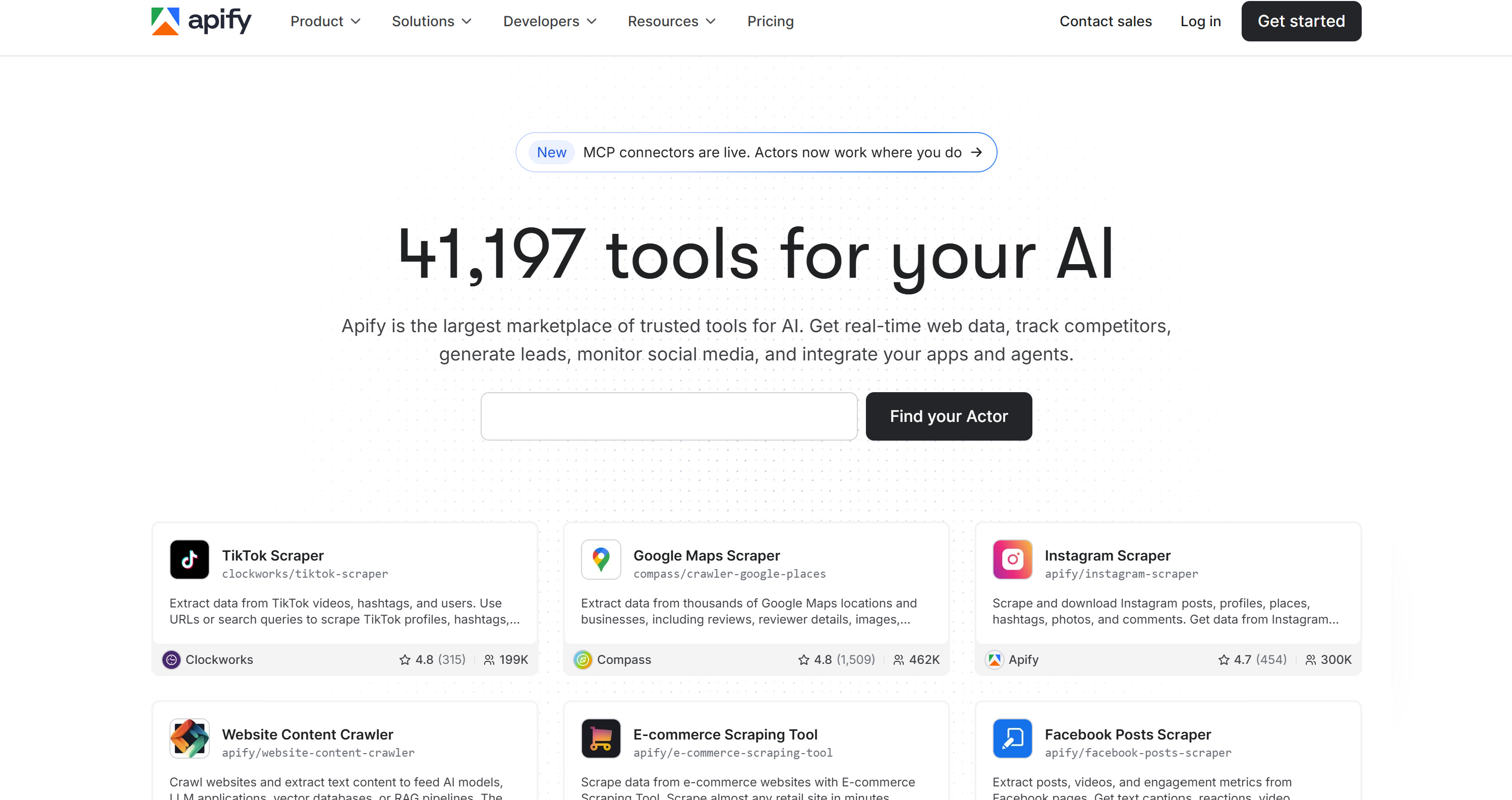
The data for this initiative has been collected using Apify, one of the largest marketplaces of ready-made tools for web scraping, automation, and AI.
Apify
If you aren’t familiar with Apify, it provides over 41,000 ready-made serverless cloud programs (called Actors) to automate a wide range of tasks, including web scraping across thousands of different domains.
These Actors are developed and maintained by the community (and in some cases by Apify itself) and run on Apify’s cloud infrastructure. You can use them directly through Apify Console via a no-code interface, or call them programmatically via API. They can also be integrated into workflows such as n8n, Make, Zapier, or AI agents via MCP.
Two main reasons influenced the choice of Apify:
It’s a Czech-based company.
It enables the Ministry of Finance to gather large-scale, up-to-date information on rental listings without maintaining scraping infrastructure in-house.
In general, a solution like Apify lowers the barrier for public-sector teams, as these may have limited engineering capacity.
Downstream Data Pipeline
At a high level, this is the downstream data pipeline implemented by the Czech Ministry of Finance:
Data ingestion: Collects rental listings via Apify-based web scraping from multiple Czech real estate portals.
Data cleaning: Sorts data and removes duplicates, incorrect entries, and inconsistencies to ensure it is up to date, accurate, and free from deviations or distortions, following the procedure defined in Decree No. 456/2024 Coll.
Geolocation and aggregation: Standardizes addresses, assigns cadastral units, and enriches listings with attributes such as size, amenities, and building type.
Statistical modelling: Uses hedonic regression with spatial and temporal weighting to estimate underlying rental price levels.
Output generation: Presents results as interactive price maps and calculators.
Note: The pipeline also includes data update and recycling via a rolling window approach. This process adds new listings while retiring outdated observations to keep the dataset current.
To make rental prices comparable across different locations, the methodology is based on a reference apartment. That represents a standardized apartment profile with predefined characteristics, such as size, type, furnishing level, etc.
This approach reduces differences caused by individual property features and enables more consistent comparisons of rental price levels across municipalities and cadastral areas.
Produced Output and Tools
The Czech Rental Housing Price Map consists of two main solutions:
Interactive rent price map: Provides estimated rental prices at the level of municipalities and cadastral areas across the Czech Republic.
Market rent calculator: A practical tool that calculates a statistical estimate of rental price levels based on a standardized apartment profile and selected property characteristics.
Important: The two solutions aren’t intended to determine the market rent of a specific apartment. Instead, they return statistical estimates based on a standardized reference apartment. So, they’re intended primarily for market monitoring, regional comparisons, and housing policy analysis.
Interactive rent price map
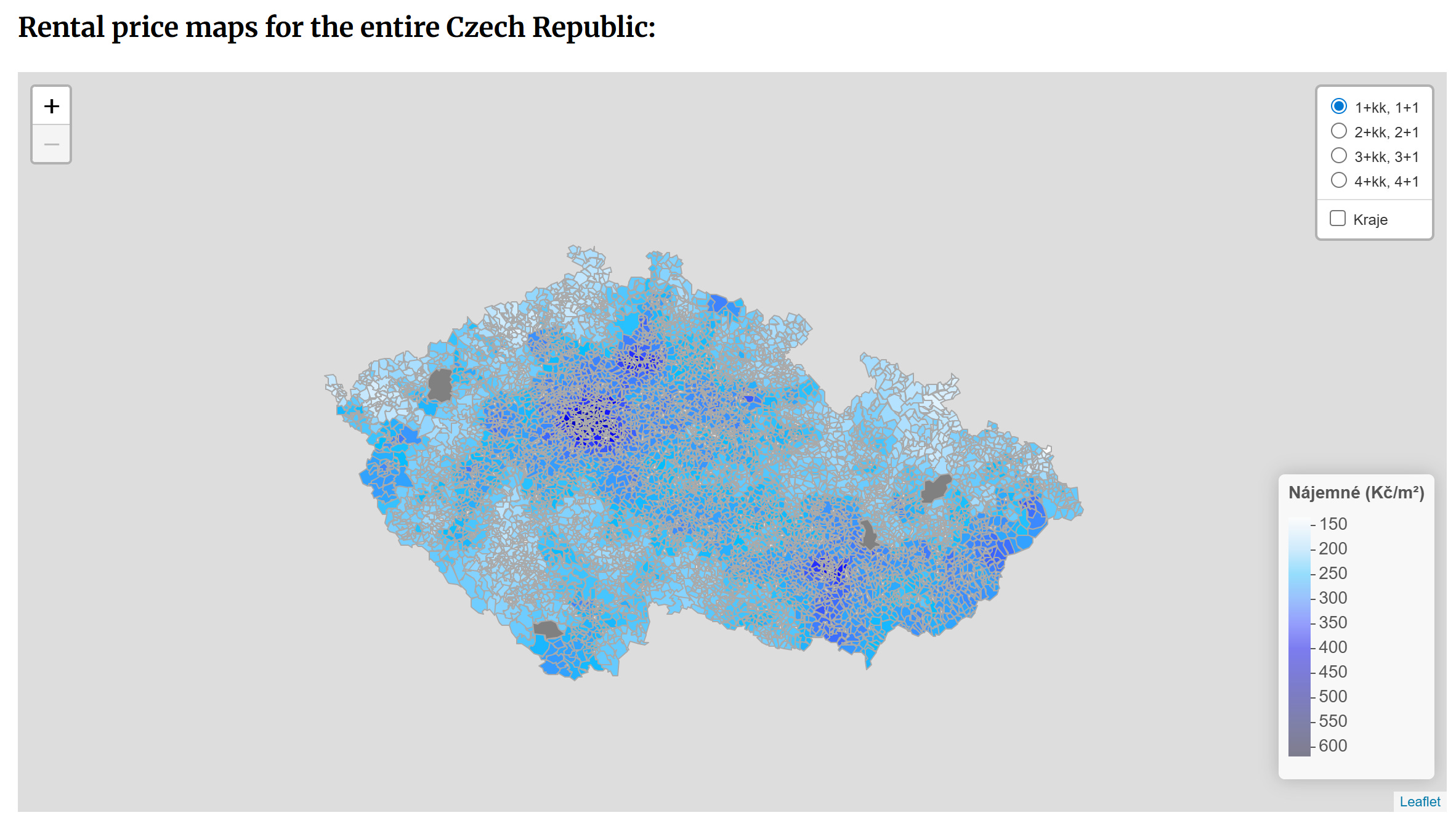
The interactive rent price map shows minimum, maximum, and median rents for each area based on market listings, adjusted per square meter for a standard unfurnished reference apartment. It covers four size categories from 1+kk/1+1 to 4+kk/4+1.
The Czech interactive rent price map (as displayed on a Google-translated page in English)
Note that the map is interactive, and you can zoom in and out to explore individual cadastral areas. It’s also updated four times per year to ensure current data.
Market rent calculator
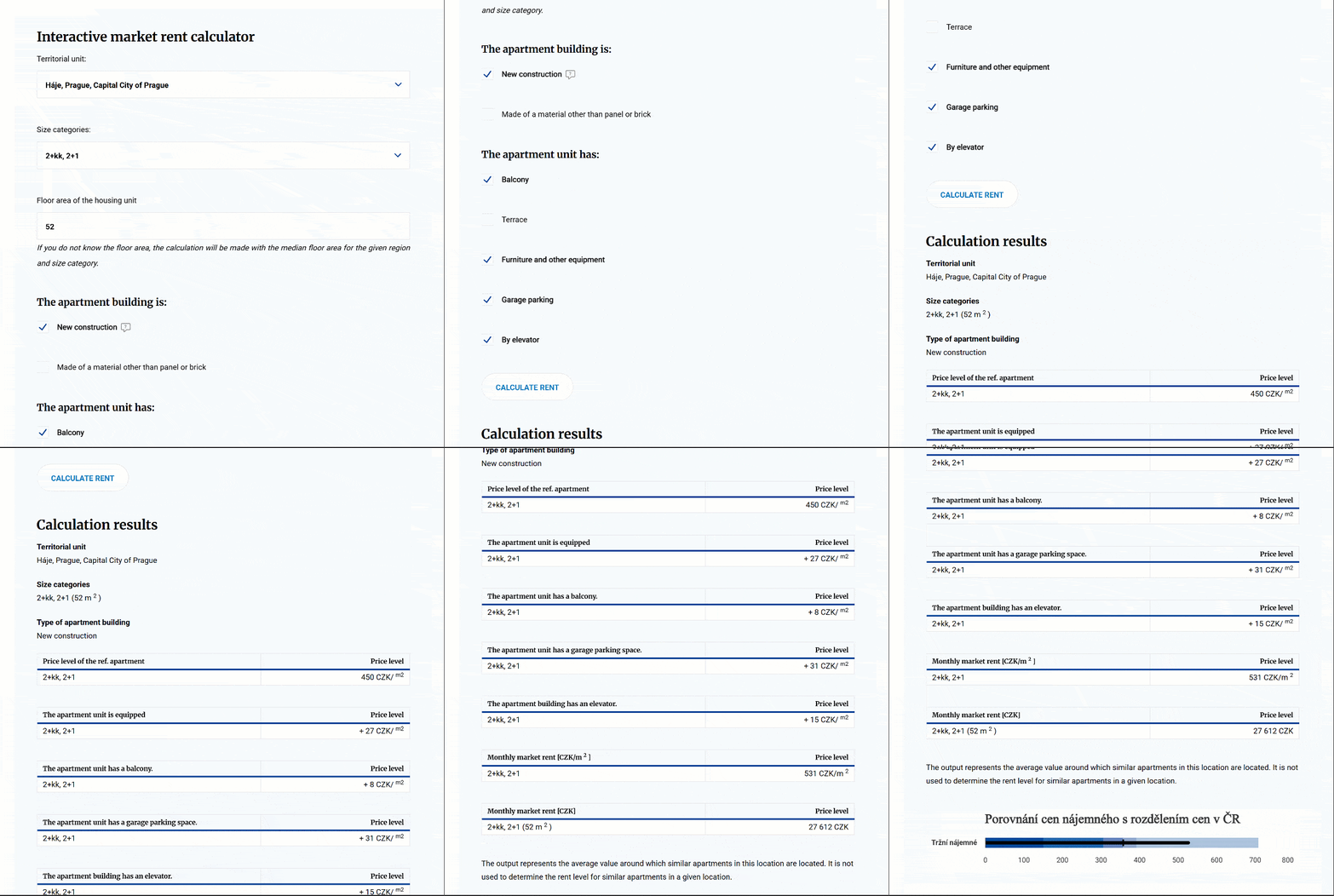
The market rent calculator is available as a form on the Czech government website. It works as follows:
Select the territorial unit where you want to estimate the rent.
Choose the size category of the apartment.
Enter the floor area of the apartment (if you don’t know it, the calculator will automatically use a default value for the selected location).
Indicate whether the apartment is in a new building.
Optionally specify whether the building uses non-standard construction materials (e.g., other than brick or panel).
Optionally select additional features such as a terrace, furniture, or an assigned parking/garage space.
Click “Calculate rent” to obtain an estimate of the monthly market rent (CZK) and the corresponding price level, which represents the final estimated rent for the selected apartment profile.
Result of a market rent calculator submission (as displayed on a Google-translated page in English)
Impact
The project provides a systematic and regularly updated overview of market rental prices across the entire Czech Republic, supporting consistent monitoring of housing market developments over time and across regions.
Beyond market observation, the outputs serve as a key evidence base for housing policy design and housing programmes within public administration. For example, the State Investment Support Fund (SFPI) relies on these results when working with its affordable rental housing schemes.
Web Scraping in the Public Sector: Extending the Model
The project carried out by the Czech Ministry of Finance is just one example of a much broader pattern: how web scraping can be used as a foundation for modern public-sector data systems.
In particular, the same pipeline logic can be applied across many other domains. For example, in labor markets, web scraping can be used to collect job postings, salary ranges, and skill requirements from recruitment platforms. This can help governments identify regional skill shortages and design more targeted education or reskilling programmes.
Similarly, in consumer price monitoring, scraping can track grocery prices, housing costs, and essential goods across regions, enabling better inflation tracking and cost-of-living analysis. Other potential public domains that can benefit from this include energy consumption and transport accessibility.
When combined, those datasets become even more powerful. For instance, housing data, job market data, and grocery price data could be combined into a broader “liveability” index. That would help citizens and policymakers assess the overall affordability of living in a given region.
Building a Job Market Choropleth for Czech Districts
In this section, I’ll guide you through building a job market choropleth across Czech districts. The idea is to show how web scraping, combined with a complete data pipeline, can be utilized for other scenarios beyond the previous example.
Important: The project below isn’t related to the initiative from the Czech Ministry of Finance and has been created purely for illustrative purposes.
Prerequisites
To follow this tutorial section, make sure you have:
geopy: Convert job location addresses into geographic coordinates through geocoding.
matplotlib: Visualize the results by generating a choropleth map showing job density by district.
Step #1: Access the Indeed Jobs Scraper Apify Actor
Just like in the Czech Ministry of Finance example, you can use Apify to collect the source data. This saves you from building and maintaining a complete job scraping pipeline from scratch.
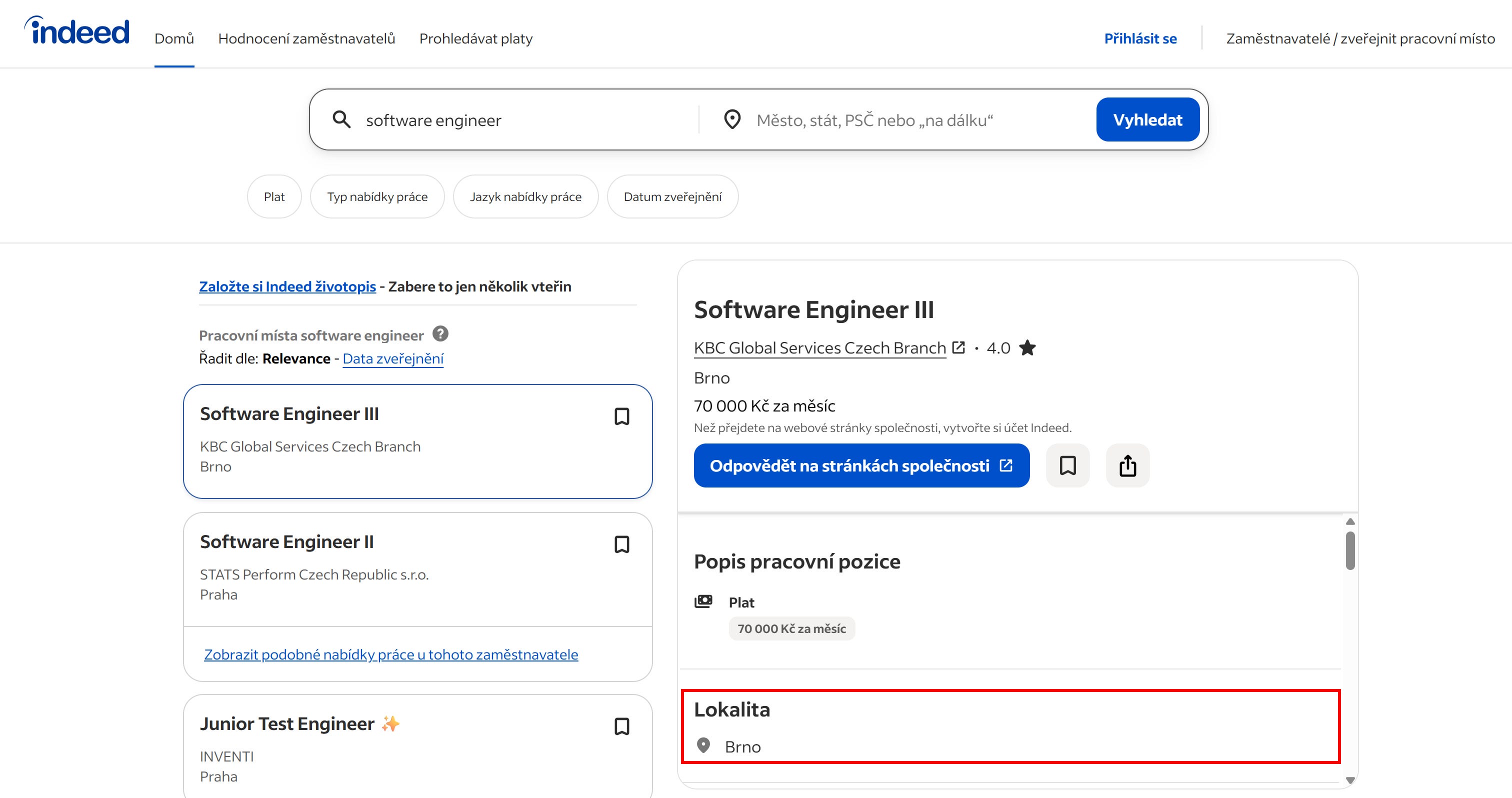
For this project, we’ll use Indeed as the data source. Indeed has a Czech version, and most listings include the full office address where employees are expected to work.
The Czech version of Indeed
In detail, I recommend using the Indeed Jobs Scraper [PPR] Actor. This automates the extraction of job titles, salaries, locations, company information, and job descriptions from Indeed.
The Indeed Jobs Scraper [PPR] Actor
To get started, log in to your Apify account and select the “Apify Store” option from the left-hand navigation menu. Then, search for “Indeed Jobs Scraper [PPR]”:
Selecting the Indeed Jobs Scraper [PPR] Actor
Click on the Actor card to reach its page. Great!
Step #2: Run the Job Scraping Task
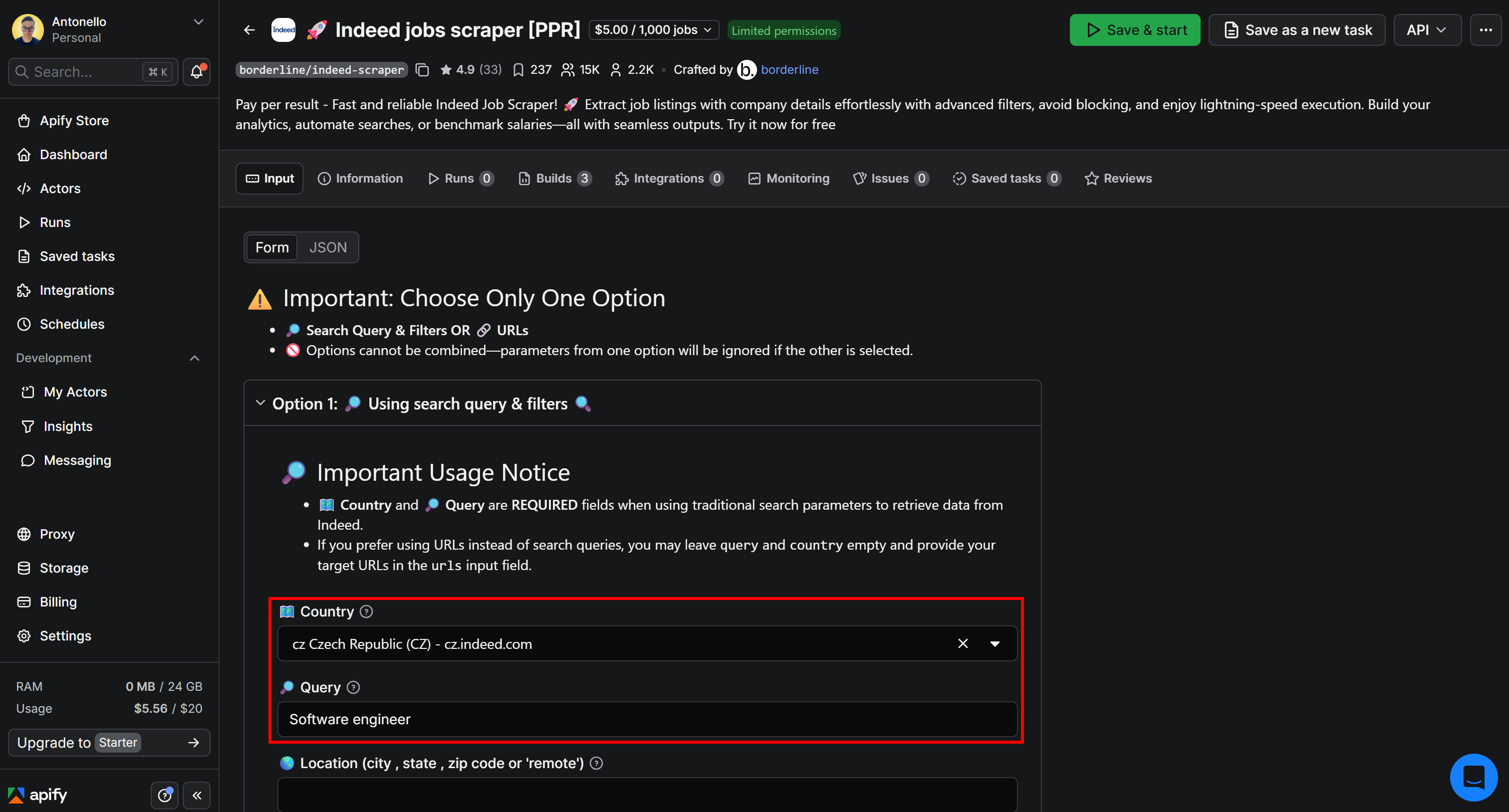
On the Actor page, you’ll find an input form that lets you configure the scraper before running it in the cloud. Select “Czech Republic” as the “Country” and enter “Software engineer” in the “Query” field:
Configuring the Actor run
Note: In a real-world scenario, configure the Actor’s inputs according to your needs.
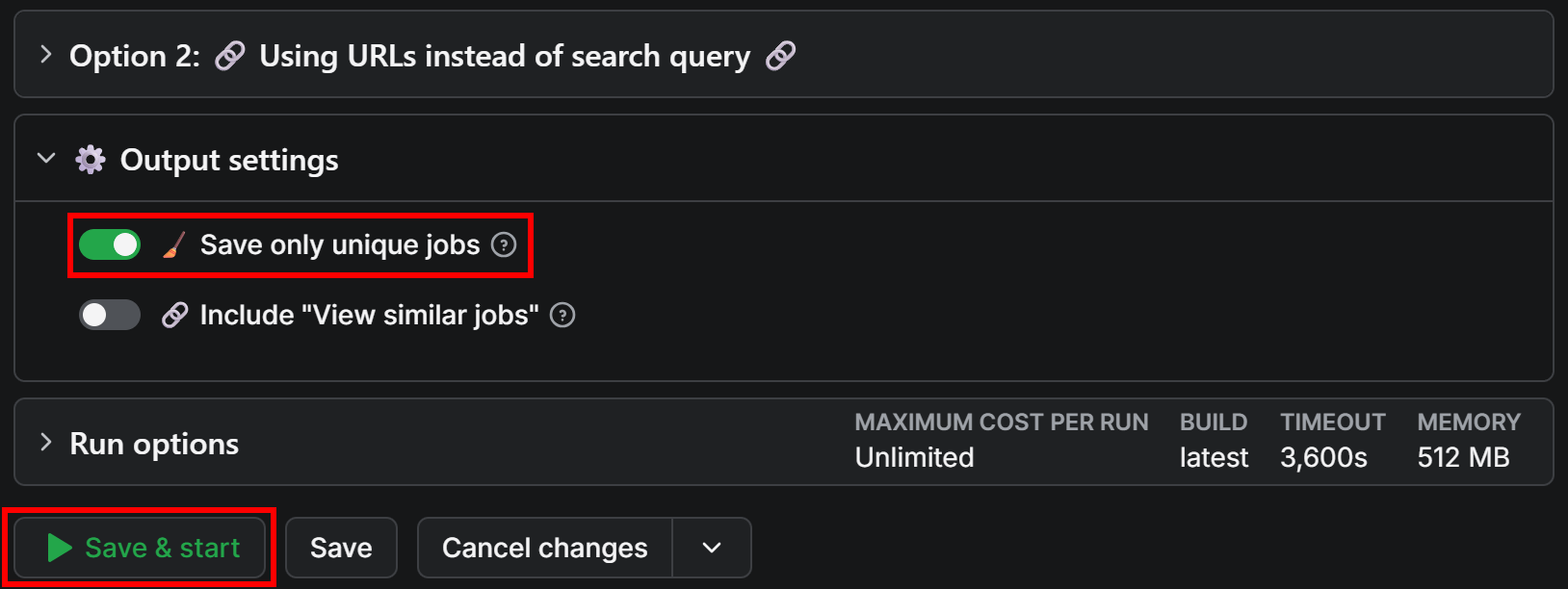
Next, toggle the option to avoid duplicates so that the Actor takes care of data deduplication for you:
Running the Actor
Click the “Save & Start” button to launch the scraping task. The Actor will start running directly in Apify Console. As the scraper progresses, you’ll see the extracted job postings appear in real time. Be patient, as the process may take a few minutes depending on the number of matching listings.
Step #3: Explore the Output and Export the Results
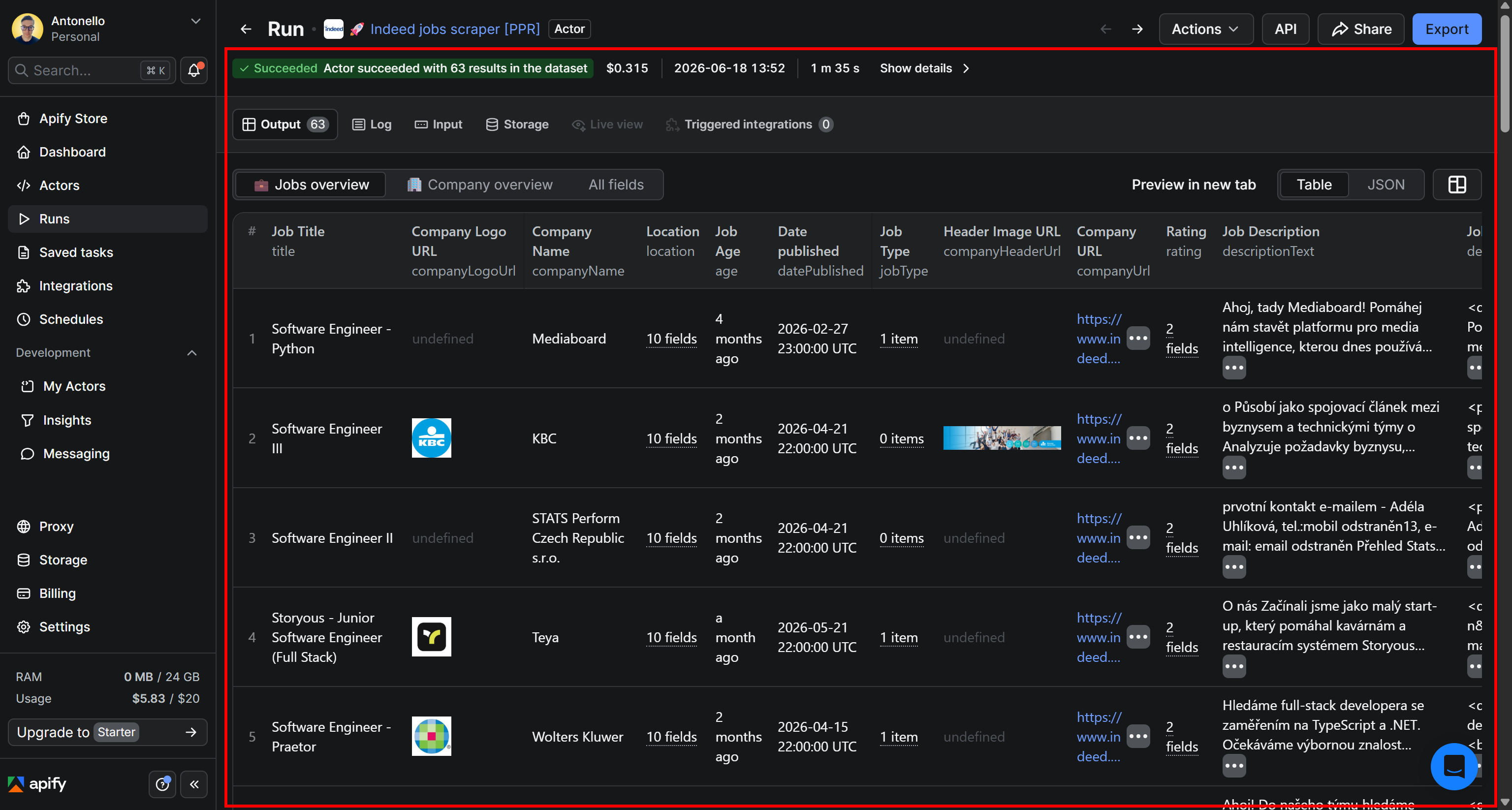
Once the run completes, you’ll be able to explore the scraped dataset directly in Apify Console. As you can see, the Actor returns structured Indeed job data:
The scraped data in a structured format
In this case, the Actor retrieved 63 job postings. That may seem like a small number, but keep in mind that the scraper targets only jobs published during the last 14 days. This helps ensure that the dataset reflects the current state of the job market.
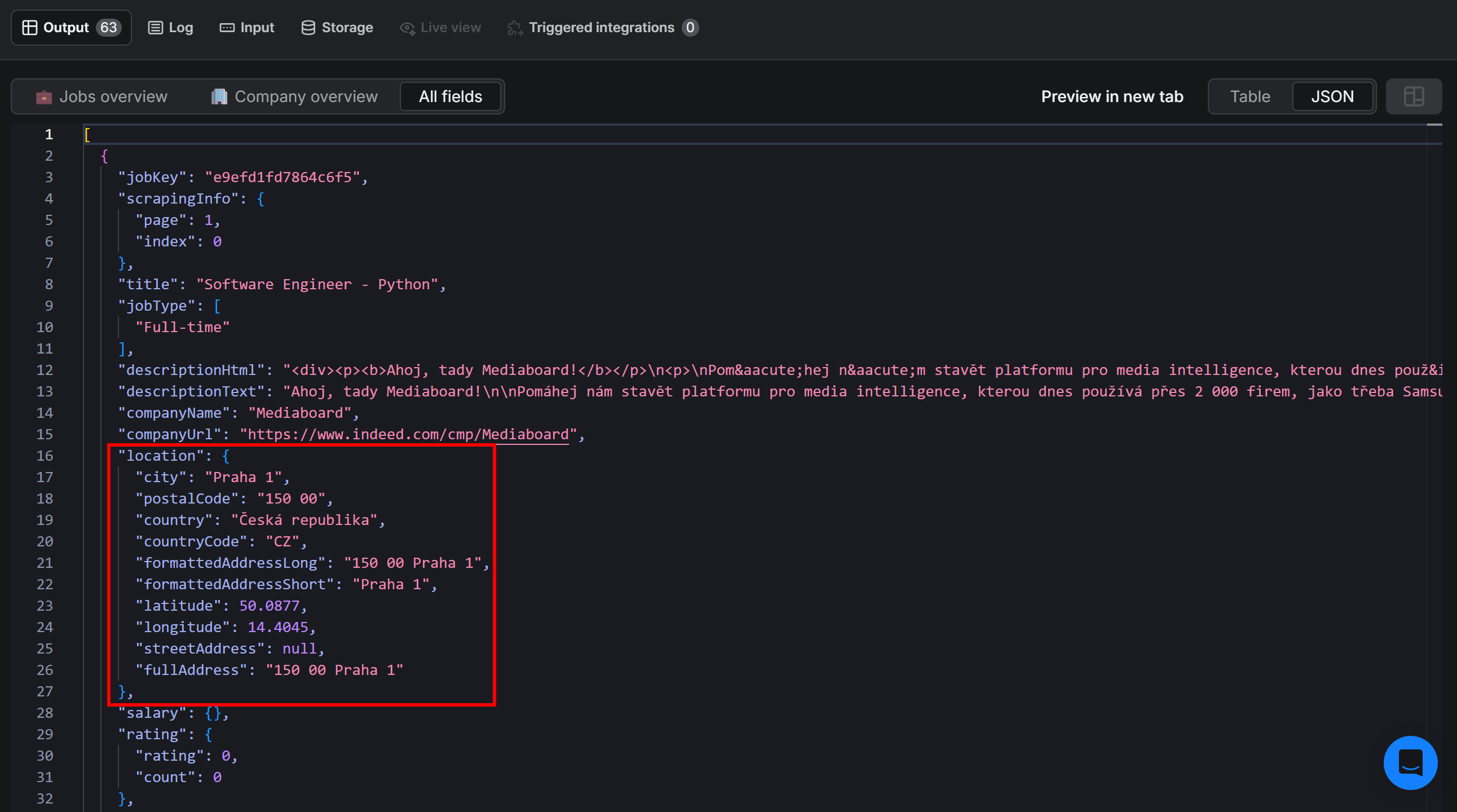
Next, switch to the JSON view and select “All fields”. You’ll notice that each job posting includes a location object containing address information for the position:
Note the “location” field on each job object in the scraped JSON dataset
That location data is exactly what you need to visualize job openings on a map and analyze their geographic distribution across Czech districts.
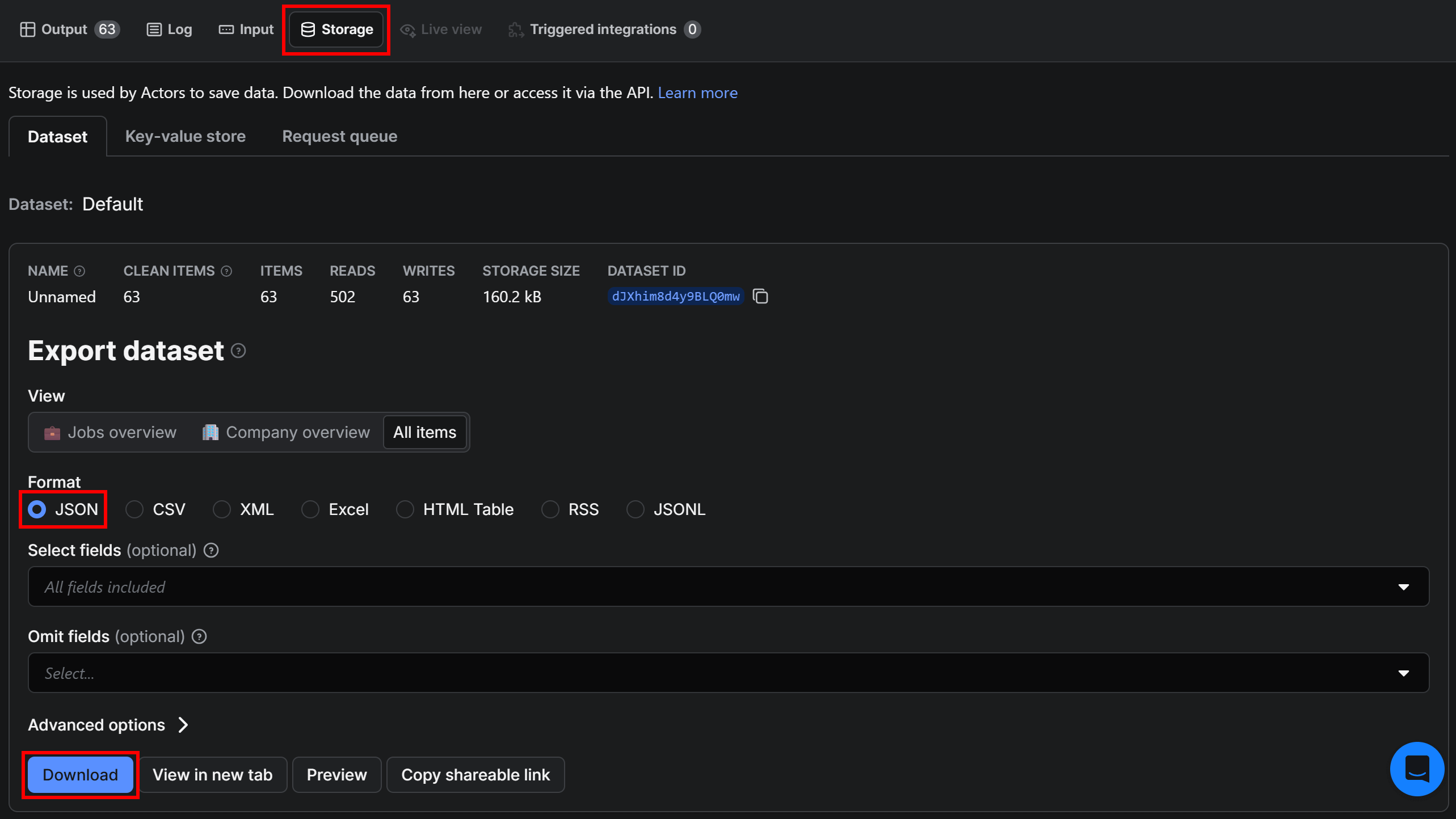
Finally, open the “Storage” tab, select the “JSON” export format, and click “Download” to export the scraped dataset:
Downloading the dataset
A file with a name similar to dataset_indeed-scraper_2026-06-18_11-54-00-555.json will be downloaded. Rename it to jobs.json and place it in your Python project’s root directory.
Step #4: Download the Required Czech GeoJSON Data
To visualize the distribution of job openings across Czech districts, you’ll need a GeoJSON dataset containing the geographic boundaries of those districts.
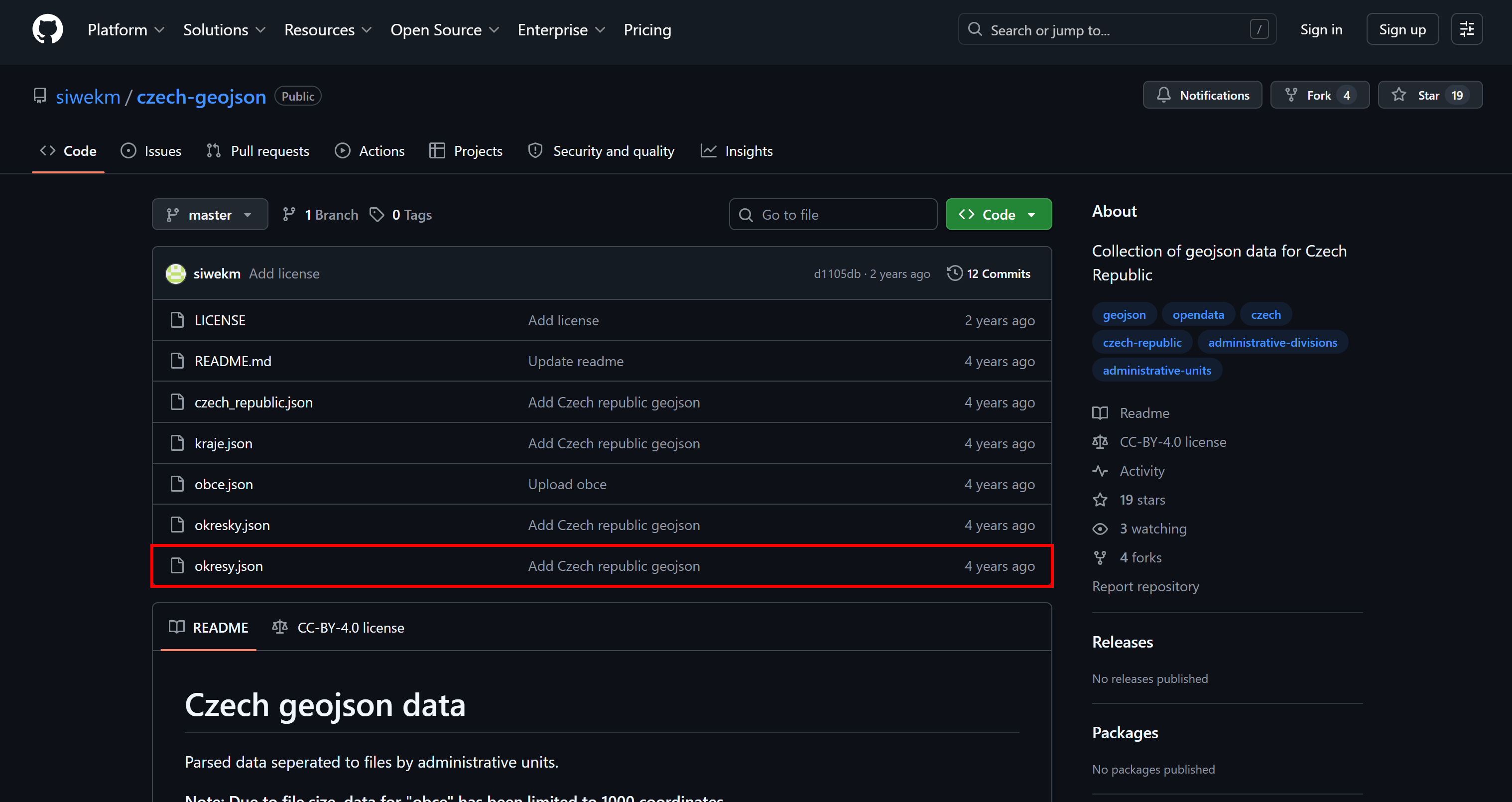
Generally, that type of data is open and publicly available. For example, one possible source is the siwekm/czech-geojson repository, which provides GeoJSON files for various Czech administrative divisions:
Downloading the “okresy.json” file from the siwekm/czech-geojson repository
Download the okresy.json file, which contains the geographic boundaries of Czech districts (okresy in Czech).
Once downloaded, add the okresy.json file to your Python project. At this point, your project structure should look similar to this:
├── jobs.json
├── okresy.json
└── main.py
Step #5: Visualize the Job Data on a Map
In your Python file, define the complete pipeline with the following code:
# pip install pandas geopandas geopy matplotlib

import json
from geopy.geocoders import Nominatim
from geopy.extra.rate_limiter import RateLimiter
import pandas as pd
import geopandas as gpd
import matplotlib.pyplot as plt

# Load the scraped Indeed job openings
with open("jobs.json", "r", encoding="utf-8") as f:
    jobs = json.load(f)

# Load the list of addresses from the job postings
addresses = []
for job in jobs:
    loc = job.get("location", {})

    # Prefer fullAddress, fallback to formattedAddressLong or formattedAddressShort
    address = (
        loc.get("fullAddress")
        or loc.get("formattedAddressLong")
        or loc.get("formattedAddressShort")
    )

    # Filter out full-remote jobs with no address
    if address and address.strip().lower() not in ["home office", "remote"]:
        addresses.append(address)

addresses = list(addresses)

# Initialize geocoder for Czech job locations
geolocator = Nominatim(user_agent="cz_job_map")
geocode = RateLimiter(geolocator.geocode, min_delay_seconds=1)

# Geocode all job addresses into latitude/longitude points
rows = []
for address in addresses:
    loc = geocode(f"{address}, Czech Republic")

    # Keep only successfully geocoded results
    if loc:
        rows.append({
            "address": address,
            "lat": loc.latitude,
            "lon": loc.longitude
        })

# Convert geocoded results into a DataFrame
df = pd.DataFrame(rows)

# Convert DataFrame into GeoDataFrame with point geometries
points = gpd.GeoDataFrame(
    df,
    geometry=gpd.points_from_xy(df.lon, df.lat),
    crs="EPSG:4326"
)

# Load Czech administrative districts (okresy) from a local GeoJSON file
okresy = gpd.read_file("okresy.json")

# Align coordinate reference systems between datasets
if okresy.crs != points.crs:
    okresy = okresy.to_crs(points.crs)

# Assign each job point to its corresponding district
joined = gpd.sjoin(
    points,
    okresy,
    predicate="within",
    how="left"
)

# Count number of jobs per district
counts = (
    joined["id"]
    .value_counts()
    .reset_index()
)

counts.columns = ["id", "count"]


# Merge job counts back into district geometries
okresy = okresy.merge(
    counts,
    on="id",
    how="left"
)

# Replace missing values with 0 (districts with no jobs)
okresy["count"] = okresy["count"].fillna(0)

# Plot choropleth map with job counts per district
fig, ax = plt.subplots(figsize=(10, 8))

okresy.plot(
    column="count",
    cmap="Reds",
    edgecolor="black",
    linewidth=0.3,
    legend=True,
    vmin=0,
    ax=ax
)

# Add labels for districts with job activity
top = okresy[okresy["count"] > 0].sort_values("count", ascending=False)

for idx, row in top.iterrows():
    centroid = row.geometry.centroid

    ax.text(
        centroid.x,
        centroid.y,
        str(int(row["count"])),
        fontsize=9,
        ha="center",
        va="center",
        color=(lambda v: "white" if v > okresy["count"].max() * 0.5 else "black")(row["count"]),
        fontweight="bold"
    )

ax.set_title(
    "Software engineering job density on Indeed in the Czech Republic (last 14 days, by district)"
)
ax.axis("off")

plt.show()
Loads scraped job data from jobs.json and extracts valid physical addresses, filtering out remote or missing location entries.
Initializes the Nominatim geocoder with a rate limiter to safely convert addresses into latitude and longitude without exceeding request limits.
Geocodes each address into coordinates and keeps only successful results, storing them in a structured pandas DataFrame.
Converts the DataFrame into a GeoDataFrame with point geometries so the job data can be used in spatial analysis workflows.
Loads Czech district boundaries from the okresy.json file and ensures both datasets use the same coordinate reference system.
Performs a spatial join to assign each job point to a district, then aggregates job counts per district and merges results back into the map.
Visualizes the final dataset as a choropleth map, coloring districts by job density and adding readable labels for high-activity areas.
Step #6: Run the Script
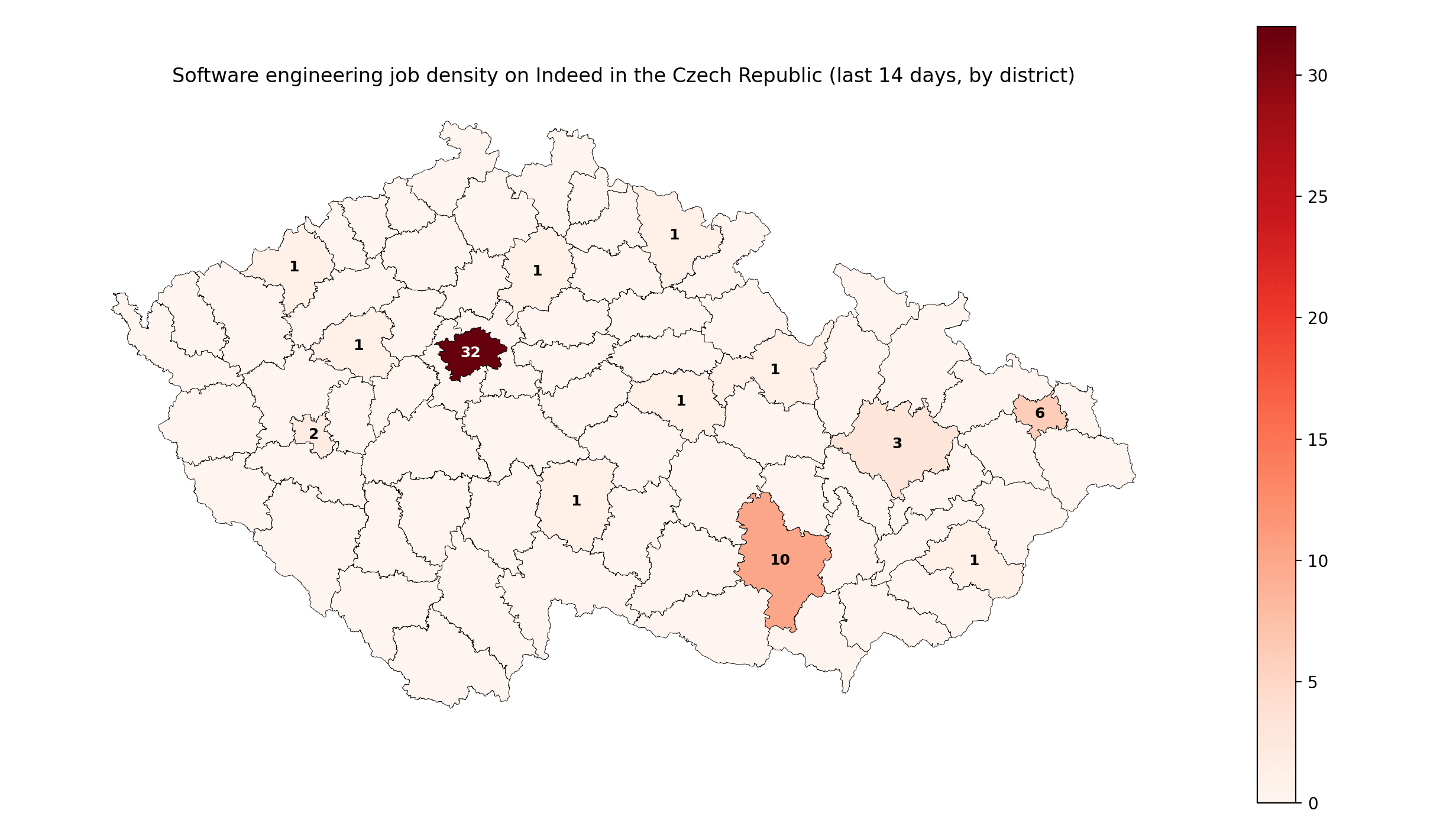
Execute the script, and you’ll get a result like this:
The map produced by the script
Notice how most fresh software engineering openings are concentrated in districts surrounding Prague, Brno, and Ostrava. These are the three largest cities in the Czech Republic, so the result clearly makes sense!
Now, this was just a simple example, but you can use the same approach to build an interactive map or add additional features, such as calculating the average salary for each position by district, and more advanced analytics.
Value and Playbook for Other Governments
The approach presented in this blog post is highly adaptable to any public dataset with a spatial dimension, where location plays a key role in understanding patterns and inequalities. Still, a reusable country-independent playbook emerges:
Collect data via web scraping (or other administrative, public sources).
Clean and validate the data.
Enrich and aggregate it with contextual and geographic features.
Apply statistical or analytical models.
Present the results through maps, dashboards, or other interactive tools.
As you can tell, this pipeline isn’t domain-specific and can be reused across many different policy areas. Finally, it’s crucial that the adopted methodology remains open and clearly explained to the public. This fosters transparency, reproducibility, and trust in data-driven decision-making.
The Web Scraping Club is a reader-supported publication. To receive new posts and support my work, consider becoming a free or paid subscriber.
Conclusion
Here, I’ve shown how the Czech Ministry of Finance uses a web scraping service as part of a full data pipeline to turn rental listings into actionable insights for housing policy and public tools.
By accessing data collected from multiple real estate portals and processing it through cleaning, geolocation, and statistical modelling, they transform raw web data into interactive maps and rent calculators that support decision-making.
In this article, I built a similar pipeline for a different use case: a job market choropleth across Czech districts. I started from scraped Indeed listings, geocoded job locations, mapped them to districts, and visualized the results on a map.
I hope this example was useful and inspiring. If you have questions or ideas, feel free to share them in the comments below.
Did you like this article? Share it with someone who might find it useful and get a discount on paid plans.




![The Indeed Jobs Scraper [PPR] Actor](https://substackcdn.com/image/fetch/$s_!d8Ku!,f_auto,q_auto:good,fl_progressive:steep/https%3A%2F%2Fsubstack-post-media.s3.amazonaws.com%2Fpublic%2Fimages%2Ff23e4310-03be-4e81-a51a-26a0c8b0c225_3028x1638.png "The Indeed Jobs Scraper [PPR] Actor")
![Selecting the Indeed Jobs Scraper [PPR] Actor](https://substackcdn.com/image/fetch/$s_!RkuG!,f_auto,q_auto:good,fl_progressive:steep/https%3A%2F%2Fsubstack-post-media.s3.amazonaws.com%2Fpublic%2Fimages%2Fcc15ea73-ddd2-4de7-a70b-79c5badec120_3026x1624.png "Selecting the Indeed Jobs Scraper [PPR] Actor")